Your Guide to the AI Text Humanizer Tool
Discover how an AI text humanizer tool can transform robotic content into natural, engaging writing that bypasses detection and connects with your audience.
An AI text humanizer tool is a piece of software built to do one thing really well: take robotic-sounding, AI-generated text and make it feel like it was written by a person. It goes way beyond a simple thesaurus, rewriting content by tweaking sentence structures, word choices, and the overall rhythm to mirror the subtle, unique patterns of human writing.
The goal? To get past AI detection systems and, just as importantly, connect with a human reader.
The Rise of AI Content and the Need for a Human Touch
We're living through a content explosion, with artificial intelligence firmly in the driver's seat. AI models can churn out blog posts, emails, and even academic papers at a dizzying pace, helping creators scale their work like never before. But this incredible efficiency has created a new, and equally fast-growing, problem.
As AI content floods the internet, the tools designed to detect it are getting smarter, too. This has sparked a digital cat-and-mouse game for millions. A student might use AI to brainstorm an essay, only for it to get flagged by their university. A marketer could publish a dozen AI-drafted articles, only to watch their search rankings tank because the content feels lifeless and uninspired.
The Core Problem with AI-Generated Text
The central issue is that AI text often lacks the messy, beautifully inconsistent spark of human writing. AI models tend to fall back on predictable sentence structures, a limited emotional range, and a uniform rhythm that can feel monotonous.
Human writing, on the other hand, is full of quirks. We use a mix of long, flowing sentences and short, punchy ones. We sprinkle in personal idioms and subtle nuances that most AI struggles to replicate.
Practical Example:
- AI-Generated Text: "The utilization of renewable energy sources is imperative for environmental sustainability. These sources, such as solar and wind, reduce carbon emissions significantly."
- Human-like Text: "If we're serious about protecting our planet, we have to lean into renewable energy. Things like solar and wind power aren't just trendy—they're our best shot at slashing carbon emissions for good."
This gap is exactly where an AI text humanizer tool comes in. It’s not just spinning words; it's a sophisticated solution designed to fix the specific giveaways of AI-generated content.
Think of an AI humanizer as a digital editor that specializes in authenticity. It analyzes the predictable footprints of AI and intelligently reworks the text to introduce the natural cadence and complexity that detector algorithms are trained to miss.
Meeting the Demand in a New Content Landscape
The intense demand for these tools isn't just a fleeting trend. It's a direct response to a massive shift in how we create content. With AI becoming so common, businesses are scrambling for expertise in optimizing AI-driven content for search engines.
This explosive growth has created a booming market. In fact, some experts predict that by 2026, a staggering 90% of all online content could be synthetically generated. This isn't just speculation; market reports show the generative AI content sector is projected to soar from USD 14.8 billion in 2024 to over USD 80.12 billion by 2030.
This new reality creates an undeniable need. The parallel growth of AI content and AI detection has created an arms race, which we can see in the market trends.
AI Content Generation vs. AI Detection at a Glance
| Market Segment | Key Trend | Market Value Projection (CAGR) |
|---|---|---|
| Generative AI Content | Rapid adoption across marketing, media, education | 35.6% (2024-2030) |
| AI Content Detection | Growing demand from academia and search engines | 31.2% (2024-2030) |
| AI Text Humanization | Emergence as a "bridge" technology | High, but emerging data |
This data paints a clear picture: as one side grows, the other responds in kind, making tools that bridge the gap—like humanizers—absolutely essential. They help users keep the efficiency of AI without sacrificing the human touch that builds trust with both audiences and algorithms.
How an AI Text Humanizer Actually Works
Ever wonder what goes on under the hood of an AI text humanizer tool? It’s not just a fancy word-swapper. Think of it less like a thesaurus and more like a skilled digital editor who fundamentally re-engineers your text from the ground up.
It goes way beyond simple grammar checks by analyzing the core patterns that scream "AI-written!" and intelligently reworking them to sound genuinely human. The goal isn't just to change words; it's to completely reshape the flow, rhythm, and personality of the content.
Deconstructing Robotic Patterns
AI-generated content has some obvious tells. These tools are trained specifically to sniff out and eliminate those giveaways—things like predictable sentence lengths, a limited vocabulary, and a general lack of stylistic flair. At its core, an AI text humanizer leans heavily on advanced Natural Language Processing (NLP) to understand what the text is actually about before it starts editing.
This deep comprehension is what allows the tool to rewrite content in a way that keeps the original meaning intact while completely shedding its robotic skin.
The first step is always analysis. The tool scans the text for two key metrics that AI detectors also look for:
- Perplexity: This is a fancy term for how complex or unpredictable the text is. Human writing is naturally a bit chaotic and less predictable, which gives it a high perplexity score. AI text, on the other hand, often plays it safe and scores low.
- Burstiness: This measures the variation in sentence length and structure. Humans write with a natural mix of short, punchy sentences and longer, more descriptive ones. AI tends to churn out sentences of similar length, leading to low burstiness.
Once the tool gets a read on these patterns, it's ready to start the real work.
By jacking up both perplexity and burstiness, an AI humanizer systematically dismantles the predictable, uniform nature of AI content. The idea is to create a final text that feels spontaneous and authentic, effectively scrubbing the digital fingerprints left by the original AI model.
Rebuilding with Human-Like Variation
After tearing down the robotic structure, the tool gets to its most important job: rebuilding the text using its own sophisticated linguistic models. These models have been trained on massive datasets of human-written content—we're talking millions of articles, books, and essays. This is how the tool learns what real, authentic writing actually feels like.
This is where a quality ai to human text converter really proves its worth. It uses this deep-seated knowledge to inject the very elements that AI generators just can't seem to get right. If you want a closer look, you can learn more about how a top-tier ai to human text converter handles this challenge.
The rebuilding process involves a few key moves:
- Varying Sentence Structure: The tool immediately gets to work breaking up monotonous sentence patterns. It might merge a few short sentences into a longer, more complex one, or slice a long sentence in two for more punch.
- Introducing Nuanced Vocabulary: Instead of just swapping out common words for clunky synonyms, it picks more sophisticated or context-aware words that a human writer would naturally choose.
- Adjusting Tone and Flow: The tool works to create a natural rhythm. It can weave in subtle idioms, rephrase ideas to sound more conversational, or add transitional phrases that make the whole thing easier to read.
Here’s a peek at what a simple interface looks like. A single "Humanize" button kicks off this whole transformation process.
Actionable Insight: Look for a tool that offers customization. For example, you might want a "more conversational" tone for a blog post versus a "more formal" tone for a business report. This control ensures the output aligns with your specific needs.
Ultimately, the process is a smart mix of deep analysis and creative rewriting. An AI text humanizer tool isn't just guessing; it's making data-driven decisions based on its extensive training to produce content that’s not only undetectable but also far more engaging for a human audience.
The Real-World Payoff: What an AI Text Humanizer Actually Does for You
Let's get past the technical jargon. What does an AI text humanizer tool actually do for you in the real world? It's not about just swapping out a few words; it’s about hitting specific, critical goals. Whether you’re trying to clear academic integrity checks or just trying to keep a reader from bouncing off your page, these tools offer a direct path to more powerful and authentic communication.
The most immediate win for many people is simply bypassing AI detection. This is huge for students using AI as a brainstorming partner who still need to submit work that sails through checks from services like Turnitin or GPTZero. In the corporate world, it means professionals can use AI to draft reports or emails without them getting flagged by internal scanners, ensuring their work is judged on its substance, not its source.
This simple diagram shows how the magic happens, turning stiff, robotic text into something that feels genuinely human.
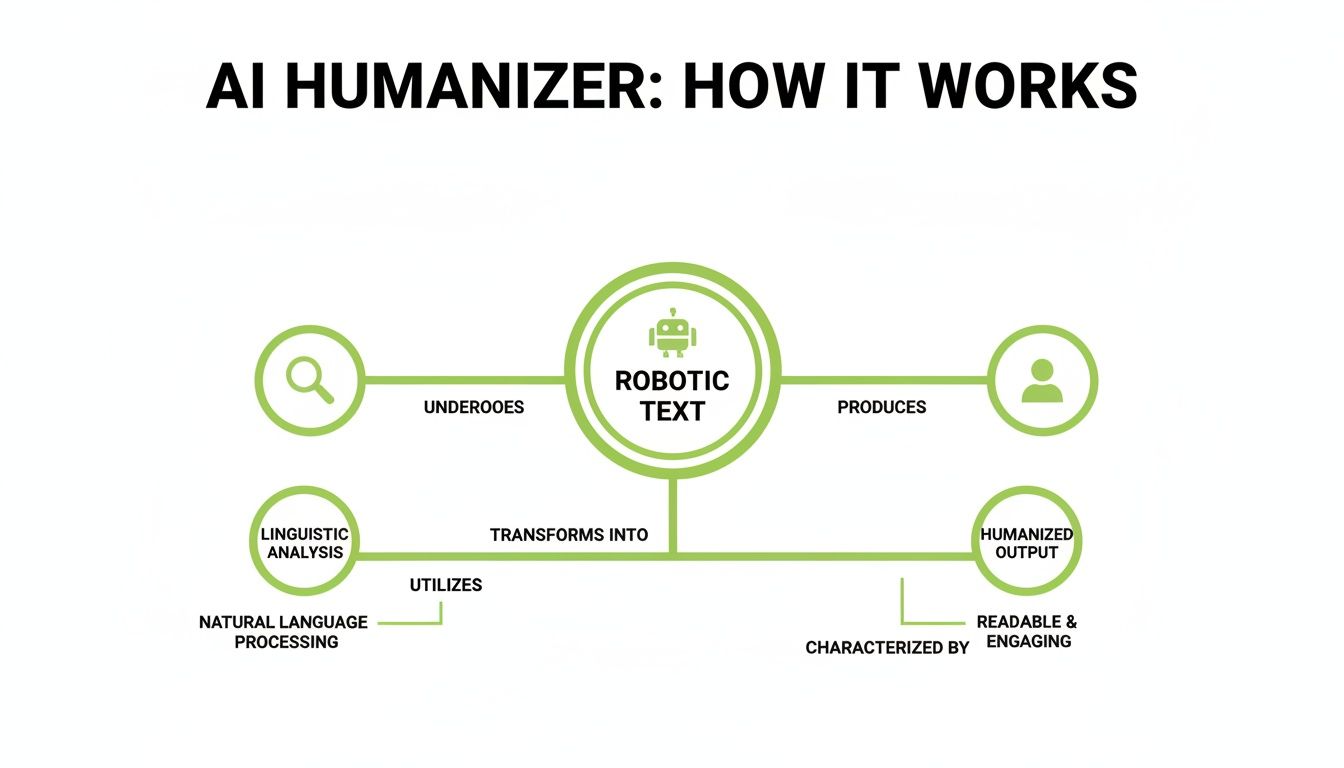
As you can see, it’s a deep linguistic overhaul that trades predictable AI patterns for the natural variety and flow of human writing.
Make Your Content More Readable and Engaging
One of the dead giveaways of AI-generated text is its flat, lifeless tone. It often lacks the rhythm, pacing, and emotional spark that keeps a reader invested. An AI text humanizer tackles this head-on, dramatically improving readability and making the content feel alive.
For marketers and copywriters, this is a game-changer. A humanized blog post or landing page connects with people on an emotional level, which is the foundation of trust and action. The tool pulls this off by:
- Creating a natural rhythm: It breaks up the monotonous sentence structures common in AI text by varying length and complexity.
- Injecting richer vocabulary: It swaps out dull, overused words for more precise and evocative language that actually resonates.
- Fine-tuning the tone: It can shift the text to sound more conversational, authoritative, or persuasive, depending on what you need to achieve.
Think of a humanizer as giving your AI draft a personality transplant. It transforms a wall of robotic text into a compelling story that feels real—and that’s what holds a reader’s attention long enough to get your message across.
Ramp Up Your Content Production
Efficiency is king for SEO teams, content agencies, and any business churning out high volumes of content. AI generators are incredibly fast, but their raw output almost always needs significant editing to meet quality standards. An AI text humanizer tool is the bridge between speed and quality, creating a much smoother workflow.
This need has fueled a massive industry. The AI detector market alone was valued at USD 1.08 billion in 2025 and is projected to explode to USD 13.68 billion by 2035. With experts predicting that up to 90% of online content could be AI-generated by 2026, tools that refine this output are becoming essential. You can dig deeper into the trends shaping the AI detector market to see where things are headed.
Instead of a writer painstakingly rewriting an entire AI draft, they can run it through a humanizer in seconds. This first pass handles the most tedious edits, freeing up the team to focus on what really matters: adding unique insights, fact-checking, and weaving in the brand's authentic voice.
A Smarter Workflow in Action
- Generate the Draft: Use your favorite AI writer to produce the initial article. For example, ask ChatGPT for a "500-word blog post about the benefits of remote work."
- Humanize Instantly: Pop that draft into an AI humanizer to fix the robotic phrasing, weird sentence structures, and predictable patterns.
- Add the Final Polish: A human editor gives it a quick review, sprinkles in personal expertise (like a specific anecdote about a remote work challenge), and optimizes it for your specific goals.
This simple process lets teams massively scale their content output. You can publish more high-quality blog posts, articles, and web pages in a fraction of the time, helping you dominate search rankings and maintain a powerful brand presence.
How to Use an AI Humanizer: A Step-by-Step Guide
So, you want to see an AI text humanizer tool in action? Theory is one thing, but walking through the process makes it all click. Let's take a raw AI draft and turn it into natural, undetectable content.
The whole process is surprisingly quick and intuitive. It’s a workflow that slots right into any content creation routine, whether you're polishing an academic paper or scaling up your blog production.

Step 1: Paste Your AI-Generated Text
First things first, you need your AI draft. Just copy the text straight from your source—whether that’s ChatGPT, Jasper, or another AI writer—and paste it into the humanizer's input box.
Most tools offer a clean, simple interface with a big text field. No special formatting needed. Just copy, paste, and you're ready for the next step.
Step 2: Run an Initial AI Scan
Before you change a single word, you need a baseline. A good AI text humanizer tool will have a built-in detector that scans your text and gives you an initial AI probability score.
This is a huge advantage. It shows you exactly what you're up against and how likely your content is to get flagged before you even start humanizing. Think of it as the "before" picture in this transformation.
Step 3: Click the Humanize Button
With your text pasted and your initial score noted, it’s time for the magic. All it takes is one click of the "Humanize" button. In just a few seconds, the tool's algorithms get to work analyzing and rewriting your content.
This isn’t just swapping out a few words. The tool re-engineers sentence structures, adjusts the rhythm, and introduces the kind of linguistic variety that real humans use. You can watch the transformation happen in real time.
Pro Tip: Look for a tool that works fast without sacrificing quality. The best ones can process hundreds of words in under a minute, keeping your workflow moving.
Step 4: Compare the Before and After
Once the tool finishes, you’ll see a side-by-side comparison: your original AI text next to the newly polished, human-like version.
This is where you can really see the value. Pay attention to how the tool has:
- Varied sentence length: Notice how some clunky sentences are broken up for better flow, while short, choppy ones might be combined.
- Improved word choice: Look for more nuanced vocabulary that adds depth and feels less generic.
- Restructured phrasing: See how awkward or repetitive phrasing has been smoothed out to sound more natural and conversational.
Comparing the two versions helps you appreciate the subtle art of making AI text feel authentic.
Step 5: Do a Final Review and Edit
This last step is the most important one, and it belongs to you. No AI text humanizer tool can replace your personal judgment and expertise.
Read through the humanized output one last time. Does it perfectly match your intended tone? Does it align with your personal style? This is your chance to add unique insights, fact-check details, and make any final tweaks.
Actionable Insight: As you review, look for opportunities to add a personal story, a specific data point from your own research, or a strong opinion. For example, if the humanized text says, "Many companies benefit from flexible work," you could add, "At my last company, we saw a 20% jump in productivity after introducing a four-day work week." This final human layer is what makes content truly exceptional.
The goal is to use the tool as a powerful assistant that handles 80-90% of the heavy lifting. That frees you up to add the final layer of polish and expertise. By combining the tool's power with your own review, you create content that is both undetectable and genuinely valuable. If you're exploring different options, our guide on the best AI to human text converter offers some detailed comparisons.
Real-World Scenarios for AI Humanizer Tools

Theory is one thing, but where does an AI text humanizer tool really pull its weight? The true test is in the trenches—solving real problems for real people every day. From the classroom to the boardroom, these tools are quickly becoming the bridge between a clunky AI draft and a polished, authentic final piece.
Let’s walk through four common situations where a humanizer takes a decent AI-generated draft and turns it into something that truly connects. Each scenario highlights a specific challenge and shows how the tool offers a direct, practical solution.
For the Student Crafting an Academic Paper
Students often lean on AI as a brainstorming partner or a research assistant to get past writer’s block. The trouble starts when that AI-assisted draft sounds flat, lacks academic nuance, and—most importantly—gets flagged by university detection software like Turnitin.
A humanizer tool tackles this head-on. It takes the AI’s logical but lifeless structure and injects it with the sophisticated vocabulary and complex sentence variations expected in academic writing. This not only helps bypass detection but elevates the paper’s quality, making arguments sound more persuasive and insightful.
Example in Action:
- Problem: An AI-drafted literature review is factually sound but uses the same simple sentence structures and transition words over and over. It reads more like a summary than a critical analysis.
- Solution: The student runs the text through a humanizer. The tool rephrases key arguments, introduces more advanced academic language ("consequently" instead of "so"), and varies sentence lengths to create a more scholarly tone. Just like that, a simple report becomes a polished academic work.
For the SEO Specialist Scaling Blog Content
For SEO specialists, the game is all about producing high-quality content at scale to climb the search rankings. While AI can churn out articles in minutes, the raw output often lacks the engaging tone and natural rhythm needed to keep readers on the page—a huge factor for both user experience and SEO.
An AI text humanizer tool allows SEO teams to keep up a blistering production schedule without compromising on quality. It quickly refines AI drafts, making sure every blog post sounds like it was penned by an expert, not a machine. This helps articles rank better and connect more deeply with readers, boosting those all-important engagement metrics.
The real win here is consistency. An SEO specialist can guarantee that every single piece of content, no matter the AI source, aligns with the brand’s authentic voice and quality standards. That’s how you build trust with both Google and your audience.
For the Freelance Writer Accelerating Drafts
Freelance writers live and die by their deadlines and their distinctive authorial voice. AI can definitely speed up the initial drafting process, but the generated text almost never captures a writer's personal style or creative spark. The challenge is using AI for efficiency without sounding completely generic.
A humanizer acts as the perfect middleman. It does the heavy lifting of smoothing out robotic phrasing and predictable sentence patterns, giving the writer a much cleaner, more dynamic base to build from. This frees them up to focus their energy on adding their signature voice, storytelling, and expert insights—the very things their clients pay them for.
For the Business Professional Refining Reports
In the corporate world, clarity and persuasion are everything. Business professionals use AI to draft emails, reports, and presentations, but the output can easily come across as cold, impersonal, or stuffy. This can weaken the message and fail to connect with colleagues or clients.
Here, an AI text humanizer tool works like a final polish, refining the tone to be clearer and more persuasive. Businesses are catching on fast; with 43% of marketers already using AI for content in 2024, the need to ditch the mechanical vibe is critical.
Humanizers adjust the rhythm and vocabulary to add a touch of emotional intelligence, making AI-assisted communication far more relatable. One industry leader, Humanizer AI, recently flew past 6 million users, showing just how massive the demand for this tech is in competitive markets. You can read more about Humanizer AI's impressive user growth on Barchart.com.
Applying AI Humanizers Across Different Professions
The beauty of these tools lies in their versatility. A marketer's goal is different from a student's, but the underlying need for authentic communication is the same. The table below breaks down how various professionals are using humanizers to solve their unique content challenges.
| User Persona | Primary Challenge | AI Humanizer Solution |
|---|---|---|
| Marketer | Producing brand-aligned content at scale while avoiding generic AI tone. | Refines AI-generated copy to match a specific brand voice, making ads and posts more engaging and converting better. |
| Student | AI-assisted drafts get flagged by detectors and lack academic rigor. | Rewrites text to use complex sentence structures and scholarly vocabulary, bypassing detectors and improving the paper's quality. |
| Journalist | Tight deadlines require using AI for drafts, but the output lacks a human narrative touch. | Infuses AI-generated reports with storytelling elements and a more natural, journalistic flow. |
| Lawyer | AI-drafted legal briefs are often too robotic and lack persuasive power. | Adjusts the tone and structure of legal arguments to be more compelling and influential for judges and clients. |
| HR Manager | Writing job descriptions or internal memos that sound impersonal and corporate. | Transforms bland corporate-speak into warm, clear, and approachable communication that connects with employees. |
As you can see, the core function remains the same: transforming robotic text into something that reads, feels, and connects like it was written by a person. It’s a simple solution to a complex and growing problem in the world of AI-assisted writing.
Using AI Humanizers Ethically and Effectively
As tools for humanizing AI text become more common, the conversation about using them responsibly is getting louder. These platforms are incredibly useful, but let's be clear: their job is to assist and augment your writing, not to enable academic dishonesty or deceive anyone.
The core principle is simple. A humanizer should be the final polish on an AI-assisted draft, not a replacement for your own thinking. Its real function is to iron out the robotic tone and predictable sentence structures that make AI content feel flat and lifeless. It’s all about elevating your ideas, not creating them for you.
Best Practices for Ethical Use
To get the most out of these tools without crossing ethical lines, think of them as a skilled editor. You still need to do the heavy lifting. Always start with a solid, well-researched draft that’s built on your own knowledge and perspective.
Here are a few firm guidelines to keep you on the right track:
- Always Review and Edit: Never, ever just copy and paste the humanized output and call it done. Read through it carefully. Make your own tweaks. The goal is to make sure it perfectly matches your personal voice and what you’re trying to say.
- Add Your Unique Insight: The tool is just handling the mechanics—the sentence structure and word choice. Your job is to inject the human element. We’re talking about your personal experiences, your unique opinions, and the specific insights that no AI could ever come up with.
- Fact-Check Everything: An AI humanizer makes language sound better; it does not verify facts. You are always the one responsible for the accuracy of the information in your final piece.
The smartest way to approach an AI humanizer is to see it as a collaborator. It takes care of the tedious work of smoothing out robotic text, which frees you up to focus on the more important stuff: critical thinking and creative expression.
Protecting Your Data and Privacy
Beyond professional integrity, data privacy is a huge deal. When you paste your text into a web-based tool, you’re handing your content over to that platform. It's crucial to pick a service that actually respects your confidentiality.
Look for an ai text humanizer tool with a crystal-clear privacy policy. Reputable platforms, like HumanText.pro, will state upfront that they do not store, share, or train their models on your submitted content. This is a non-negotiable feature that ensures your work stays your own.
Actionable Insight: Before using any new AI tool, spend two minutes finding its privacy policy. Search the page (Ctrl+F or Cmd+F) for keywords like "store," "data," "train," and "share." If the language is vague or confirms they use your data, it’s best to find an alternative that explicitly guarantees your privacy.
By choosing a tool that puts user privacy first, you can use the technology safely and with total peace of mind. For a deeper look into creating AI content that stays private and authentic, our guide on producing undetectable AI offers some more valuable strategies.
Frequently Asked Questions
Jumping into the world of AI content raises a lot of questions. Let's tackle the big ones so you can move forward with confidence and get the results you're looking for.
Can These Tools Guarantee 100% Undetectable Content?
While the best humanizers have incredibly high success rates, no tool can honestly promise a 100% guarantee against every detector, every time. The world of AI detection is in a constant state of flux, with detectors and generators always trying to outsmart each other.
A high-quality humanizer drastically lowers the chances of your content getting flagged by rewriting it to mirror the complexity and rhythm of human writing. The smartest approach is to use the tool as a powerful assistant to do the heavy lifting, then give it a final human review to add your own unique voice and insights.
Think of it this way: a good humanizer gets your content 95% of the way there, making it almost impossible to distinguish from something a person wrote. That final 5% is your personal touch, closing the gap and making the content truly yours.
Does the Humanization Process Alter My Original Meaning?
This is a big concern for many, and a valid one. Will the tool twist your words and change your core message? The short answer is no—reputable AI humanizers are built from the ground up to preserve your original meaning, facts, and intent.
They pull this off by using sophisticated linguistic models that grasp the context of your writing, not just shuffling words around. The tool's job is to rework sentence structures, upgrade word choices, and improve the overall flow—all stylistic tweaks. Your key arguments, data, and core ideas stay exactly as they were, just presented in a more natural, engaging way.
Is It Safe to Input Sensitive Information?
Data privacy should always be top of mind when you're using any online tool. As a rule, you should be careful about what you paste into a third-party website. The best practice here is to pick an ai text humanizer tool that has a crystal-clear and robust privacy policy.
Look for services that explicitly state they do not store, save, or share your submitted content. Platforms that put user privacy first will ensure your work stays completely confidential and isn't used to train their own AI models. Always take a minute to review a tool’s privacy terms before uploading anything sensitive. It’s a small step that gives you complete peace of mind.
Ready to turn your AI text into authentic, undetectable content? HumanText.pro offers a powerful yet easy-to-use solution that preserves your meaning while bypassing AI detectors with up to 99% accuracy. Try it for free and see the difference for yourself.
Ready to transform your AI-generated content into natural, human-like writing? Humantext.pro instantly refines your text, ensuring it reads naturally and authentically. Try our free AI humanizer today →
Related Articles

10 PimEyes Alternatives for Safer Image Verification
Compare 10 PimEyes alternatives for face search, image reuse, privacy, pricing, and safer verification of online identities and media.

Fake Profile Picture Detector: How to Verify Photos Online
Learn how a fake profile picture detector works and verify online photos manually. Step-by-step guide for detecting AI images, catfish, and scams.

Who Is This Person Photo: A Practical Verification Guide
Wondering who is this person photo? Use reverse image search, face search, and AI checks to verify online identities safely and protect yourself from scams.

