How to humanize ai text free: Quick Tips to Sound Natural
Learn how to humanize ai text free with practical tips, prompts, and tools to make your writing sound natural and engaging.
You can get AI-generated text looking and sounding human without spending a dime. It boils down to a mix of smart manual editing, telling the AI what you really want from the start, and using some great free tools. This isn't about just cleaning up a few words; it's about transforming a robotic draft into something that actually connects with people.
Why Your AI Content Sounds Robotic

Ever read something and just knew a machine wrote it? You're not alone. Raw AI output has some obvious tells that make it feel sterile and detached. It's not always about glaring errors, but subtle patterns that just feel... off. Figuring out what those signs are is the first step to fixing them.
AI writing tools have exploded in popularity, and it's easy to see why. The AI Text Generator market was valued at around USD 488 million in 2023 and is expected to hit USD 2.18 billion by 2032. Businesses are jumping on board for the sheer efficiency, which you can read more about in this market report on content automation. But that speed often comes at the expense of authenticity, leaving a trail of flat, robotic content.
The Telltale Signs of AI Writing
AI models work by predicting the next most likely word in a sentence based on massive amounts of data they've been trained on. This predictive process is exactly what creates its most common flaws. You end up with paragraphs that are grammatically perfect but completely soulless, lacking any real point of view.
Here are some of the most common red flags I see all the time:
- Repetitive Sentence Structures: AI often falls into a rut, starting sentences the same way or keeping them all the same length. It creates a monotonous rhythm that no human writer would use.
- Overly Formal Tone: Unless you specifically tell it not to, most AI models default to a tone that sounds like an encyclopedia entry. It’s stiff, impersonal, and strips the content of any personality.
- Lack of Personal Stories or Opinions: Real writing is shaped by experience and emotion. AI doesn't have experiences, so it can't create those genuine, trust-building moments.
- Predictable Vocabulary: You’ll notice the same "safe" words appearing over and over. It avoids the specific, nuanced language an expert would naturally use to make a point.
At its core, AI writing is about statistical probability, not genuine understanding or feeling. It pieces together what is most likely to come next, which is why it often lacks the unexpected turns of phrase, personal insights, and emotional depth that define human communication.
To see what this looks like in practice, here’s a quick comparison of the common traits of robotic AI text versus the characteristics of well-humanized content.
AI Text vs Humanized Text Key Differences
| Characteristic | Typical AI Text | Humanized AI Text |
|---|---|---|
| Sentence Structure | Uniform and predictable | Varied lengths, with a natural rhythm |
| Tone of Voice | Formal, generic, and often overly academic | Conversational, with a distinct personality |
| Word Choice | Repetitive and safe, using common vocabulary | Precise and nuanced, using specific industry language |
| Originality | Lacks unique insights or personal stories | Includes anecdotes, opinions, and original thought |
| Emotional Connection | Detached and objective | Empathetic and relatable, connecting with the reader |
| Flow & Transitions | Can be abrupt or formulaic | Smooth and logical, guiding the reader naturally |
| Grammar & Perfection | Often flawlessly grammatical, but unnaturally so | May include intentional fragments for effect |
This table highlights the shift you’re aiming for. It’s not just about passing an AI detector; it's about making your content resonate with your audience. Once you learn to spot these robotic traits, you can target your edits and begin turning sterile output into something that’s engaging, authentic, and genuinely helpful.
Your Manual Editing Toolkit for Humanizing Content

While free tools give you a great head start, nothing beats your own human touch. This is where you roll up your sleeves and transform a generic AI draft into something that actually sounds like you.
Manual editing isn't just about catching typos. It's about injecting personality, smoothing out the rhythm, and making sure your message genuinely connects. Think of the raw AI output as a block of marble—your job is to chisel away the sterile, predictable bits to reveal the authentic voice hidden inside. Honestly, it's the most reliable way to humanize AI text free of charge, giving you 100% control over the final piece.
Inject Your Voice and Personality
The quickest way to break the robotic mold is to add your own experiences. An AI can’t share a personal story, offer a genuine opinion, or crack an inside joke that lands with your audience. Weaving these elements in is an instant giveaway that a real person is behind the keyboard.
For instance, an AI might spit out something generic like, "Social media marketing is important for brand growth." That's true, but it's also incredibly boring. Let's give it a human touch.
- Before (AI-generated): "Utilizing social media platforms is a crucial strategy for businesses aiming to enhance brand visibility and foster customer engagement."
- After (Humanized): "I once spent weeks perfecting a product, only to launch it to crickets. It wasn't until I started sharing the messy, behind-the-scenes journey on Instagram that people actually started paying attention."
See the difference? We’ve moved from a stuffy declaration to a short, relatable anecdote. The content is immediately more memorable and trustworthy. For more ideas on this, check out our guide on converting AI text to human text.
Vary Sentence Structure and Rhythm
AI often writes with a monotonous rhythm. Sentence after sentence follows the same basic length and structure, which is a dead giveaway of machine-generated content. Your goal is to mix things up to create a natural, conversational flow.
The best trick? Read your text out loud. If it sounds clunky or you find yourself reading in a flat, monotone voice, it’s time to edit for rhythm. Good writing has a cadence, just like a real conversation.
Break up long, complex sentences. Follow them with short, punchy ones. Use natural transitional phrases like "But here's the thing," "In other words," or "For instance" to guide the reader smoothly from one idea to the next.
This kind of manual polish is more critical than ever. The generative AI content market was valued at USD 14.8 billion in 2024 and is projected to soar to USD 80.12 billion by 2030. As the internet floods with automated content, personalized, human-touched writing will stand out even more. You can dig into more insights about this market growth on Grand View Research.
Swap Common AI Words for Dynamic Language
Finally, it's time to get aggressive with your vocabulary. AI models love their "safe" words and phrases, using them over and over again. Creating a personal "banned words" list can make a huge difference in how fresh your content feels.
Here are a few common culprits to hunt down and replace:
- Instead of "delve into," try "dig into" or "break down."
- Instead of "it is important to note," just state the fact directly. It’s cleaner.
- Instead of "furthermore," switch to "plus," "on top of that," or just start a new sentence.
By actively swapping these overused terms for more dynamic and specific language, your writing will feel sharper and more authentic. This hands-on approach is the real foundation of humanizing AI content.
Craft Prompts for More Human-Sounding Drafts
While manual editing is where the magic happens, you can drastically cut down your workload by getting a better first draft from the AI. The secret is to stop treating it like a text generator and start treating it like a writing assistant who needs very specific instructions. This is where prompt engineering comes in.
A lazy prompt like "write a blog post about social media marketing" will almost always spit out a robotic, cookie-cutter article. To get something that actually sounds human, you need to feed the AI context, personality, and constraints from the get-go. This is one of the best ways to humanize AI text free of cost—it just takes a little upfront thought.
Give Your AI a Persona
The quickest way to steer an AI away from its default robotic tone is to give it a persona. Instead of letting it write from its neutral, all-knowing void, you tell it who to be. This one move frames the entire output, shaping its word choice, sentence structure, and overall vibe.
Think about the voice you're aiming for and spell it out.
- For a marketing blog: "Act as a witty and experienced brand storyteller with 10 years in the trenches. Your tone is conversational and confident. Use short, punchy sentences."
- For an academic paper: "Assume the persona of a helpful university professor explaining a complex topic to first-year students. Use clear analogies and avoid overly technical jargon."
- For a product review: "You're a skeptical but fair tech enthusiast. Write in a direct, honest tone, highlighting both the pros and the cons you found."
Giving the AI a role forces it to adopt a more natural and consistent voice, which makes your editing job infinitely easier.
A well-defined persona acts as a creative constraint for the AI. It narrows the infinite possibilities of language down to a specific style, forcing it to generate text that is more focused, consistent, and ultimately, more human.
Specify Tone and Readability
Beyond just a persona, you can lay down explicit stylistic rules for the AI to follow. These commands are like guardrails, stopping the model from churning out the overly complex sentences and stuffy paragraphs that scream "AI-generated."
Try adding rules like these to your prompts:
- "Write at an 8th-grade reading level."
- "Use active voice and avoid passive constructions."
- "Weave in at least two rhetorical questions to keep the reader engaged."
- "Vary sentence length, mixing short statements with longer, more descriptive ones."
When you combine these instructions, you get a much stronger starting point. For instance: "Act as a helpful industry expert writing a blog post about email marketing for beginners. Write at an 8th-grade reading level, use active voice, and keep paragraphs to 2-3 sentences max."
This level of detail is what separates a frustrating editing session from a quick polish. For a deeper dive into how these little tweaks make a huge difference, check out our guide on how to avoid AI detection. By mastering your prompts, you shift from being a passive user to an active director, making sure the AI's output aligns with your vision from the very first word.
Using Free Tools to Polish Your AI Writing
Manual editing is powerful, but let’s be honest, it can be slow. You can seriously speed up your process by building a simple workflow with a few free tools. You don't need an expensive subscription to turn robotic text into something that reads like a human wrote it.
Combining a couple of strategic resources helps you spot and fix the awkward phrasing and predictable patterns that you might miss on your own. This multi-tool approach lets you tackle different problems—from clunky sentence structure to grammatical quirks and overall clarity. It's a practical, no-cost way to create a reliable system that elevates your first draft, fast.
Start with an AI Humanizer
Your first move should be to run the raw AI text through a dedicated AI humanizer. These tools are built specifically to break up the monotonous sentence structures and repetitive phrasing that AI models love to generate. They’re fantastic for doing the initial heavy lifting.
For a quick, no-fuss option, HumanText.pro offers a 500-word free trial with no signup required. Just paste your content in, and it instantly rewrites the text to sound more natural. This first pass rephrases those clunky sentences before you even dive into your own detailed edit.
Here's what the clean interface looks like when you land on the page.
The straightforward design means you can paste your text and get results in seconds, which is perfect for quickly processing sections of a blog post or an essay.
Refine Grammar and Phrasing
Once you have a more natural-sounding draft, the next layer of polish comes from a solid grammar checker. The free version of a tool like Grammarly is perfect for this. It goes way beyond basic spell-checking and helps you hunt down common AI writing habits.
Use it to zero in on these specific issues:
- Passive Voice: AI often defaults to passive constructions like, "the report was submitted by the team." Grammarly will flag these and suggest active alternatives ("the team submitted the report"), making your writing more direct and engaging.
- Wordy Sentences: It’s great at highlighting redundant phrases and helping you trim the fat. This leads to clearer, more concise text.
- Tone Suggestions: Even the free version gives you some basic tone feedback, which can help you spot sentences that sound overly formal or stiff.
Think of this step as a detailed clean-up. The humanizer reshapes the text's structure, and the grammar checker sharpens its delivery. Every sentence becomes stronger and more purposeful. For more advanced options, check out our list of the best AI to human text converters, as many of them bundle in similar features.
Simplify for Readability
The final tool in this free workflow is a readability checker, like the free web version of the Hemingway App. AI-generated text can sometimes be overly complex, crammed with long sentences and five-dollar words that are a slog to get through.
Hemingway highlights these issues visually, making them impossible to ignore. It flags sentences that are hard to read, suggests simpler words, and calls out excessive adverbs. This final check ensures your content isn't just grammatically correct but is genuinely easy for your audience to read and understand.
Real-World Workflows for Students and Marketers
This is where the rubber meets the road. Whether you're a student staring down an essay deadline or a marketer trying to get a new blog post out the door, having a smart workflow transforms AI from a simple text generator into a powerful assistant. The goal isn't just to work faster, but to create something better and more authentic in the end.
The trick is to let AI handle the grunt work—the initial research, the basic structuring—and then bring your unique human insight to the editing phase. This blend of machine efficiency and human creativity is what makes content stand out from all the generic noise. If you're looking to humanize AI text free, these practical blueprints are your path forward.
The Student Workflow for Authentic Essays
For students, the tightrope walk is real: use AI to help, but maintain academic integrity and find your own analytical voice. An essay that sounds like a robot will get flagged in a heartbeat, but a good workflow keeps you safe.
Start by using AI as a brainstorming partner. Ask it for a high-level outline or to identify key themes and potential arguments. Once you have that skeleton, generate the first draft section by section, but jump into the manual editing process immediately.
Here are your main jobs:
- Inject Your Own Analysis: Swap out the AI's generic statements with your own critical thoughts and interpretations. When the AI states a fact, your job is to explain why it matters to your argument.
- Rewrite for an Academic Voice: Use a tool like HumanText.pro's free trial to smooth out clunky sentences. Then, go back through and manually tweak the vocabulary to match the specific terminology you've been learning in class.
- Fact-Check Every Single Source: Never, ever trust AI-generated citations. Look up every source yourself to make sure it's real and that it actually supports the claim you're making.
This approach turns the AI into a research assistant, not the author. It ensures the final paper you submit is genuinely your work.
The Marketer Workflow for Engaging Content
Marketers have a dual challenge: create content that ranks on Google but also connects with people using a specific brand voice. An effective workflow here is all about speed, brand consistency, and adding that special something AI can't replicate. The AI text generator market is already exploding—projected to grow from USD 0.58 billion in 2024 to USD 3.64 billion by 2035—because businesses need relevant content. You can learn more about these AI text generator market trends.
The best marketing content feels like it was written by a real person who actually gets the customer's problems. Your workflow needs to add that layer of empathy and expertise on top of an AI-generated foundation.
This simple flowchart shows an effective process for polishing a raw AI draft with free tools.
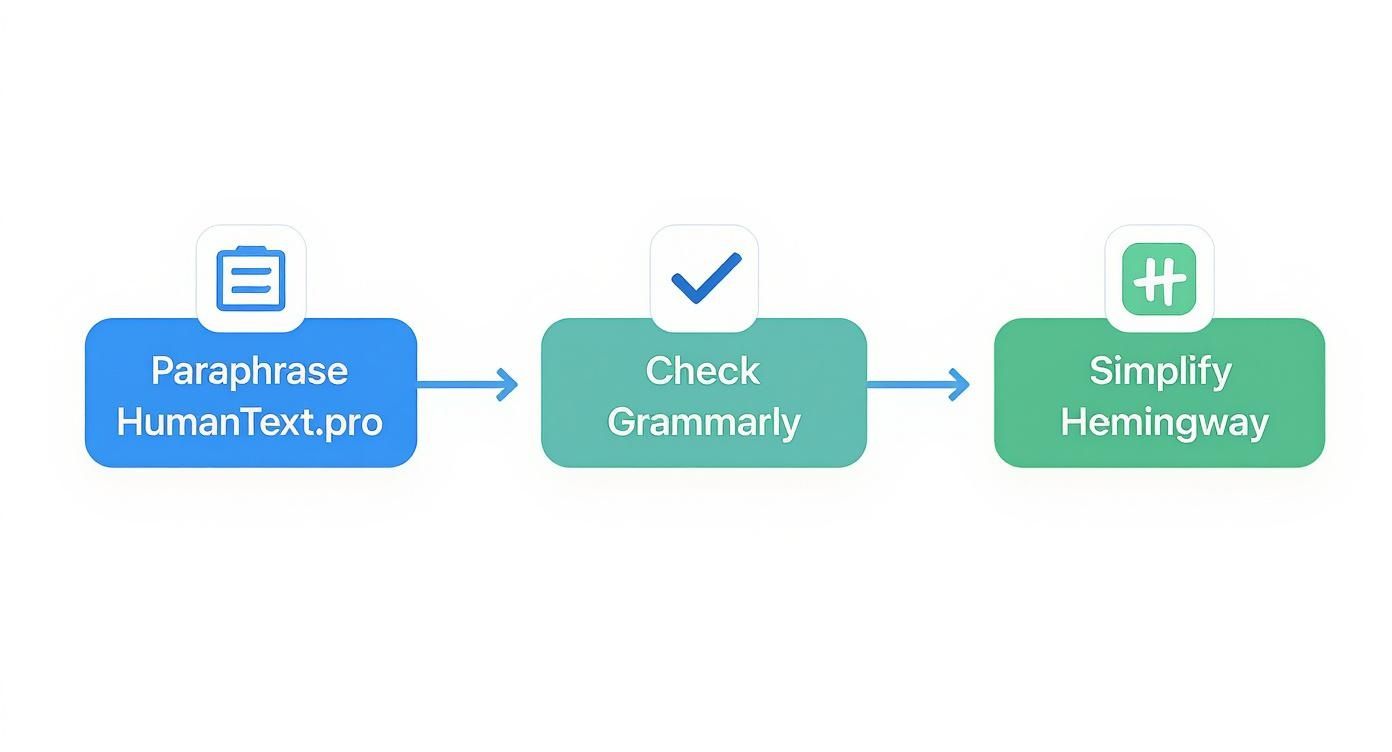
This multi-pass approach makes sure your content sounds natural, is grammatically perfect, and is easy for people to read.
After running your draft through this process, you add the final, irreplaceable human touch. This is where you weave in unique brand assets—things like customer testimonials, proprietary data from your own research, or a personal story from your team's experience. This last step is what makes your content truly your own.
Common Questions About Humanizing AI Content
Diving into the world of humanizing AI text can bring up some valid questions. It’s natural to wonder if your edits are really enough to get past detectors or just how much time you should sink into the process. Let's tackle some of the most common questions head-on to clear up the confusion.
Getting straight answers helps you focus on what actually matters: creating authentic, high-quality content that genuinely connects with your readers.
Can AI Detectors Still Flag Humanized Text?
Yes, it's possible—but it becomes far less likely when you do it right. Just running your text through a paraphraser and calling it a day probably won't cut it. The best detectors are getting smarter, looking for subtle AI tells beyond word choice, like perfectly uniform sentence lengths or a predictable, robotic flow.
But a proper humanization process—the kind we've been talking about—changes the text on a fundamental level. When you inject personal stories, vary your sentence structures, and refine the vocabulary to match your own, the content becomes fundamentally different from the AI's first draft.
The goal isn't just to trick a machine. It's to create content that is genuinely valuable and indistinguishable from human writing because you've infused it with your unique perspective and style. When you focus on quality, bypassing detectors becomes a natural byproduct.
How Much Editing Is Really Necessary?
Ah, the million-dollar question. The honest answer is: it depends. But there's a good rule of thumb. The less specific your initial prompt, the more surgery your draft will need. A vague request will always get you a generic output that requires a heavy rewrite.
A much better approach is to follow the 20/80 principle. Spend 20% of your time crafting a killer prompt with a clear persona, specific tone, and structural guidelines. This front-loaded effort means the remaining 80% of the work is just polishing and adding personal flair, not a complete overhaul. Start with a great draft, and you can easily cut your editing time in half.
What Are the Biggest Mistakes to Avoid?
When you’re trying to humanize AI text, a few common pitfalls can completely undermine your efforts. Simply being aware of them is half the battle.
Here are the top three mistakes to sidestep:
- Leaving in AI Jargon: Watch out for robotic transition words like "furthermore," "in conclusion," or phrases like "it is important to note." These are dead giveaways. Swap them for more natural connectors that sound like you.
- Forgetting to Fact-Check: AI models can confidently state incorrect information or "hallucinate" sources that don't exist. Always verify every single statistic, date, and claim. Trusting the AI blindly is a recipe for disaster, especially for academic or professional work.
- Neglecting the Human Element: This is the big one. The single biggest mistake is failing to add what only you can bring to the table—your stories, your opinions, your voice. Without that spark, even the most polished text will feel hollow and fail to connect with a reader.
Ready to transform your robotic drafts into authentic, engaging content? Try the HumanText.pro AI humanizer. Get a 500-word free trial with no signup required and see the difference in seconds. Experience the HumanText.pro difference today.
Ready to transform your AI-generated content into natural, human-like writing? Humantext.pro instantly refines your text, ensuring it reads naturally and authentically. Try our free AI humanizer today →
Related Articles
AI Face Search Explained: Verify Identity and Stay Safe
Understand how AI face search works, including embeddings, accuracy, and legal issues. Learn to use these tools for personal safety and verify identity online.

Reverse Face Search: A Verification Safety Guide
Learn how reverse face search works, when to use it for safety, and how to pair it with AI image checks to verify online contacts and reused photos.

Face ID Search Explained: How It Works and How to Verify
Learn how face ID search works, why it differs from reverse image search, and how to verify identities and photos safely with practical checks and tools.

