Face ID Search Explained: How It Works and How to Verify
Learn how face ID search works, why it differs from reverse image search, and how to verify identities and photos safely with practical checks and tools.
A stranger messages you on a dating app. Their profile photo looks polished, familiar, and a little too perfect. Or maybe you're a recruiter, editor, or teacher who needs to know whether a headshot belongs to the person using it. That's where face ID search becomes useful, not as a magic identity machine, but as a verification step.
Used carefully, face ID search can help you check whether someone is real, spot catfish and romance scams, and find where your own photos were reused without permission. It should not be used to stalk, surveil, or identify strangers against their wishes. That line matters, and in some places the law treats biometric face search as sensitive or restricted activity.
What Face ID Search Really Means
When people say face ID search, they often mean two different things at once.
One meaning is public-web lookup. You upload a face photo and try to find where that same person appears online. The other meaning is biometric verification. A system compares a submitted face against a stored face template to check whether the person matches a claimed identity.
That's different from Apple's Face ID on a phone. Apple's feature opens a device. Face ID search is broader. It asks whether a face appears elsewhere, or whether it matches an enrolled identity record.
Two common uses people mix together
The confusion usually starts here:
- Web-based face lookup: You upload a profile picture from a dating app and look for that face on public websites.
- Identity verification: A service compares a selfie to a known reference, such as an ID photo or prior account image.
Both involve faces, but they answer different questions. One asks, “Where else does this face appear?” The other asks, “Is this the same person as the trusted reference?”
Why the distinction matters
That difference becomes important fast. In safety work, a person may only need to verify a claimed identity. In surveillance systems, a tool may search one face across many records. Those are not the same use case, and they don't carry the same risks.
If you work in security or facilities, materials on CCTV facial recognition for businesses can help show how commercial deployments frame enrollment, watchlists, and operational controls. For an everyday user, though, the safer frame is narrower: verify a claim, reduce risk, and stop there.
Practical rule: If your goal is personal safety, start with the smallest question you need answered. “Is this really the person in the profile?” is safer than “Who is this stranger?”
A good verification habit also doesn't stop at the face alone. If a profile photo looks suspicious, check the image itself, any attached video, any voice note, and any provenance signals that come with the media.
Why Face ID Search Finds People, Not Just Pictures
A common safety problem looks like this. You save a dating profile photo, run a reverse image search, and get nothing useful back. That does not prove the profile is real. It may only mean the exact picture, or a close copy of it, has not been indexed elsewhere.
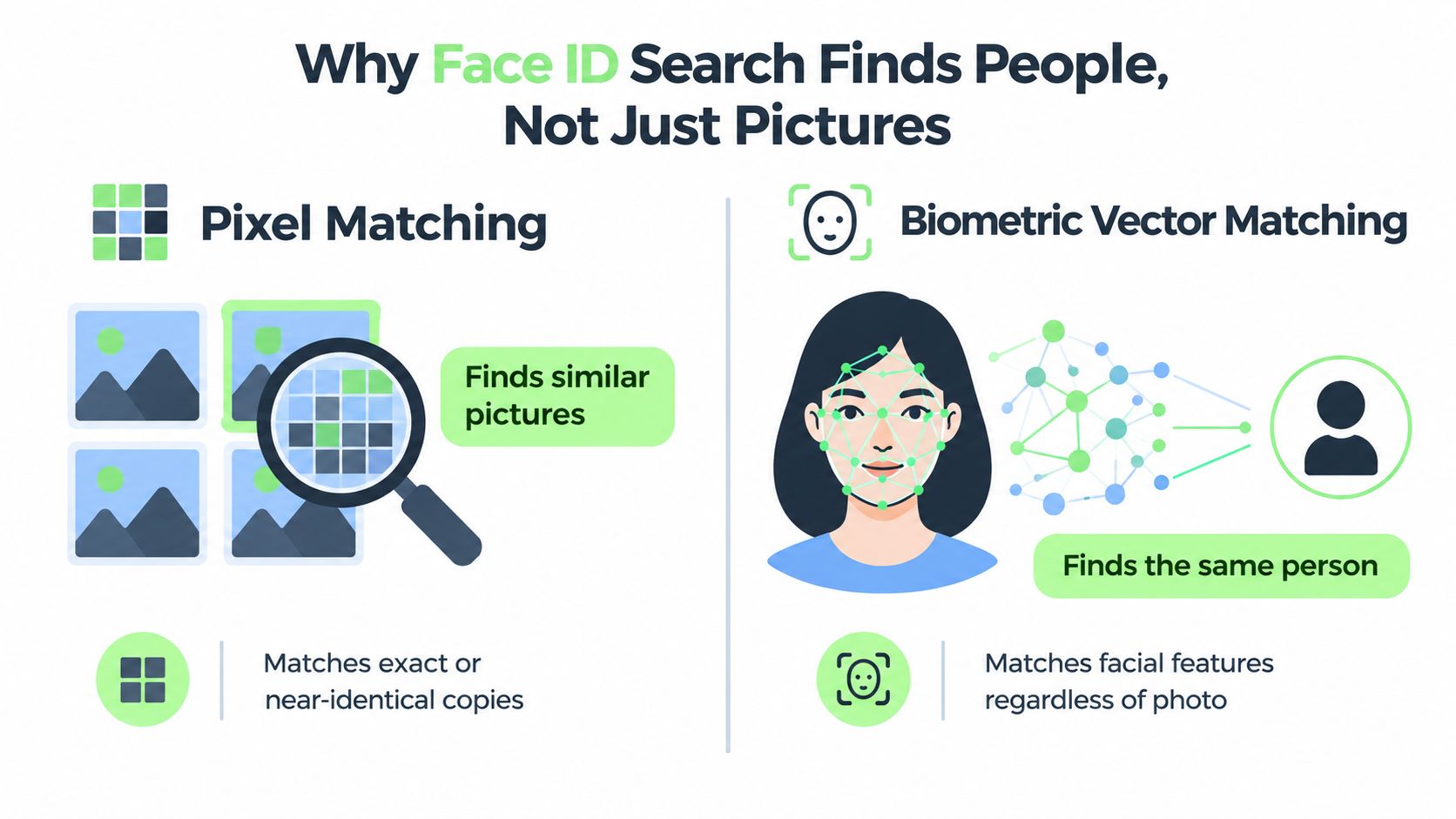
Face ID search can catch a different kind of mismatch. Instead of asking, "Where has this image appeared?" it asks whether the face in one photo appears to be the same face in other photos, even when the background, camera angle, lighting, or age of the image changes. That difference matters in personal-safety checks, because bad actors often switch photos of the same person rather than reusing one identical file.
What changes under the hood
Reverse image search mainly looks at the picture itself. It is good at finding duplicates, reposts, screenshots, and edited versions that still preserve much of the original visual pattern.
Face ID search uses a face template, sometimes called a biometric vector. In plain language, the system maps measurable facial features into a mathematical representation so it can compare faces across different photos. The search is not trying to match every pixel. It is trying to judge whether two images likely show the same person.
A passport checker offers a useful comparison. Staff are not asking whether your live selfie matches the exact pixels of your passport photo. They are asking whether both images belong to the same human being.
Why that matters for safety
This is why face ID search fits into verification work better than simple image lookup alone. If someone stole a stranger's photos from several social accounts, each image might be different enough to avoid a standard reverse image hit. A face-based system may still connect those photos to one person, which can reveal that the profile is borrowing someone else's identity.
That makes face ID search a person-focused tool, not just a picture-focused one. Used carefully, it helps answer a narrower safety question: does this claimed identity stay consistent across available media?
Use both checks together when the stakes are personal. Reverse image search can show image reuse. Face comparison can show identity consistency. The same workflow applies when AI-generated media is a concern. Check the still image, then any video, then any voice note, then any provenance signal such as SynthID or related metadata, instead of treating the face alone as final proof.
If your concern shifts from online verification to lawfully locating a known individual, services such as tracing agents London belong to a different category of work. That boundary matters. Verifying a claimed identity for personal safety is not the same task as tracing someone's whereabouts.
1 - 1 Verification Versus 1 - N Identification
The most useful distinction in this whole topic is 1:1 verification versus 1:N identification.
A lot of public confusion disappears once you separate those two modes.
The two questions they answer
1:1 verification asks whether one submitted face matches one claimed identity.
1:N identification asks whether one submitted face matches anyone inside a larger database.
That sounds technical, but the safety question is simple. In 1:1 mode, you already have a claimed identity and want to test it. In 1:N mode, you're searching for candidates.
| Attribute | 1:1 Verification | 1:N Identification |
|---|---|---|
| Core question | Is this the person they claim to be? | Who might this person be? |
| Comparison target | One enrolled reference | Many records in a gallery or database |
| Typical output | Accept or reject against a threshold | Ranked candidate matches for review |
| Personal-safety use | Dating checks, account checks, KYC-style flows | Rarely appropriate for ordinary users |
| Risk profile | Narrower and easier to justify | Broader and more legally sensitive |
| Human review need | Often limited to exception handling | Important because results are candidate leads |
Why regulators care about the split
Legal rules increasingly draw a sharper line between these modes. Privacy International notes that the EU AI Act bans or tightly restricts live facial recognition for law enforcement in public spaces except narrow exceptions, while retrospective use is treated as high-risk and becomes subject to added safeguards from 2 August 2026. The same discussion notes that China's 2025 face-recognition measures require explicit classification of deployment mode with stricter consent, retention, and data-minimization rules in some uses, as discussed in Privacy International's analysis of facial recognition regulation.
For an ordinary person trying to stay safe online, 1:1 thinking is the safer frame. You're not building a watchlist. You're checking whether a person who contacted you appears consistent across the materials they provided.
A practical way to think about it
Use 1:1 verification when you have consent, a clear reason, and a limited claim to test.
Use 1:N identification only when you have a lawful basis and a process for reviewing candidate results carefully. Most readers won't.
Three Safety Scenarios Where Face ID Search Helps
People usually understand face ID search once they see it in a real situation. The value isn't abstract. It sits in small, tense moments where you need to decide whether to trust what's in front of you.
Romance scam and catfish checks
You match with someone online. Their profile is polished, they move quickly, and they avoid live calls. Start with the profile photo.
- Save the clearest face image they've shared publicly.
- Run a face-based lookup to see whether the same face appears on unrelated profiles or websites.
- Run a regular reverse image search too, because exact-image reuse still matters.
- Compare names, usernames, and locations across what you find.
- Ask for a fresh selfie or brief live verification if the stakes are rising.
If the same face appears under different names, or the image appears tied to unrelated biographies, treat that as a warning sign. If the image results line up with their story, that still isn't proof. It just reduces uncertainty.
If someone refuses every ordinary verification step but keeps asking for emotional commitment, money, or secrecy, the risk is no longer theoretical.
Reused headshots on professional profiles
A recruiter, journalist, or conference organizer often gets a polished profile image with very little time to evaluate it.
A sensible workflow is to compare the headshot across public profiles, then check whether the same face appears tied to conflicting employers, bios, or names. If a person claims one professional identity but the image belongs to someone else's long-established public presence, face ID search can surface that mismatch quickly.
This also helps if your own headshot was copied without permission. Search your face, note the pages where it appears, take screenshots, and document dates before contacting the platform or publisher.
Fast newsroom or classroom verification
An editor receives an event photo close to deadline. A teacher receives a project submission with attached profile media. In both settings, speed matters, but so does restraint.
A careful user might:
- Check the source path: Who sent the file, and how?
- Inspect the face claim: Does the depicted person match the named source?
- Cross-check context: Does the clothing, setting, and timing fit the claim?
- Look for mismatch signals: Different names, recycled bios, or reused images elsewhere.
Face ID search is useful here because it can support a fast quality check. It shouldn't replace reporting, consent, or direct confirmation when those are possible.
Accuracy Limits and Real-World Error Rates
A face ID search can feel decisive when it returns a strong match score. Real verification is less tidy. The result depends on whether the system is doing a simple yes or no comparison between two images, or searching one face against a large set of possible identities.
That distinction matters for safety. In a 1:1 check, you are asking, "Does this selfie match the person from yesterday's video call?" In a 1:N search, you are asking, "Does this face appear anywhere else under a different name?" The second task is harder because the system must sort through many near-matches, low-quality copies, and images taken in different conditions.
What the common errors mean
Two error types shape how you should read a result:
- False match: The system links two different people.
- False non-match: The system misses the same person across two images.
False non-matches confuse readers most. A person can fail to match their own older profile photo because one image is blurry, cropped, compressed, turned sideways, or partly covered by hair, glasses, or a hand.
False matches create a different risk. Two people can share enough visible features for a system to rank them close together, especially if the source image is weak. That is why a top result is a lead for review, not a final answer about identity.
Why field conditions change the outcome
Face matching works a bit like comparing two signatures after one has been photocopied three times. The core pattern may still be there, but some detail is gone, and missing detail raises the chance of error.
Independent testing has shown the same pattern for face systems. Accuracy is usually strongest with clear, front-facing, well-lit images of cooperative subjects. It gets worse with off-angle photos, older images, screenshots, social-media compression, and single frames pulled from video. As noted earlier, error rates can rise sharply under harder conditions.
| Factor | Effect on Match Reliability | Reader Adjustment |
|---|---|---|
| Lighting | Shadows hide facial detail | Use a clear, evenly lit image |
| Pose | Side angles reduce overlap between features | Try a front-facing photo if you have one |
| Compression | Reposts and screenshots remove detail | Upload the highest-quality original available |
| Occlusion | Glasses, masks, hair, or hands block features | Test another image with less obstruction |
| Age gap | Features can shift across years | Compare photos from similar time periods |
| Single-frame reliance | One frame may catch an awkward expression or blur | Pull two or three usable frames when checking video |
How careful users handle uncertain results
Use face ID search the way you would use a metal detector at the beach. It points you to a spot worth checking. It does not tell you whether you found a coin, a bottle cap, or nothing useful at all.
For personal safety, that means confirming the match with surrounding evidence. Does the name stay consistent across profiles? Do the job history, location, friends, and posting style line up? If the person sent video, inspect whether the face stays consistent across the full clip, because a convincing frame can still sit inside manipulated footage. A guide to checking AI-manipulated video before trusting face matches fits naturally into that same workflow.
The practical rule is simple. Use biometric results as one verification signal alongside image, video, voice, and context checks. That approach reduces the risk of treating a score as proof when it is only one piece of a larger identity puzzle.
Privacy, Consent, and Legal Guardrails
Face ID search touches biometric data, and biometric data isn't ordinary information. A face photo may look casual, but once it becomes a template for matching, the legal and ethical stakes go up.
For personal safety, that means you should ask a narrower question, keep less data, and avoid turning curiosity into surveillance.
What lawful use looks like in practice
A reasonable use looks like this: you want to verify whether a person you met online is presenting a real, consistent identity before sharing more information, meeting in person, or sending money.
An unreasonable use looks different: collecting strangers' faces, building your own watchlist, or searching people who haven't given you any reason or permission to do so.
The line isn't only moral. It can also be legal. U.S. privacy rules already restrict biometric collection in several places. Illinois' BIPA requires notice before collecting biometric data and prohibits disclosure without consent, Colorado requires consent before processing facial-recognition data, and recent reporting says 23 states have passed or expanded laws limiting biometric scraping, according to NPR's reporting on biometric and facial-recognition laws.
Consent questions readers often miss
Ask these before you run a search:
- Whose safety is at stake: Are you verifying a direct claim that affects your own safety or work?
- What's the minimum needed: Could a live call or fresh selfie answer the question with less data use?
- Who will see the results: Are you keeping the search private and limited?
- Will you retain anything: If you save screenshots or reports, do you need them?
For educators, editors, and HR teams, documentation matters too. Keep access limited, avoid casual sharing, and set retention limits. If you handle AI-generated or AI-modified media, the compliance side of transparency is easier to understand once you review EU AI Act Article 50 explained.
The safest search is the one with a clear reason, a small scope, and an obvious stopping point.
A Verification Workflow With Image, Video, Voice, and SynthID Checks
The strongest use of face ID search is as one signal inside a broader verification workflow. That keeps you from overreading one match result and helps you catch manipulations that don't depend on face mismatch alone.
Use this process when you need to verify a dating profile, a submitted media asset, or a suspicious piece of identity content.
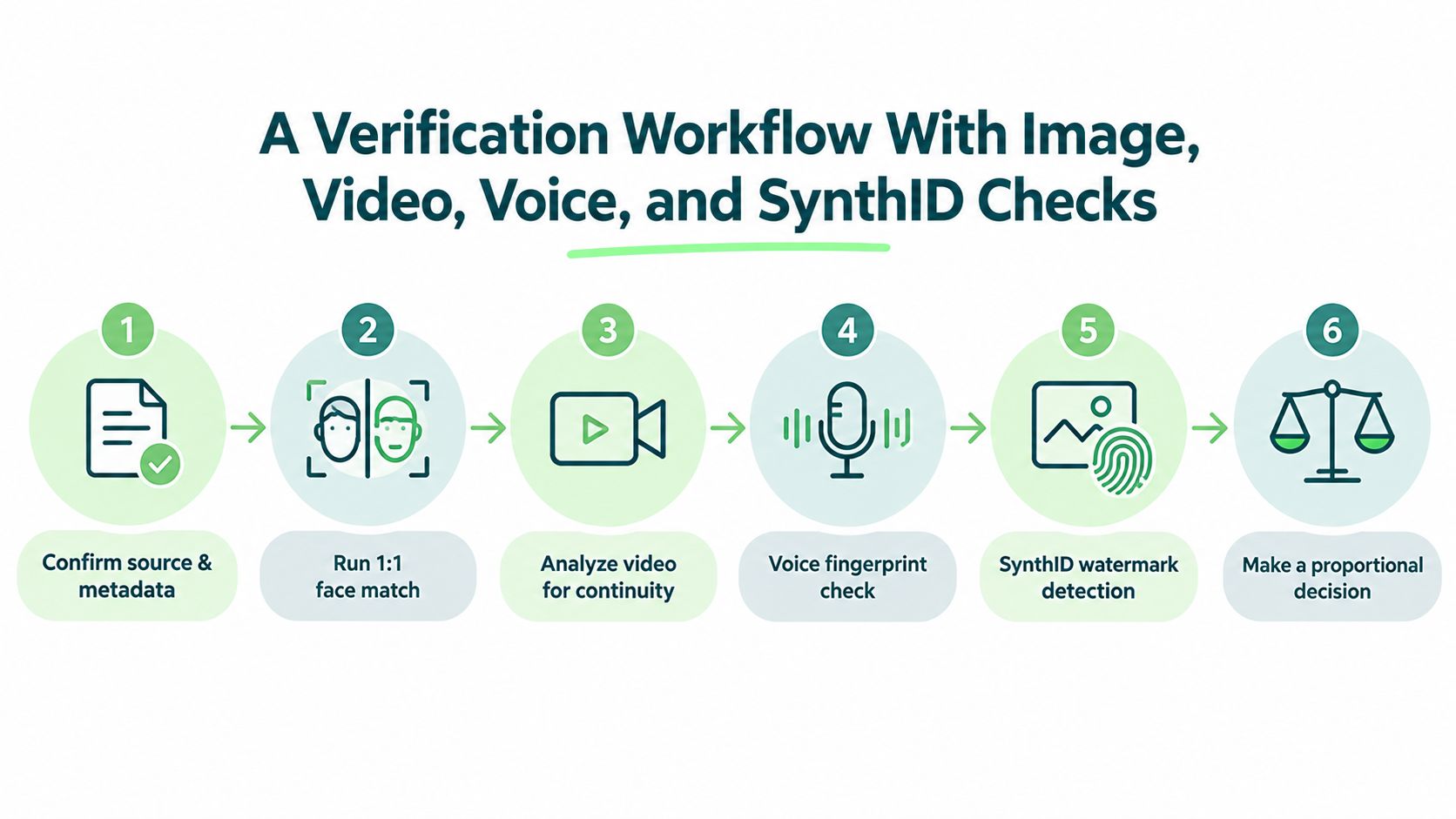
Step 1 and Step 2
Confirm source and metadata
Start with the file itself. Who sent it, where did it come from, and is it a screenshot, a reupload, or an original file? Even before analysis, source quality changes how much trust the file deserves.Run a 1:1 face match against a trusted reference
Compare the submitted face to a reference the person provided for verification. A service like Humantext.pro can fit as one option if you need to upload a clear photo or image URL and check where a face image appears on public web pages.
After those two steps, pause. If the source path is shaky and the face claim already conflicts, you may not need more analysis to decide the risk is too high.
A related check is ordinary image lookup. If you want to compare where a profile image appears and whether the same photo was reposted elsewhere, photo lookup methods add useful context.
A visual review helps too.
Step 3 through Step 6
Analyze video for continuity
If the person sent a clip, check whether facial movement, lighting transitions, and frame consistency hold together.Check the voice signal
If there's audio, compare tone, cadence, and synthetic artifacts using a voice-analysis tool. Voice claims and face claims should align, not contradict each other.Look for provenance markers
Some platforms support watermarking or content-authenticity signals such as SynthID or C2PA-style manifests. If they exist, review them.Make a proportional decision
One weak signal is not enough. Two or more aligned signals can justify a stronger conclusion. A mismatch between face results, image origins, video continuity, and voice evidence is often more meaningful than any single score.
What this workflow is for
This approach is about verification and quality, not accusation. It works especially well when someone is trying to prove they are who they say they are, or when you need to determine whether media can be trusted for publication, moderation, or personal safety decisions.
Verification Mindset and Responsible Next Steps
Face ID search is most useful when you stop treating it like a verdict. It's a verification aid.
That mindset keeps the tool in the right lane. Use it to verify someone you met online, to check for catfish and romance scams, or to find where your own photos were reused without permission. Don't use it to stalk, surveil, or identify strangers against their wishes.
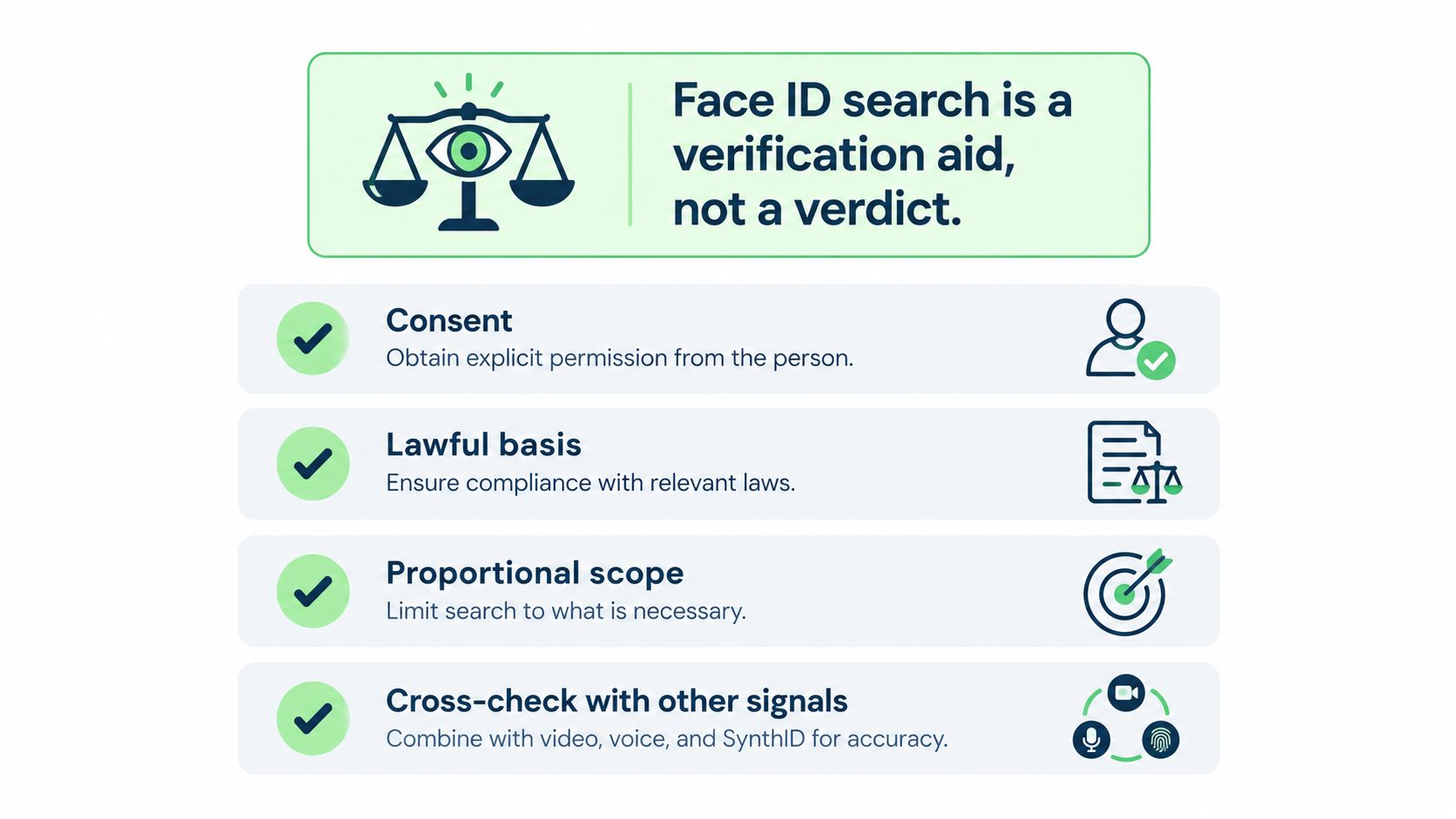
A simple next step is to save your own short checklist: face match, reverse image check, video review, voice check, and provenance check. The same habit applies in adjacent verification tasks too. For example, if you're checking whether visual identity markers were copied or misrepresented, a resource like this TattoosAI meaning guide shows how verification thinking can extend beyond faces into symbols and claimed meanings.
If you want a direct safety-focused tool for this purpose, start with a clear image, ask the narrowest possible question, and document only what you need.
Humantext.pro offers tools for checking whether text, images, video, or voice content may be AI-generated, along with a face-search workflow that fits broader identity verification tasks. If you're checking a suspicious profile, reviewing media authenticity, or building a safer content-verification routine, visit Humantext.pro to test those checks in one place.
¿Listo para transformar tu contenido generado por IA en una escritura natural y humana? Humantext.pro refina instantáneamente tu texto, asegurando que se lea de forma natural y auténtica. Prueba nuestro humanizador de IA gratis hoy →
Artículos Relacionados

Photo Lookup Guide: Verify Images Step by Step
Master photo lookup with this practical guide. Learn reverse image search, EXIF checks, AI detection, and how to verify people safely online.
10 Reverse Image Search Free Tools for Verification
Compare 10 reverse image search free tools and methods for desktop and mobile, with practical steps, privacy guidance, and safer verification use cases.

How to Write Descriptively with Vivid Sensory Detail
Learn how to write descriptively with sensory detail, strong verbs and vivid examples. Practical techniques, rewrites and prompts to make your writing shine.

