Illuminarty Explained: Accuracy, Limits and How to Verify
Illuminarty explained: what its AI image detector checks, reported accuracy, known limits, and how to verify results before you publish.
You found a high AI score and treated it as a verdict. Is one percentage really enough to reject a photo, fail an assignment, or pull a listing?
A detector score is evidence you review, not proof of how a picture was made. Illuminarty estimates the chance that an image came from a publicly known generator. Two tools can disagree on the same file, and that disagreement is useful. It means the picture needs provenance, a second check, and a person before anyone publishes, grades, or sells.
What Illuminarty Is and Why the Name Gets Confused
A photo editor receives a glossy product shot from a freelancer, types "illuminarty" into a search bar, and expects a yes or no answer. What the tool returns is a probability, and reading that number correctly is the whole skill.
Illuminarty, at illuminarty.ai, is an AI image detector. It estimates the chance that a picture came from a publicly known generator and, where it can, names the likely model family. Its output works like a smoke alarm: sensitive to patterns associated with generation, silent on who pressed the button. That is why two detectors can score the same file differently, and why one percentage belongs in a review queue rather than deciding a publishing, grading, or marketplace outcome on its own.
The spelling causes real confusion. Many searches for "illuminarty" are looking for the Illuminati. The historical group, more precisely the Bavarian Illuminati, was founded on May 1, 1776, in Ingolstadt by Adam Weishaupt, then a 28-year-old professor of canon law, and it began with only five members under the name "Perfectibilists" until 1778, according to Encyclopedia.com. A short-lived secret society and a web-based detector share a similar string of letters and nothing else. Confirm the spelling and the domain before trusting what you land on.
Who runs this kind of check? Publishers screening submitted photos, marketplaces reviewing listings, teachers checking artwork, and creators auditing their own files. Each group asks the same three questions in different language: how accurate the score is, which clicks produce it, and where it stops being reliable evidence.
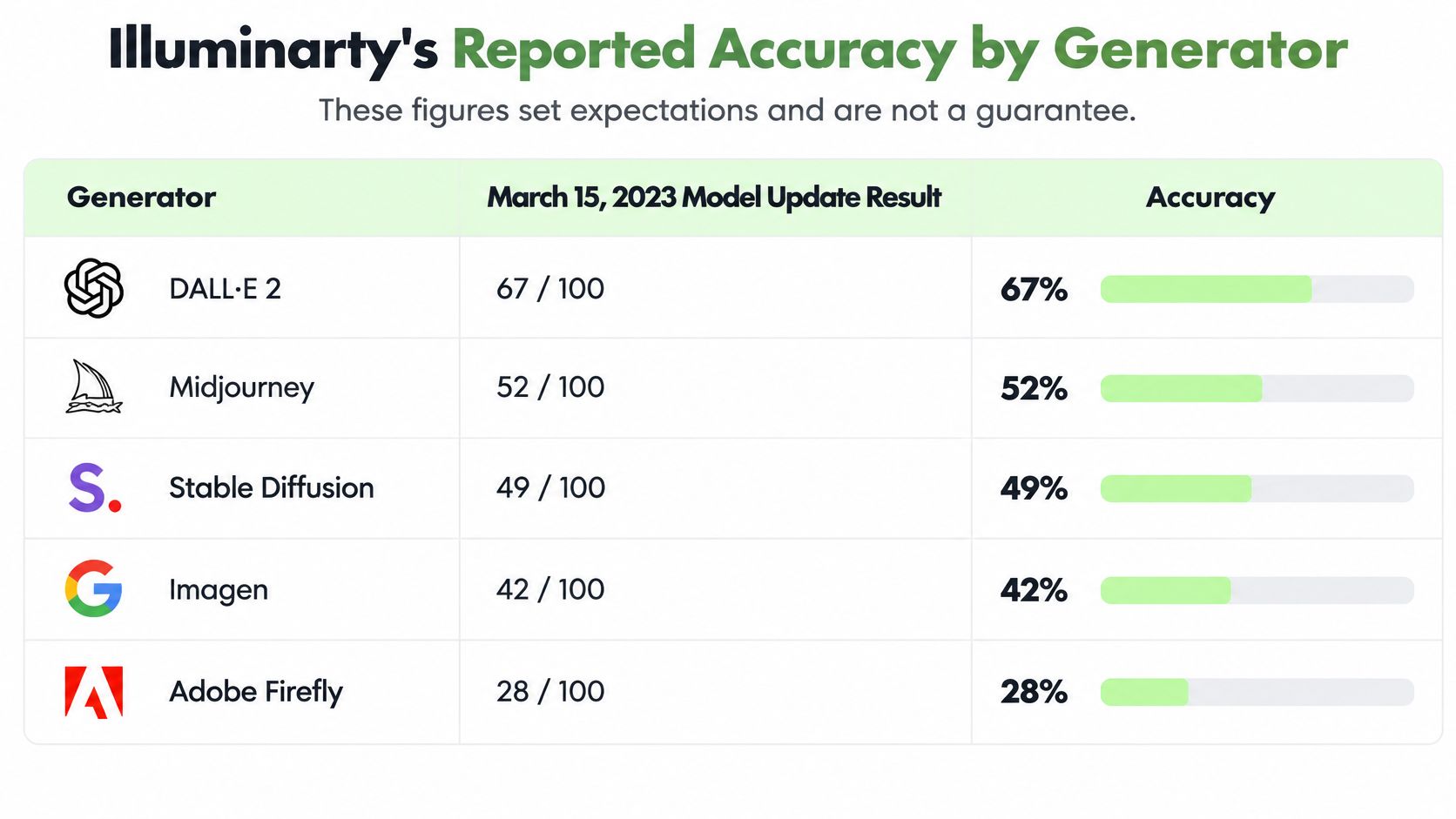
Illuminarty's Reported Accuracy by Generator
A reported accuracy table is only useful when the test set, the generator and the decision are kept in the same frame.
| Test | Earlier result | Updated result |
|---|---|---|
| Binary AI vs human images | 91.8% | 97.5% |
| Identifying the generating model | 90.1% | 96.4% |
| Midjourney images | 68.9% | 88.5% |
| Stable Diffusion variants | 79.1% | 93.5% |
| DALL·E 2 images | 99.2% | 99.8% |
On Illuminarty's site, the March 15, 2023 update reports binary AI-versus-human accuracy rising from 91.8% to 97.5%, and generating-model identification rising from 90.1% to 96.4%, on its own validation dataset. Spotting a synthetic image is the easier job. Naming the family is harder, so a file can look synthetic while the model label is wrong.
The spread across generators
The more useful signal is the gap between families. DALL·E 2 sits almost at the ceiling in this internal pass, Stable Diffusion variants land high but lower, and Midjourney trails both. That ordering matters because strong performance on one family says little about a file from another. When the job is sorting outputs rather than judging one file, a compare AI image generators guide helps you identify which family you are looking at before treating a label as meaningful.
These pairs describe one validation pass, not a permanent property of the tool. A detector validated on one fixed dataset can miss images that differ from it, including unfamiliar art styles, heavy editing, compression marks or files produced outside the tested generator set. Treat the table as a starting point for review, then test the file in front of you. If Illuminarty points one way and provenance, metadata or a second check points another way, that disagreement is evidence to inspect further, and it should not become an automatic publish, grade or marketplace decision on one score alone.
Where Illuminarty Results Break Down
The number that should stop an automatic rejection is 67.4%. In an academic evaluation that separated human art from AI images, Illuminarty labeled genuine artworks as AI-generated at that false-positive rate on the tested human-art corpus, as a CVPR 2026 workshop paper reports.
Detectors learn statistical traces tied to particular generators, datasets, and rendering pipelines. Alter the image, add noise, compress it, or give it an unusual style, and those traces weaken. They can also overlap with ordinary brushwork, grain, and retouching. A hand-painted digital illustration with heavy texture, or a product photo cleaned in an editor, can share the same smooth patches a generator leaves behind. The score then describes the surface, not the author.
What independent tests actually measured
| Condition | Reported result | What to do |
|---|---|---|
| Baseline test setting | Accuracy about 0.80 | Treat as a starting point, not a guarantee |
| Gaussian noise added | Accuracy about 0.57 | Keep the original unmodified file for analysis |
| Genuine human artwork tested | 67.4% false-positive rate | Never act on a score alone for artwork |
The same paper puts baseline accuracy at about 0.80, then about 0.57 once Gaussian noise is added. That drop is the operational warning. A noisy export, a messaging-app resize, or a stylized illustration is not the clean validation file.
Practical rule: Set an uncertainty band. Mid-range scores trigger review. They do not trigger a verdict.
Use the tool for triage, not automatic rejection. Preserve the unmodified original. Require a second piece of evidence before any adverse step. A reverse image search from PeopleFinder can show whether the same picture already appears under another caption or account, which is provenance, not another probability. Before you automate anything, run your own illustrations, product listings, and editorial photos through the detector and write down where it fails on those types.
Illuminarty or a General-Purpose Detector for Everyday Checks
A clean browser page is not the same thing as dependable accuracy across compression, file size, and image type. The documented independent test is small, and it should be read as a warning.
In that test, Illuminarty identified 4 of 10 original AI images and 4 of 10 compressed AI images, while incorrectly flagging 1 of 4 tested real photos. Six larger real photos were not analyzed, and the test reported no account requirement, according to Debunk.org. Four hits out of ten is a first look. It is not a benchmark you can hang a publishing rule on.
Match the tool to the job
| Everyday check | Use Illuminarty for | Use a second general-purpose detector for |
|---|---|---|
| First look at a suspicious image | Quick probability score and heatmap where available | Confirming the score on the same file |
| Compressed or resized copies | Only after testing its results on your own copies | Checking whether the score holds |
| Real photos and artwork | Flagging for human review, never final rejection | Second opinion before any action |
| Publishing or grading decisions | Triage input only | Independent corroboration alongside provenance evidence |
| Video or voice files | Not covered by this image test | Not covered by this image test |
Illuminarty is the fast first pass, with a probability and a heatmap when your plan includes one. A second general-purpose detector is an independent reading of the same untouched file. When the two percentages split, record the split. Disagreement is information about the file, not a mistake by the person who uploaded it.
For a wider look at how detectors diverge, see this AI detector accuracy comparison. Compressed copies stay conditional until you have tested your own exports. Video and voice stay outside this sample, so do not borrow an image result and apply it to a clip.
How to Run an Illuminarty Check Step by Step
Treat the check as triage. Each step exists because a shortcut changes the signal or hides the reason for the score.
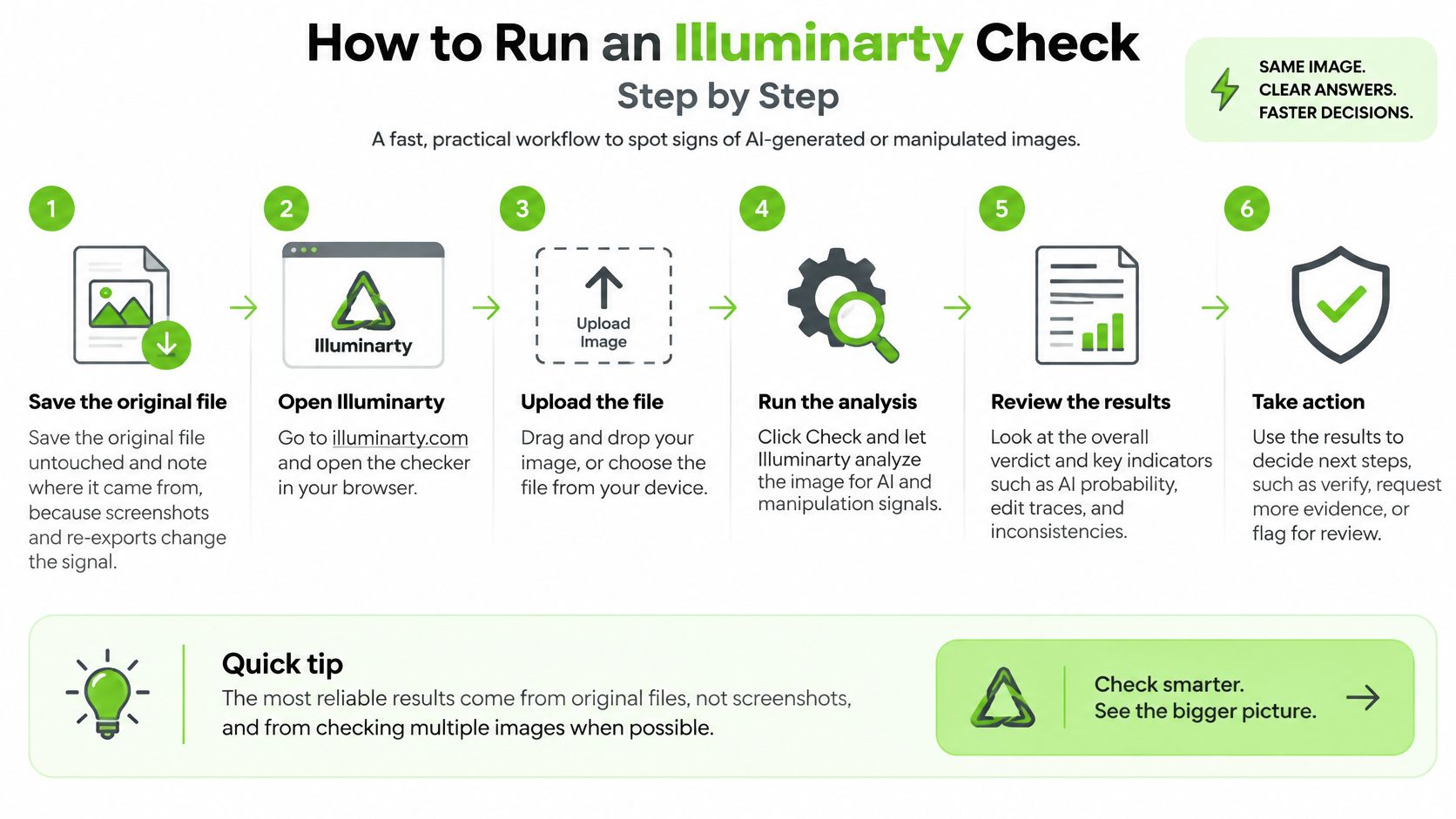
- Save the original untouched. Note who sent it and which channel it arrived on. Screenshots and re-exports change compression and crop, so a later score may describe your export rather than the submitted file. The common slip is uploading the chat preview instead of the attachment.
- Open illuminarty.ai and drop the file on the page, or use the upload control. The interface is built as a quick browser check, and Shotkit's hands-on review describes that drag-and-drop path.
- Read the AI-generation probability and write it down with the date and file name. A clear high score has a shape you can recognize. That same review reported a 94.7% AI likelihood for an AI-generated astronaut-dog image. Record the number. Do not translate it into "fake" in the filename.
- Inspect the heatmap if one appears. Paid functionality has been described as adding localized analysis that marks regions contributing to the result, so check what your plan includes before you expect the map. Look at textures, lighting, hands, text, and compositing edges. A hot region is a place to look, not a confession.
- Run the same untouched file through a second general-purpose detector. Put both percentages in the same note. Agreement raises confidence in the triage. Disagreement sends the file to a person.
- Ask for provenance. Request source files, prompts, or earlier versions from the creator. A missing original is a process problem, even when both scores are low.
- Choose the next step, not a final label. Keep the image in review when scores conflict or sit in the middle. Escalate a rejection, a grade, or a takedown only when secondary evidence supports it.
A probability tells you where to look next. It does not close the file.
Verifying Video and Voice Without Relying on One Score
The checks above are about still images. There are no validated results here for Illuminarty's video or voice analysis, so a score on a clip should not be assumed to transfer from a photo workflow.
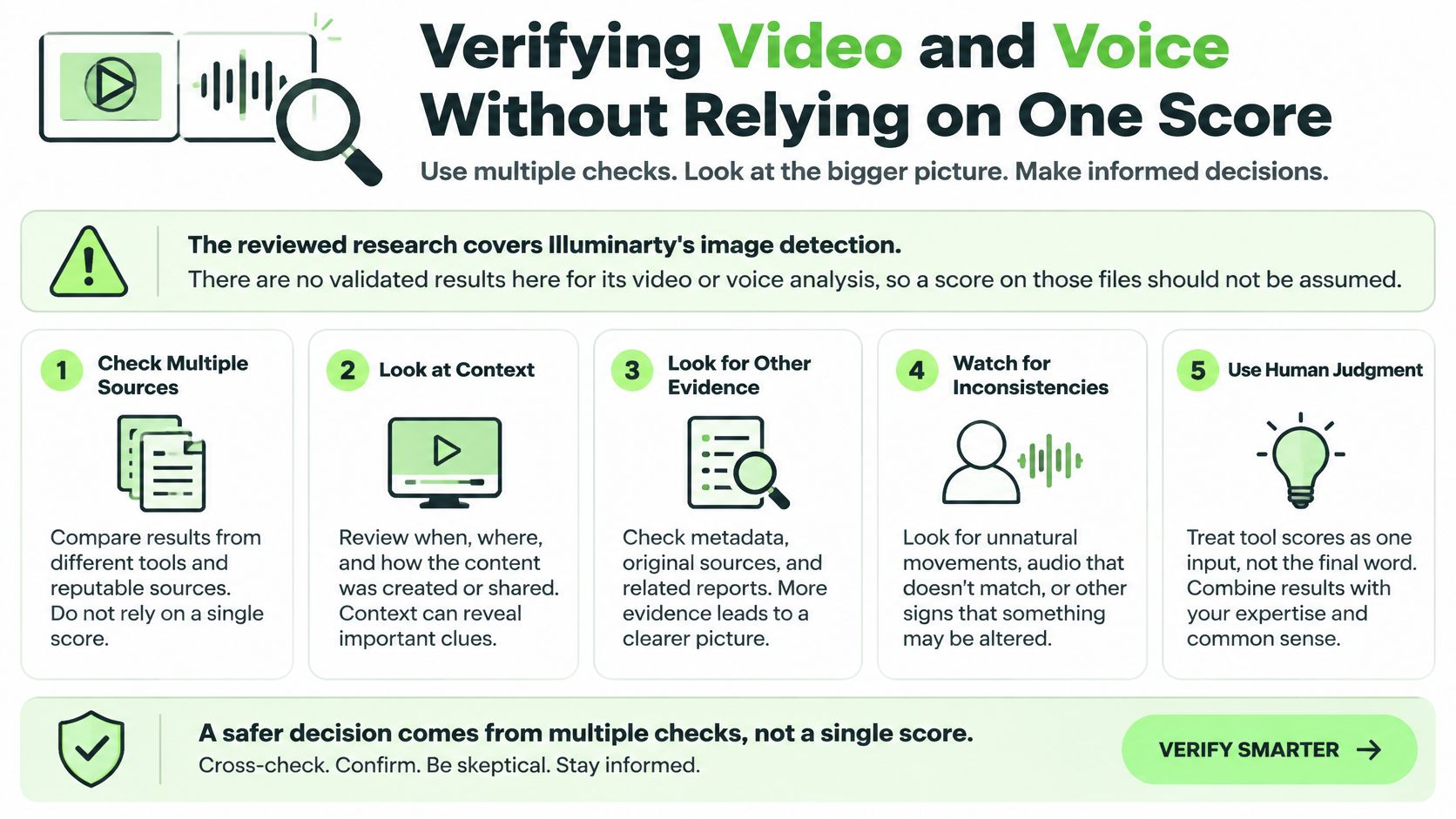
Keep the original file, and still get a second opinion from a tool built for that medium. Then add checks that only make sense for moving pictures and speech. A practical path for video and voice sits in this AI video detector guide.
A checklist tied to a decision
- Trace the source. Find the first upload, the account history, and earlier posts. If the clip appears nowhere before today, hold it.
- Match voice and timing. Compare the speaker with a known recording, and compare the scene with the event the caption claims. A familiar voice on the wrong day is still a problem.
- Look for platform provenance. Watermarks and content credentials count when the platform attaches them. Absence is a note, not a finding by itself.
- Ask for the raw recording. An unedited clip lets you see cuts that a social export hides.
- Use a second tool made for that medium. Do not recycle an image percentage onto a soundtrack.
- Log every result. Write the tool, the reason you trust or doubt it, and the date. Several independent, time-stamped signals outweigh one number.
Say a viral clip has a convincing voice and no traceable first post. Hold it for review. Do not label it or remove it on the strength of one score. The decision you are protecting is a public correction, a payout, or a moderation action, and each of those needs more than a single dial.
Publisher Rules and the Publish-or-Act Decision
A pulled licence, a rejected listing, a refused payout. Each of these decisions gets examined later by someone who was not in the room, and "the detector flagged it" is a weak defence on its own. Before you label or publish anything, check whether your role triggers the EU AI Act's transparency obligations for certain AI-generated content. A detector score can start that review. No single score should be the basis for rejecting, labeling, or paying for content.
| Use case | Detector role | Minimum evidence before adverse action |
|---|---|---|
| Editorial photo desk | Triage | Original file, source contact, second detector result |
| Marketplace listing | Triage and flag | Creator disclosure, original upload, human review |
| Commercial image licensing | Screening | Licence records and original source files |
| Product or ad imagery | Screening | Source files, revision history, and a creator response |
When two detectors disagree on the same file, treat the gap as evidence rather than a malfunction. Agreement between independent tools strengthens a finding. Disagreement tells you the file sits in ambiguous territory and belongs with a human reviewer. Either way, you have learned something a single reading could not show you.
Four habits for this week
Sort the file in this order: the probability, a second detector, provenance, human review, and the creator's response. If the tools disagree, or the score sits in the middle, the image goes to review. It does not go to a verdict.
- Keep originals and a log. Store the untouched file and every score with a date, so a later challenge can be answered with records rather than memory.
- Disclose AI assistance when you publish. Labeling rules are about your role, not about winning an argument with a detector. These AI disclosure requirements are the compliance companion to the score.
- Let the creator respond before any adverse action. A disclosure, a raw file, or a revision history can resolve what two percentages cannot.
- Re-test when the image type changes. A rule that worked on studio product shots may fail on illustrations.
Match the seriousness of the consequence to the strength of the evidence. Pulling a paid licence needs licence records and source files. Flagging a listing for a human look needs less, and still needs more than one scan.
Today, run the untouched original through Illuminarty and a second checker, then write down both results and your reasoning. The AI image detector can be that second check, a verification and quality step rather than proof of origin. The Free AI Photo Detector detects AI-generated images from Midjourney, DALL-E, and more, which makes it a practical paired reading when you are sorting those families.
Humantext.pro helps publishers, teachers, and marketplace teams verify images, video, and voice, and it helps writers improve AI-assisted drafts so the wording stays clear. Pair an Illuminarty score with a second check and a provenance note before you publish or act. Visit Humantext.pro to run that verification step on the file you are holding now.
Siap mengubah konten yang dihasilkan AI menjadi tulisan yang alami dan manusiawi? Humantext.pro menyempurnakan teks Anda secara instan, memastikan terbaca alami dan autentik. Coba humanizer AI gratis kami hari ini →
Artikel Terkait
AI Content Rewriter Guide: What It Does and How to Choose
Learn what an AI content rewriter changes, how it differs from paraphrasers and humanizers, and how to choose and verify one for natural output.
AI Disclosure Requirements You Must Meet in 2026
AI disclosure requirements under the EU AI Act hit on 2 August 2026. See who labels what, the exceptions, and a workflow you can run now.

10 Best AI Detector Online Tools Compared in 2026
Compare the 10 best AI detector online tools of 2026: how they work, accuracy limits, privacy, free access, and which audience each one fits.

