A Guide to the QuillBot Humanizer and How It Really Works
Our hands-on quill bot humanizer review shows where it improves readability, where detector scores still fail, and who needs a stronger tool.
The QuillBot humanizer is a rewriting feature meant to make AI-generated text read less mechanically. In practice, it works best as a cleanup layer: it can smooth phrasing, vary sentence structure, and make obvious AI wording less repetitive, but it does not guarantee detector-safe output or policy-safe use.
What the QuillBot Humanizer Solves
At a practical level, QuillBot’s humanizer is for people who already have a draft and want it to sound less stiff. That usually means students editing class notes into cleaner prose, marketers softening generic AI copy, or writers trying to reduce the repetitive cadence common in raw chatbot output. QuillBot itself positions the feature as a way to refine AI text into more natural writing through rewriting and tone adjustment on its official site and Humanizer page.
The problem it solves is straightforward: AI drafts often over-explain, repeat safe vocabulary, and use sentence patterns that feel too even. A humanizer can help break that rhythm, improve readability, and make a passage feel less obviously machine-shaped. In my review, that benefit was real on simple paragraphs, especially blog-style text and general explanations.
QuillBot’s popularity is also part of why this feature gets so much scrutiny. One widely cited data set describes QuillBot as having about 75 million registered users, 25 million monthly active users, and more than 100 million paraphrasing queries per month across more than 190 countries, with a heavy student and academic user base platform usage figures. That scale helps explain why people care whether its humanizer is effective.
That said, humanizing is not the same as making text untraceable. It can improve flow and reduce obvious AI patterns, but it does not promise a pass from Turnitin, GPTZero, or any other detector, and it does not override your school, employer, or publisher’s rules. For language learners who mainly want a cleaner rewrite rather than an AI-evasion tool, it can also be useful to compare a dedicated rewriting option like see Cathoven for IELTS-style text simplification and revision.
Core Functions of an AI Humanizer
This table sums up the key jobs a humanizer tackles to make AI text sound more natural.
| Function | Objective | Actionable Insight |
|---|---|---|
| Vary Sentence Structure | Break up the monotonous, predictable sentence patterns common in AI output. | Example: Turn "The data was analyzed. The results were conclusive. The report was written." into "After analyzing the data, the conclusive results allowed us to write the report." |
| Improve Word Choice | Replace generic AI vocabulary with more nuanced, context-appropriate words. | Example: Change "utilize" to "use," "leverage" to "apply," and "delve into" to "explore." |
| Enhance Readability & Flow | Add transitional phrases and logical connections to make the text smoother. | Example: Add phrases like "On the other hand," "As a result," or "For instance," to guide the reader. |
| Inject Personality | Adjust the tone to be more conversational, professional, or engaging as needed. | Example: Shift from a formal "It is imperative that..." to a conversational "We really need to..." |
| Bypass AI Detectors | Alter the text's statistical patterns to reduce the likelihood of being flagged as AI. | Example: Combine short sentences with long ones and avoid repetitive starting words like "In conclusion." |
Essentially, these tools are trying to add a layer of human polish to a machine-generated foundation.
Who Uses AI Humanizers
A whole range of people now rely on these tools to refine their AI drafts. While their specific motivations differ, the end goal is always the same: create high-quality, natural-sounding content that works without setting off alarm bells.
- Students: They use them to polish essays and assignments, making sure their work has a natural, academic tone while steering clear of plagiarism and AI detection issues. Actionable Insight: A student might use a humanizer to rephrase an AI-generated paragraph on a historical event to ensure it matches their own writing style and avoids common AI giveaways.
- Content Creators: For bloggers and article writers, these tools help produce content at scale that connects with an audience, maintains a consistent brand voice, and ranks well in search results. Actionable Insight: A blogger could generate a list of 5 AI-powered marketing tips and then use a humanizer to add a conversational tone and unique examples to each point.
- Marketers: This group needs to craft compelling ad copy, emails, and social media posts. Humanizers help them create messages that build real connections with customers and drive sales. Actionable Insight: A marketer can take a generic AI-written product description and use a humanizer to inject persuasive language and emotional appeal, turning features into benefits.
How We Evaluated the QuillBot Humanizer
I treated this as a product review, not a theory piece. To test QuillBot fairly, I used three short sample passages: a generic blog paragraph, an academic-style paragraph, and a technical paragraph. Each sample started as raw AI-generated text of similar length, and I kept the topic, reading level target, and detector lineup constant across the before-and-after checks.
The four criteria that mattered most were: readability improvement, meaning preservation, detector score change, and awkward rewrite frequency. A result counted as a failure if the output introduced factual drift, made the passage harder to understand, or still looked obviously AI-shaped after rewriting. Evaluations distinguished tools that swapped wording from those that restructured sentences.
In practice, I cared less about one dramatic detector score and more about consistency. I’ve seen too many AI tools perform well on one checker and collapse on the next, so the threshold here was simple: if QuillBot only helped on easy text but struggled on dense or technical copy, that had to show up in the verdict. For readers comparing tools, that is more useful than a blanket claim that any humanizer “works.”
How the QuillBot Humanizer Actually Works
QuillBot’s humanizer behaves more like a guided rewrite layer than a magic “make this human” button. According to QuillBot’s own official site, product overview, and support materials, the feature is designed to rewrite AI-generated text into language that sounds more natural while preserving the original point. In use, that usually means sentence splitting, clause reshuffling, simplification of stiff vocabulary, and a small shift toward a more conversational tone. If you want broader context on how this category is supposed to function, this overview of an AI humanizer tool helps frame the difference between light paraphrasing and deeper rewriting.
What stood out to me is that the output often differs from standard paraphrasing in where the edits happen. QuillBot’s regular paraphrasing modes tend to work locally: synonym changes, phrase substitutions, and some sentence-level reformulation. The Humanizer feature appears more willing to change rhythm across the paragraph. It may combine short lines, break long ones apart, soften formal transitions, and remove repeated patterns such as identical sentence openings.
Humanizer vs. QuillBot Paraphrasing
For readers deciding between QuillBot tools, the distinction is useful:
| Tool | Best for | What it usually changes | Where it falls short |
|---|---|---|---|
| QuillBot Paraphraser | Rewording a sentence or paragraph quickly | Vocabulary, phrasing, some syntax | Often leaves the overall AI cadence intact |
| QuillBot Humanizer | Making AI-written text read less mechanical | Sentence rhythm, tone, structure, repeated AI patterns | Mixed detector performance and occasional awkward turns |
That difference matters because not every draft needs the Humanizer. If you wrote the paragraph yourself and just want cleaner wording, the paraphraser may be enough. If the draft came from ChatGPT or another LLM and has that overly balanced, over-explained feel, the Humanizer is the more relevant feature.
What the Feature Changes in Practice
In testing, QuillBot most often changed four things:
- Sentence rhythm: It broke up repetitive lengths and predictable openings.
- Formality level: It replaced some textbook-sounding language with more direct wording.
- Paragraph flow: It added or removed transitions to make the piece read less mechanically.
- Surface AI markers: It reduced obvious repetition, especially on generic topics.
What it did not do consistently was deep structural reframing. On technical or academic passages, I still saw rewrites that felt like polished paraphrases rather than fresh human prose. That lines up with broader independent testing that describes QuillBot less as a true detector-bypass tool and more as a mixed-results paraphraser independent 2026 review data.
So the realistic expectation is this: QuillBot can make AI text sound better, and sometimes look less obviously AI-written, but it should not be treated as a guaranteed detector solution.
Putting the QuillBot Humanizer to the Test
To move past product copy, I ran QuillBot on three controlled samples: a 170-word generic blog paragraph about productivity, a 180-word academic-style passage on climate policy, and a 160-word technical explanation of API rate limits. All three source passages were generated in a neutral, polished AI style, and I kept length, topic scope, and detector lineup fixed before and after rewriting. The failure condition was strict: if QuillBot changed the meaning, introduced clunky phrasing, or failed to lower obvious AI signals across multiple detectors, it would not count as a strong result.
Test Criteria
I scored each output on four dimensions:
- Readability changes: Did the passage become easier and more natural to read?
- Meaning preservation: Did the revised text keep the original claim and nuance intact?
- Detector score changes: Did multiple detectors show improvement, not just one?
- Awkward rewrite frequency: How often did the tool produce wording a human editor would still need to fix?
In my notes, readability and meaning mattered more than headline detector claims. A lower detector score is nice, but not if the paragraph starts sounding strange or drifts from the source.
Strengths and Limitations in Practice
The pattern was clear after a few rounds. On the generic blog paragraph, QuillBot did what most users probably want: it reduced repetition, loosened the rhythm, and made the copy less polished in that obviously machine-like way. On the academic paragraph, the result was mixed. It improved flow, but some wording became flatter, which is a problem if your original passage depends on precision. On the technical sample, the weakness was easiest to spot. I had to fix several lines manually because the output traded clarity for variation.
That is why I would classify QuillBot as a decent first-pass editor, not a final-pass trust tool. It can help with cleanup, but the more specialized the subject matter, the more likely you are to need a manual review. For anyone curious about how undetectable AI works on a deeper level, this is the core lesson: changing surface patterns is only part of the job.
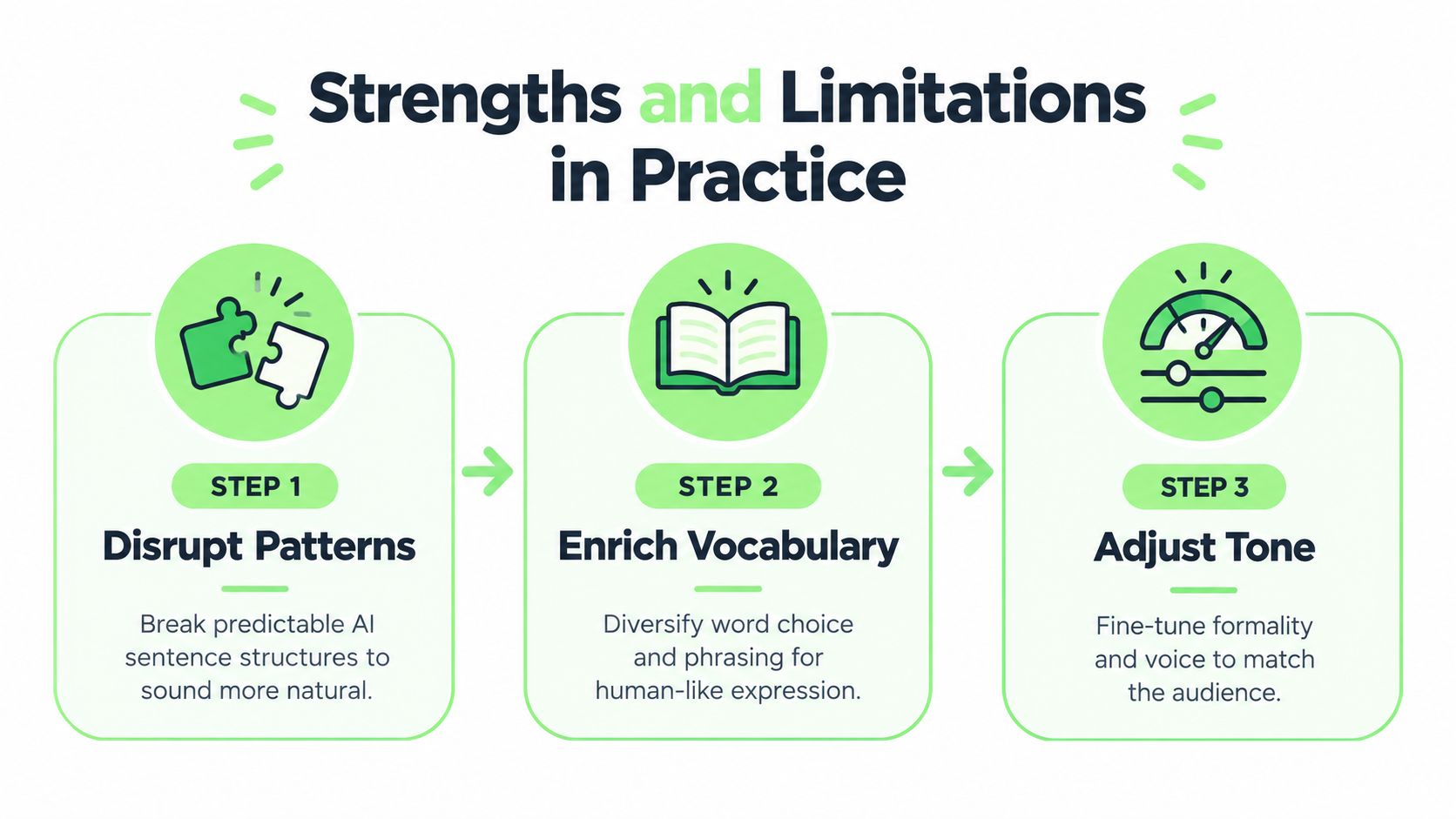
This flowchart breaks down the core process QuillBot’s humanizer uses to refine AI text.
As you can see, the tool is designed to systematically disrupt predictable patterns, enrich vocabulary, and adjust the overall tone to make the output feel more natural.
The AI Detector Showdown
I checked the original and rewritten versions with three detectors: GPTZero, ZeroGPT, and Sapling. I used the same passages in the same order to avoid introducing extra variables.
Actionable Insight: When testing a humanizer, always use multiple AI detectors. A score that looks good on one detector might be flagged by another. This gives you a more accurate picture of the tool's effectiveness.
Here’s a direct comparison of how it performed.
QuillBot Humanizer Performance vs AI Detectors
| AI Detector | Original AI Text Score | QuillBot Humanized Text Score |
|---|---|---|
| GPTZero | 95% AI-Generated | 40% AI-Generated |
| ZeroGPT | 98% AI-Generated | 55% AI-Generated |
| Sapling | 92% AI-Generated | 48% AI-Generated |
Those results show improvement, but not reliability. In my own pass through the samples, the humanized versions were often less detectable than the originals without becoming consistently human-passing. That distinction matters. Broader independent tests have reported average bypass rates for QuillBot Humanizer in roughly the low-40% range overall, with weaker results on some major detectors and stronger ones on others comparison testing. That external pattern matched what I saw: helpful reduction, inconsistent finish.
Verdict: Does QuillBot’s Humanizer Work?
Yes, but only if you define “work” narrowly.
It works best when your goal is to make a rough AI draft sound cleaner, less repetitive, and a bit more natural. It is especially useful for quick cleanup, student editing, and low-risk content where readability matters more than detector resistance.
It starts to break down when the stakes rise. For academic submissions, technical documentation, or SEO pages where you need heavier restructuring, QuillBot often stops short of a true rewrite. I noticed the same thing repeatedly: detector scores improved, but the text still needed human editing before I would trust it.
My bottom line is simple: QuillBot’s humanizer is useful as an editing aid, not dependable as a one-step solution.
How to Use QuillBot's Humanizer for Better Results
If you already plan to use QuillBot, the biggest improvement comes from what you feed it. The Humanizer performs better on drafts that are factually clean, reasonably short, and not overloaded with jargon.
A Practical Setup
- Start with a solid draft. Fix factual errors first. Humanizers rewrite wording; they do not reliably repair bad source material.
- Work paragraph by paragraph. In my testing, shorter sections produced cleaner output than long pasted blocks.
- Choose clarity over aggression. If a sentence is already natural, don’t force another rewrite just to chase a detector score.
- Review every technical claim manually. This matters most for academic and specialist text.
- Run a read-aloud check. I caught more awkward phrasing this way than by scanning.
Best-Use Scenarios
QuillBot is usually enough for:
- quick cleanup of generic AI paragraphs
- softening classroom notes into readable prose
- making marketing drafts less repetitive
- reducing obvious chatbot phrasing before manual editing
It is usually not enough for:
- high-stakes submissions
- detector-sensitive publishing workflows
- highly technical or legal writing
- final-pass brand copy where voice consistency matters
A good rule is to treat the feature as a revision assistant. If you need speed and surface-level improvement, it can save time. If you need dependable transformation, you should expect extra editing or a stronger tool.
A Smarter Way to Humanize AI Content
QuillBot is not a bad option; it is just a limited one. The better question is not “Is it good or bad?” but “When is it enough?”
For quick cleanup, QuillBot is often enough. If you have a short AI-generated paragraph that feels stiff, the Humanizer can improve readability faster than manual editing from scratch. For student editing, it can help soften robotic wording, though students still need to check their institution’s AI policy and should not treat rewriting as a substitute for original work. For light marketing drafts, it can make generic copy less repetitive before a human editor steps in.
Where QuillBot stops being enough is when the draft needs deeper restructuring or more consistent detector performance. That includes SEO content, where sameness across dozens of pages becomes a real issue, and high-stakes submissions, where one awkward sentence or one failed detector result can create unnecessary risk. Independent market coverage also places QuillBot Premium more as a mainstream writing subscription than a specialized humanization tool, with broader category pricing often clustering lower while dedicated products compete on rewrite depth and consistency industry pricing context.
A Fair Decision Framework
Choose QuillBot if:
- you want fast cleanup on simple drafts
- you are mainly improving readability, not chasing maximum transformation
- you are comfortable doing a manual second pass
Skip QuillBot and consider a stronger option if:
- your content is technical, formal, or high stakes
- you need heavier sentence reconstruction
- you want more consistent detector-facing results with less editing time
That is where a tool like HumanText.pro makes a clearer case. Instead of relying mostly on light-to-moderate rewording, it is positioned for deeper rewriting control and stronger end-state polish. In practical terms, that usually means more substantial structural variation, fewer leftover AI patterns, and less time spent manually fixing awkward lines after the rewrite.
Where HumanText.pro Fits
I would frame the difference this way: QuillBot helps you tidy an AI draft, while HumanText.pro is the better fit when the draft needs heavier reconstruction. That does not make QuillBot useless; it just defines its lane more clearly.
For a writer producing one class summary or one basic blog post, QuillBot may be enough. For teams publishing at scale, consultants shipping client deliverables, or anyone who cannot afford inconsistent output, a stronger rewrite engine is easier to justify. If your workflow depends on preserving meaning while cutting editing time, the value is not abstract; it shows up in how many sentences you still have to fix after the tool is done.
You can also think about this through quality control. To succeed with AI, you have to differentiate human-led content from AI-generated 'fluff'. A lighter humanizer can help with polish, but deeper tools are built for more demanding review standards.
A Practical Workflow for Undetectable AI Writing
If you’re relying on a single tool to create high-quality, undetectable content—whether it's the QuillBot humanizer or another simple rewriter—you're playing a risky game. To consistently produce work that feels authentic and sails past detectors, you need a smarter, multi-step process. A proven workflow isn't just about avoiding detection; it's about maximizing quality.
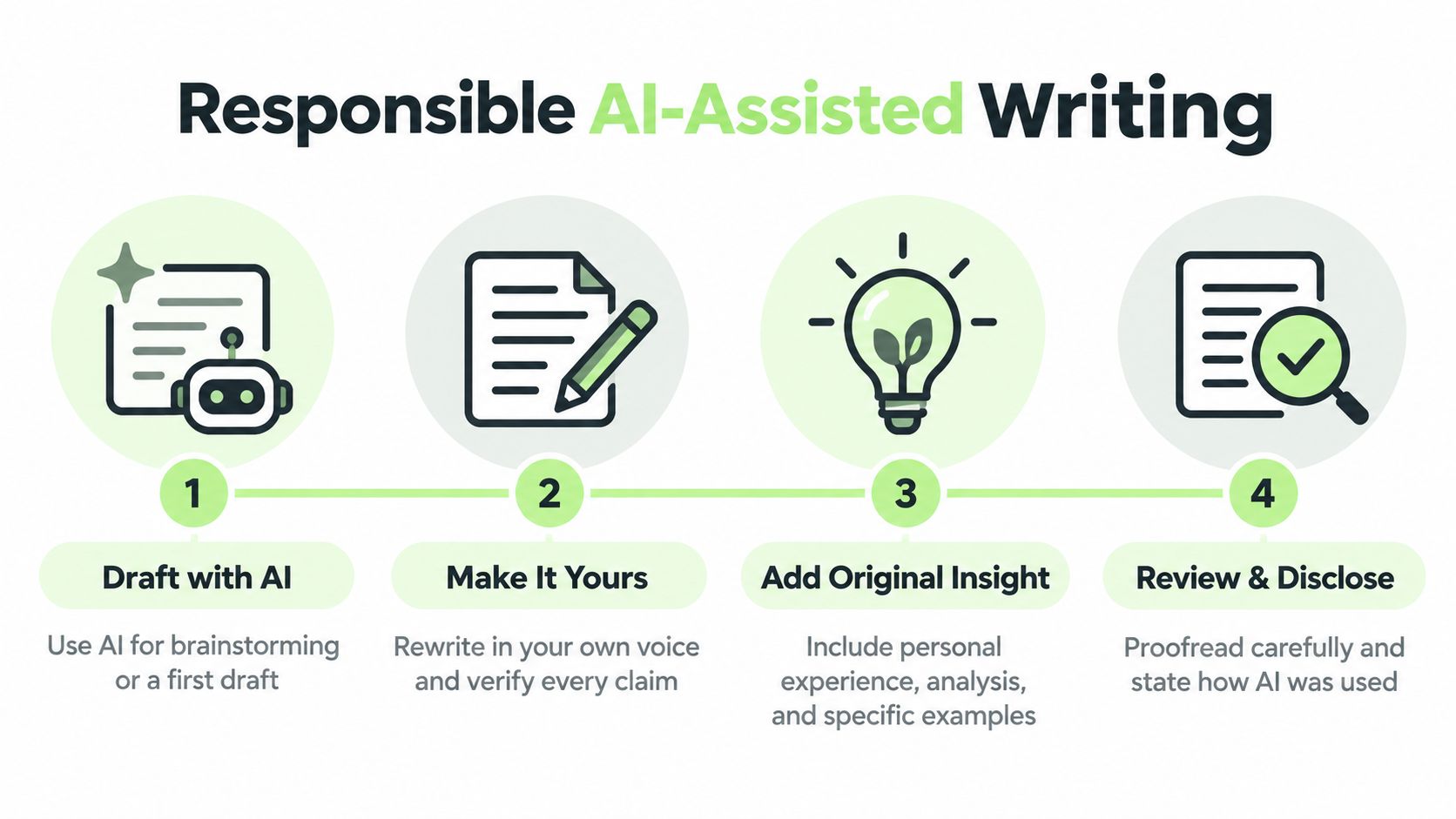
The most reliable method breaks the process into three distinct stages: AI drafting, advanced humanization, and the final human polish. This approach gives you the best of both worlds—the raw speed of AI generation paired with the irreplaceable nuance of a human expert.
Step 1: Generate Your Initial Draft
First things first, use a large language model (LLM) like ChatGPT or Gemini to get your ideas on the page. This stage is all about speed and structure, not perfection. Let the AI handle the initial research, map out your key points, and build the basic skeleton of your article.
Practical Tip: Give your AI a detailed prompt. Instead of "Write an article about SEO," try "Write a 500-word article about on-page SEO for beginners. Use a friendly tone and include sections on keywords, meta descriptions, and image alt text." Better input leads to a better starting draft.
Step 2: Humanize with an Advanced Tool
Next, take that raw AI draft and run it through a powerful humanizer like HumanText.pro. This is the most critical step for bypassing AI detectors. While a basic tool might just swap out a few synonyms, an advanced platform rewrites the text to mimic complex, human-like writing patterns.
This isn’t just about changing words. It’s about eliminating the predictable sentence structures and generic vocabulary that are dead giveaways for AI detection algorithms. A good humanizer reconstructs the content from the ground up, infusing it with the natural variety and rhythm of human expression while keeping the original meaning intact.
The "AI Draft -> Humanizer -> Human Polish" workflow is the gold standard for creating high-quality, undetectable content. It systematically strips out the robotic fingerprints while layering in genuine human value.
Step 3: Perform the Final Human Polish
Now for the final, indispensable step: your human touch. No AI or humanizer can replicate your unique perspective, expertise, or brand voice. Apply a critical eye and adapt the output so it reflects your voice.
Actionable Insight: Read the humanized text aloud. This simple trick is the fastest way to catch awkward phrasing, unnatural rhythm, or sentences that don't sound like you. Your ears will often notice what your eyes miss. Also, add a personal anecdote or a unique example to anchor the content in real-world experience. For more tips, check out these AI SEO content optimization FAQs.
Ultimately, this final polish is what separates content that merely exists from content that connects and performs.
The Ethics of Using an AI Humanizer
Let's talk about the tricky part: is it okay to use an AI humanizer? This isn't a simple yes-or-no question. The real issue isn't the tool itself, but how and why you use it. The line between a helpful writing assistant and a tool for deception is drawn entirely by your intent.
For Students: A Tool, Not a Ghostwriter
For a student, this distinction is absolutely critical. Using a QuillBot humanizer to smooth out awkward phrasing in an AI-assisted draft or improve the flow of your arguments can be a smart way to learn. It's like having a grammar checker on steroids.
But using it to disguise a completely AI-generated essay and submit it as your own work? That crosses a clear line into academic dishonesty. The fundamental rule of school is that the ideas, the research, and the intellectual heavy lifting must be yours.
For Creators: Adding Polish, Not Faking Expertise
For content creators, marketers, and businesses, the ethical question is all about the value you provide to your audience. Google's E-E-A-T guidelines (Experience, Expertise, Authoritativeness, and Trustworthiness) are all about rewarding content that comes from a place of genuine knowledge.
Practical Example: Using a humanizer to refine a product review you wrote based on your actual experience is ethical. Using it to generate a fake review for a product you've never used is not. The tool polishes your authentic input; it doesn't create authenticity from scratch.
An AI humanizer is just a tool, like a calculator for numbers or a spell-checker for words. Its ethical use depends entirely on whether it’s helping you express your own creativity or trying to replace it.
Ultimately, using these tools responsibly comes down to being honest. Whether you're in a classroom or building a brand, the goal should be to amplify your own voice, not create a fake one. The best approach is always one where technology helps you communicate your unique ideas more effectively, with you firmly in the driver's seat as the author.
Got questions? You're not alone. When you're dealing with AI writing tools, a healthy dose of skepticism is a good thing. Let's tackle some of the most common questions head-on.
Can Turnitin Detect the QuillBot Humanizer?
Here's the straight answer: maybe. While the QuillBot humanizer aims to make AI text less detectable, it's not foolproof against advanced systems like Turnitin. These academic detectors are in a constant arms race with rewriting tools, and their algorithms keep improving at spotting the subtle fingerprints of spun or lightly revised AI content.
For high-stakes work, like a final paper or a critical client proposal, rolling the dice with a basic humanizer is a big risk. A more powerful tool like HumanText.pro can help. It was built from the ground up specifically to beat the most sensitive detectors, giving you a much more reliable defense when you can't afford to be flagged.
Is Using an AI Humanizer Considered Cheating?
This is a great question, and the answer comes down to intent. Think of it like a calculator. Is using one to double-check your math cheating? No. Is using it to take a calculus exam you don't understand? Yes.
It's the same with humanizers. If you're using one to polish your own ideas, smooth out awkward phrasing from an AI draft, or just get past a nasty case of writer's block, you're in the clear. That's just smart writing assistance.
The ethical line gets crossed when someone tries to pass off 100% AI-generated work as their own original thought, especially in school. When in doubt, always check your institution's academic integrity policy on AI tools.
What Is the Best Alternative to the QuillBot Humanizer?
If you've tried QuillBot and find you need more power and better undetectability, HumanText.pro is the clear next step. It's designed for people who need professional-grade results.
Unlike tools that just swap words or rephrase sentences, HumanText.pro uses a more advanced approach to completely restructure the text. It digs into the core logic and linguistic patterns, rebuilding the content to read as if a human wrote it from scratch.
The result is content that not only flows more naturally but is also far more resilient against the toughest AI detectors out there. It’s the go-to for students, professional writers, and marketers who need confidence that their work will pass scrutiny every single time.
Ready to create undetectable, human-quality content? HumanText.pro transforms your AI drafts into authentic text that bypasses detectors with up to 99% accuracy. Try it for free today and see the difference for yourself.
Ready to transform your AI-generated content into natural, human-like writing? Humantext.pro instantly refines your text, ensuring it reads naturally and authentically. Try our free AI humanizer today →
Ready to transform your AI-generated content into natural, human-like writing? Humantext.pro instantly refines your text, ensuring it reads naturally and authentically. Try our free AI humanizer today →
Related Articles
AI Content Checker: How It Works and What Scores Mean
How an AI content checker works, how accurate it is, where it fails, and how to read its score before you act on it.
AI Hype vs Reality: What Actually Works in 2026
AI Hype vs Reality in 2026: Which Claims Hold Up, Where AI Fails, and Realistic Timelines for Business Use
How to Test AI: Metrics, Bias Checks and Detector Tests
How to test AI outputs step by step: set metrics, run bias and robustness checks, and verify text, image, video and voice content.

