What Is an AI Text Humanizer and How Does It Work?
Discover what an AI text humanizer is and how it transforms AI writing. Learn how to bypass AI detection and create natural, high-quality content.
An AI text humanizer is a tool that takes content written by artificial intelligence and tweaks it to sound less robotic and more natural. Its whole purpose is to smooth out the stiff, predictable patterns of AI-generated text, giving it the rhythm, quirks, and personality of human writing.
A big reason for this? Making the text invisible to AI detection software.
What an AI Text Humanizer Actually Does
Think of an AI text humanizer less like a simple editor and more like a sophisticated style translator. When an AI writer like ChatGPT creates content, it’s building sentences based on massive data sets and statistical patterns. This often results in text that’s technically perfect but feels… off. The sentences might have the same length, or the word choice is a bit too formal and flawless.
This is where a humanizer steps in. It analyzes the AI-generated draft and starts making strategic changes—varying sentence lengths, swapping out common AI vocabulary for more interesting words, and adjusting the overall flow. It’s not just playing a game of find-and-replace with synonyms. It’s fundamentally restructuring the text to mimic how a real person would express the same idea.
Actionable Insight: The end goal is to produce content that reads as if it were written by a human from the get-go. Instead of spending an hour manually editing an AI draft, you can get 90% of the way there in seconds, leaving you with just a few minutes of final polishing.
Why Are These Tools Gaining Popularity?
It’s no surprise that AI text humanizers are popping up everywhere. As more and more content gets churned out by AI, the need to make it sound authentic has exploded. Here’s a quick look at who’s using them and why:
- Bypassing AI Detection: This is a big one. Students, marketers, and writers often need their work to fly under the radar of detectors like GPTZero or Turnitin. Humanizers are designed to scrub the digital fingerprints left by AI models.
- Improving Reader Engagement: Let's be honest, robotic text is boring. Humanized content feels more persuasive and is far more engaging, which is absolutely critical for blog posts, marketing emails, and social media updates where a genuine connection with the audience matters.
- Enhancing Authenticity and Trust: For any brand or professional, content that sounds like it was written by an actual person is key to building credibility. It helps establish a trustworthy voice that people can connect with.
This screenshot from HumanText.pro shows just how straightforward these tools are. You paste in the AI text, and it gives you back a version designed to sound human.
Notice the focus on achieving a "100% human score." That simple metric reveals the primary mission of these tools: to make AI-generated content completely indistinguishable from something a person would write.
To give you a clearer picture, this table breaks down the key differences between standard AI output and what you get after running it through a humanizer.
AI-Generated Text vs Humanized Text at a Glance
| Characteristic | Typical AI-Generated Text | Humanized AI Text |
|---|---|---|
| Sentence Structure | Often repetitive, with similar lengths and patterns. | Varied sentence lengths; mixes simple and complex structures. |
| Word Choice | Predictable and common words; can sound overly formal. | More nuanced and diverse vocabulary; uses idioms and colloquialisms. |
| Tone & Style | Tends to be neutral, objective, and somewhat generic. | Adopts a specific tone (e.g., casual, witty, formal) and a unique voice. |
| Flow & Rhythm | Can feel choppy or mechanically smooth. | Natural cadence and rhythm that's easier and more engaging to read. |
| AI Detection | Easily flagged by common detection tools. | Designed to appear human-written and bypass AI detectors. |
| Personal Touch | Lacks personal anecdotes, opinions, or unique perspectives. | Incorporates elements that mimic personal experience and human quirks. |
Essentially, the humanized version takes the raw, machine-made material and gives it the final polish it needs to feel authentic and connect with people.
An AI text humanizer is less of a rewriting tool and more of a "digital voice coach." It doesn't just change the words; it teaches the text to speak with a more natural, convincing, and relatable cadence.
Ultimately, an AI text humanizer closes the gap between the raw efficiency of a machine and the expressive touch of a human. It allows creators to produce content quickly with AI assistants but ensures the final product has the warmth and personality needed to actually connect with readers, pass detectors, and hit its goal—whether that’s earning a good grade or winning over a new customer.
How AI Humanizers Work Under the Hood
Ever wondered what’s actually happening inside an AI text humanizer? Think of it less like a simple spell-checker and more like a skilled digital editor. It’s not just swapping out a few words; it's fundamentally reshaping the deep structural patterns that make AI writing feel so… robotic.
The whole process kicks off by deconstructing the predictable, almost formulaic nature of AI-generated content.
At its core, the technology runs on advanced linguistic modeling. These models have been trained on an enormous diet of high-quality human writing—we’re talking millions of examples, from classic literature and academic papers to the best blogs and professional emails. This massive dataset teaches the AI to recognize the subtle rhythms, diverse sentence structures, and unique expressions that make human writing feel authentic.
This flow chart breaks down the transformation from robotic to readable.
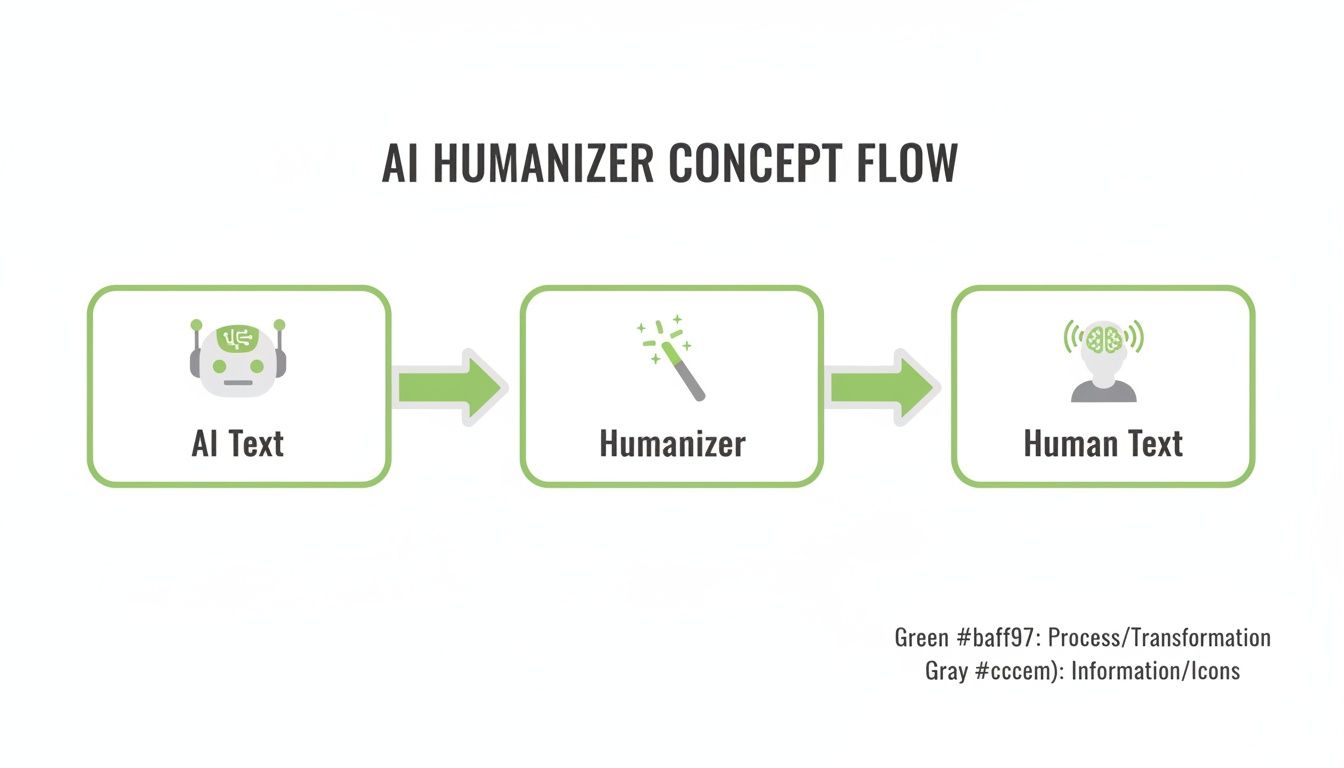
Essentially, the humanizer acts as a bridge. It takes the logical but lifeless output from an AI and applies the stylistic rules it learned from all that human text.
The Secret Sauce: Perplexity and Burstiness
Two key ideas drive this transformation: perplexity and burstiness. They might sound a bit technical, but the concepts are actually pretty simple—and they are the secret ingredients for adding that human touch.
Perplexity is all about unpredictability. AI models, left to their own devices, tend to pick the most statistically likely next word. This leads to text that is perfectly logical but also incredibly predictable and, frankly, dull. A humanizer's job is to increase perplexity by introducing more creative—yet still coherent—word choices. It surprises the reader just enough to keep them hooked.
Practical Example: Perplexity in Action
- AI Text: "The economy is an important factor for business success. Businesses must consider economic trends." (Low Perplexity - super predictable)
- Humanized Text: "The economy’s pulse dictates the rhythm of business success. Ignoring its subtle shifts is a risk most companies can’t afford." (High Perplexity - way more creative and less obvious)
That small shift makes the content feel more dynamic and less like it was pieced together by an algorithm.
Mastering the Rhythm of Human Writing
Burstiness, on the other hand, is about the rhythm and flow of your sentences. Real people naturally write with a mix of short, punchy statements and longer, more descriptive ones. AI often falls into a monotonous pattern of medium-length sentences, which is a dead giveaway for AI detectors.
An AI humanizer actively works to create that natural ebb and flow. It will break up a string of uniform sentences, sprinkling in concise points for impact and weaving in more complex phrases for detail. This creates a cadence that is just much easier and more enjoyable to read.
- It spots patterns: The tool identifies monotonous sentence structures.
- It varies length: It strategically shortens some sentences and lengthens others.
- It restructures phrases: It reorders clauses and uses different grammar to kill repetition.
The growth in this tech points to a much bigger trend. The market for generative AI content is expected to explode from $14.8 billion in 2024 to over $80.12 billion by 2030. This surge shows a massive demand for tools that can refine raw AI output into polished, human-ready content for everything from video scripts to ad copy.
With some experts predicting that 90% of online content could be synthetically generated by 2026, the skill of humanizing text is about to become essential. You can learn more about the future of AI in content creation and its staggering growth projections.
Ultimately, these tools work by reverse-engineering human creativity. They learn the statistical fingerprints of our writing and apply them to machine-generated text, effectively teaching a bot to write with the nuance and style of a person.
What Are the Real-World Benefits of Using an AI Text Humanizer?
Knowing how an AI text humanizer works is one thing, but seeing its impact in the real world is where it gets interesting. These tools do more than just swap a few words; they offer real advantages for anyone who creates content, from students sweating over a deadline to marketers trying to connect with an audience. By polishing up AI drafts, humanizers tackle the four biggest headaches of AI-generated text.
Beat AI Detection With Confidence
Let's start with the most obvious win: bypassing AI detectors. In a world where tools like GPTZero and Turnitin are commonplace, you need to be sure your work won't get flagged. An AI humanizer is designed to do just that by breaking up the predictable, uniform patterns that scream "robot."
AI text has a certain rhythm—a statistical predictability in word choice and sentence length that detectors are built to spot. A good humanizer scrambles those signals, introducing the kind of variety and slightly less common vocabulary a human writer naturally uses. This process can drop detection scores from sky-high to virtually zero.

Enhance Readability and Audience Engagement
Beyond just staying under the radar, humanized text is simply better to read. Raw AI output can feel sterile, repetitive, and completely devoid of personality. That’s a surefire way to make your readers' eyes glaze over. An AI text humanizer breathes life back into the content, making it more persuasive and memorable.
Think about the small touches that make a big difference:
- Varied Sentence Flow: It swaps out monotonous structures for a healthy mix of short, punchy sentences and longer, more descriptive ones.
- Relatable Language: It replaces stiff, robotic phrasing with more natural expressions, helping you build a genuine connection with the reader.
- Improved Persuasion: For sales copy or blog posts, that human touch makes your arguments more compelling and your calls-to-action more effective.
Practical Example: Imagine a product description. An AI might say, "This product is manufactured with high-quality materials to ensure durability." A humanizer could change it to, "Built to last, this isn't just another gadget—it's a reliable partner for your everyday adventures." The second version connects emotionally and sells the benefit, not just the feature.
Improve SEO and Align With Google’s E-E-A-T
Search engines, especially Google, are obsessed with content that shows Experience, Expertise, Authoritativeness, and Trustworthiness (E-E-A-T). Raw AI text often fails this test because it lacks a credible, human voice. It just feels generic.
Humanizing your content is a smart move for anyone serious about mastering AI Search Engine Optimization. By refining the text to sound more authentic and expert-led, you’re basically speaking Google’s language and aligning your content with its quality standards.
Humanized content doesn't just read better for people; it signals higher quality to search engines. The nuanced language and natural structure can contribute to better rankings by appearing more credible and valuable to users.
At the end of the day, Google just wants to serve up the best, most helpful content. Humanizing your AI drafts is a direct path to meeting that bar.
Save a Ton of Time and Effort
Finally, let's talk about the practical payoff: saving a massive amount of time. Manually editing an AI draft to make it sound human is a grind. You have to hunt down repetitive phrases, rewrite awkward sentences, and inject a consistent tone—a process that can easily eat up an hour or more.
An AI text humanizer automates that entire polishing stage. Instead of spending your valuable time on painstaking manual edits, you can get a professional, human-sounding result in seconds. This allows you to scale up your content creation without letting quality slide.
Actionable Insight: See How the Workflow Changes
- Before Humanizer: Generate AI text -> Spend 30-60 minutes manually editing -> Finalize draft.
- With Humanizer: Generate AI text -> Paste into humanizer (10 seconds) -> Make minor tweaks (5 minutes) -> Finalize draft.
That efficiency boost frees you up to focus on what really matters—strategy, research, and coming up with the next big idea. You let the tool handle the final stylistic touches.
A Step-by-Step Guide to Humanizing AI Text
Taking a robotic AI draft and making it sound genuinely human doesn't have to be a grind. Forget spending an hour painstakingly editing every sentence. With the right tool, you can get a polished, undetectable result in just a few clicks.
Let's walk through the exact process using a real-world example. You’ll see just how an AI text humanizer works its magic, turning clunky machine text into natural-sounding content. The whole thing usually breaks down into four quick stages, designed to get you from raw draft to ready-to-publish in minutes.
Step 1: Paste Your AI-Generated Draft
First things first—you need some raw material. Go ahead and generate your content using whatever AI writer you like, whether that’s ChatGPT, Claude, or something else. Once you have the draft, just copy the entire block of text.
Now, head over to an AI humanizer platform like HumanText.pro and paste your content straight into the input box. This is your starting point.
The interface is designed to be dead simple, with a clear box on the left for your text and an output box on the right. No guesswork involved.
Step 2: Analyze the Initial AI Detection Score
Before you do anything else, you need a baseline. What are you working with? Most quality humanizers come with a built-in AI detector that scans your text right on the spot.
Just click the "Check for AI" button to get your initial score. This instantly shows you how likely your text is to get flagged by common detection tools. Seeing a high AI probability confirms that, yep, this text needs some work before you can use it confidently.
This initial check is more than just a number; it’s a diagnosis. It pinpoints the "robotic" fingerprints in your writing, giving you a clear before-and-after benchmark to prove the tool is actually working.
Step 3: Humanize the Text With a Single Click
With your baseline score locked in, the real transformation is just a button press away. Hit the "Humanize" option and let the tool’s algorithms get to work.
Behind the scenes, the AI text humanizer is busy restructuring sentences, swapping out predictable word choices, and tweaking the rhythm to sound more like a person wrote it. This whole process usually takes just a few seconds, even for a decent-sized chunk of text.
Step 4: Review the Output and Refine
The final step is a quick quality check. The tool will show you the revised, humanized version, usually with a new, much lower AI detection score to go with it. Take a moment to read through it. Does it still capture your original meaning? Does the tone feel right?
While the tech is impressive, a quick final read-through by a human is always a good idea. This is your chance to add your own final touches and make sure the content perfectly reflects your unique voice.
Actionable Insight: For longer articles, a great pro tip is to process your content in smaller chunks—say, a few paragraphs at a time. This gives you more control and helps maintain nuance throughout the entire document. If you want to dive deeper, you can explore our complete guide on how to humanize AI text for more advanced strategies.
Picking the Right AI Text Humanizer for Your Needs

With the market for AI writing tools exploding from $392 million in 2022 to a projected $629 million in 2025, it’s no wonder picking an AI text humanizer feels like a chore. There are dozens of options, all making big promises.
But here’s the reality: not all of them are created equal. Some are just glorified paraphrasers that spit out awkward, clunky text. Others use seriously advanced models that produce content that’s genuinely indistinguishable from human writing. To find the right one, you have to look past the marketing fluff and focus on what actually matters.
Does It Actually Beat the Detectors?
Let's be honest, the main reason you're looking for a humanizer is to fly under the radar of AI detectors. So, its ability to bypass tools like GPTZero, Turnitin, and Originality.ai isn't just a feature—it's the whole point.
Look for tools that are upfront about their performance. The best ones even include a built-in detector, so you can see a "before and after" score. This gives you instant proof that the tool is doing its job. A solid humanizer should consistently crush the AI probability score, giving you the confidence to use your content without a second thought.
Is the Output Actually Good?
A tool that dodges detectors but butchers your message is completely useless. The second—and equally important—test is the quality of the humanized text. You need something that sounds natural and fluent while keeping your original meaning intact.
A great AI text humanizer doesn't just swap out words; it refines the flow and improves readability. The result should sound like a more polished version of your idea, not a jumbled mess.
Actionable Insight: Before committing to a tool, run a test. Take a 200-word paragraph generated by ChatGPT and run it through a free trial. Read the output aloud. Does it sound like something you'd actually say? If it feels awkward or you stumble over phrases, it’s not the right tool for you.
Is It Easy to Use and Private?
Your time is valuable. A tool with a confusing interface or a steep learning curve will just slow you down. You want something clean and intuitive: paste your text, click a button, get your result. Simple.
Just as crucial is the company's privacy policy. You could be working with sensitive information—class assignments, confidential business reports, or your secret marketing sauce. Make sure the provider has a rock-solid policy that they do not store, share, or use your content to train their own AI models. Your work should always belong to you.
When you're weighing your options, it helps to see how they stack up against the broader landscape of the best AI tools for content creation.
Finally, always take advantage of free trials. Any company that’s confident in its product will let you test-drive it. There’s no better way to see for yourself if a tool meets your standards for quality, undetability, and ease of use.
Ethical Considerations and Best Practices
Using an AI text humanizer comes with a big responsibility: you have to be honest. These tools are fantastic for polishing your writing, but misusing them can get you into serious trouble, especially in school or at work. You need to know where the ethical lines are drawn before you start.
Academic Integrity: The Bright Red Line
This is the big one. Submitting AI-generated work as your own, even after running it through a humanizer, is academic dishonesty. Plain and simple. It's crucial to think of an AI text humanizer as a very advanced writing coach, not as a ghostwriter. It’s there to help you refine your phrasing and improve the flow, not to come up with the ideas for you.
Actionable Insight: The ethical line is all about authorship. If the core ideas, research, and arguments are yours, using a tool for a final polish is generally fine. If the tool is doing the heavy lifting and generating the substance of your paper, you've crossed into plagiarism. Always check your institution's specific AI usage policy.
Transparency in the Professional World
In fields like journalism, marketing, or corporate comms, trust is everything. Using AI to help draft an internal memo for your team is one thing; publishing content for the public is another story entirely. Whether you need to disclose that you used AI really depends on the context and what your audience expects.
A blogger using a humanizer to speed up their workflow probably doesn't need a disclaimer on every post. But a journalist or a researcher publishing a formal report absolutely should be transparent about the tools they used. Honesty builds credibility, while hiding your methods—even by just leaving it out—can destroy it.
Practical Guidelines for Responsible Use
So how do you use these tools ethically and effectively? It’s pretty straightforward if you follow a few best practices. This approach lets you get all the benefits of AI assistance without compromising your integrity.
- You Are the Author: Always start with your own ideas, your own research, and your own rough draft. The AI is your assistant, not the originator.
- Fact-Check Everything: An AI humanizer makes your text sound better; it doesn't check your facts. You are 100% responsible for the accuracy of everything in your content.
- Use It for the Final Polish: Run your text through the humanizer after you’ve finished writing and editing it yourself. This ensures it’s your work being refined, not replaced.
- Always Review the Output: Never, ever just copy and paste the humanized text without reading it. Go through it carefully to make sure it still has your intended meaning, voice, and tone.
By sticking to these principles, you can use an AI text humanizer to make your writing better without cutting corners. If you're curious about the tech behind making content pass detectors, you can learn more about how tools create undetectable AI while sticking to these ethical standards.
Got Questions? We’ve Got Answers.
As you start using AI to help with your writing, it’s only natural for questions to pop up. Getting straight, honest answers is the key to using these tools the right way. Here are some of the most common questions we hear about an ai text humanizer and what you actually need to know.
Can AI Detectors Still Catch Humanized Text?
Yes, it’s possible. Think of it as a constant cat-and-mouse game between AI humanizers and AI detectors. As the detection tools get smarter, the humanizers have to get better at mimicking real human writing.
While top-tier humanizers can bypass detectors over 99% of the time, no tool is absolutely perfect. Success really comes down to two things: how good the humanizer is and how sophisticated the detector is. Since detectors are always being updated, the best approach is to use a humanizer as your super-powered writing assistant, then give the text a final once-over yourself. That personal touch is what really seals the deal.
Will Using an AI Humanizer Hurt My SEO?
Actually, it’s the opposite—it can genuinely help. Google's main goal is to reward high-quality, helpful content made for people. This is exactly what their E-E-A-T (Experience, Expertise, Authoritativeness, and Trustworthiness) guidelines are all about. Raw, robotic AI text usually fails this test because it sounds generic and lacks a natural voice.
When you use an ai text humanizer, you're polishing that raw output into something that's more engaging and readable for a real person. That improves the user experience, which is a massive factor in how Google ranks your content.
Here’s a simple way to look at it: Google doesn't penalize you for getting help from AI; it penalizes low-quality, unhelpful content. A humanizer is a tool to elevate your AI drafts so they meet—and even beat—what search engines are looking for.
Is It Ethical to Use an AI Humanizer for School or Work?
This one is all about how you use it. If you’re generating an entire essay from scratch and trying to pass it off as your own work, that’s just plain academic dishonesty. But if you're using it as a smart writing assistant to polish your own original thoughts, that's a perfectly ethical—and effective—way to improve your writing.
Not sure where the line is? Follow this simple ethical checklist:
- Start with your own ideas. The core concepts, research, and arguments have to be yours.
- Use it for refinement, not creation. Treat the humanizer like a next-level grammar checker or thesaurus that helps with flow and style.
- Always review and edit. You are the author. That means you’re responsible for the final piece’s accuracy and quality.
When used the right way, an ai text humanizer is just another powerful tool in your writer’s toolkit.
Do These Tools Change the Original Meaning of My Text?
A good ai text humanizer is built to preserve the core meaning and intent of your original text. Its job is to change the style, structure, and phrasing—not the actual substance of what you’re saying. It swaps out predictable AI word choices, varies sentence lengths, and adjusts the rhythm to sound more natural.
That said, it’s always smart to give the humanized output a quick read-through. In rare cases, especially with very technical or nuanced topics, a rephrased sentence might slightly shift the emphasis. A final review ensures your text is not only undetectable but also perfectly aligned with your original message.
Ready to turn your AI drafts into content that sounds genuinely human? Give HumanText.pro a try. Just paste your text, check the AI score, and get a polished, natural-sounding version in seconds. Start your free trial at https://humantext.pro and see the difference for yourself.
Ready to transform your AI-generated content into natural, human-like writing? Humantext.pro instantly refines your text, ensuring it reads naturally and authentically. Try our free AI humanizer today →
Related Articles
AI Generated Text Detection: How It Actually Works
Explore AI generated text detection methods, accuracy limits, and how to choose the right tool for publishers, educators, and compliance workflows.
AI Humanizer Free Trial: Your Step-by-Step Playbook
Try an AI humanizer free trial the smart way. Learn what to expect, how to test quality, and how to choose the right paid plan for your workflow.
Sightengine API Review for Media Moderation
Explore how the Sightengine API handles image and video moderation. Learn about its accuracy, pricing, and when a browser-based checker is a better fit.

