How to Reliably Bypass GPTZero Every Time
Learn how to bypass GPTZero with proven techniques that actually work. Our guide covers manual edits, AI humanizers, and strategies for undetectable content.
To get past GPTZero reliably, you can't just swap out a few words here and there. It takes a smarter approach, combining hands-on editing with the right AI humanizing tools to make your text truly indistinguishable from something a person would write.
The real goal is to fundamentally change the text's predictability and sentence patterns, which are the biggest red flags these detectors are trained to spot. For example, instead of just running a thesaurus on an AI-generated sentence like "The utilization of advanced analytics facilitates superior decision-making," a better approach involves rewriting it from the ground up to sound like something a real person would say: "Using advanced analytics helps you make much better decisions."
Why Bypassing GPTZero Has Become Essential

It’s a scenario that's becoming all too common for writers, students, and marketers: you use AI to help brainstorm or draft, then put in the hard work of editing and refining, only to have your content flagged by an algorithm. The need to get around GPTZero isn't about cheating the system; it's about making sure your work gets a fair shake, judged on its actual quality, not on an algorithm's best guess.
Here’s the frustrating part: even heavily edited, human-guided content can still trigger these detectors. That’s because the ghost of the original AI structure—that unnaturally smooth sentence flow and predictable word choice—often lingers. A simple rewording pass just doesn't cut it. For example, if you manually change "The report indicates a substantial increase" to "The document shows a large rise," the underlying predictable sentence structure remains, which GPTZero can still detect.
This has kicked off a cat-and-mouse game. On one side, we have incredible AI assistants that speed up our work. On the other, we have detectors like GPTZero getting better at spotting them. To work effectively today, you have to understand how to play the game.
The Real-World Stakes of AI Detection
False positives are more than just a nuisance; they carry real weight. For a student, a wrong flag can lead to accusations of academic dishonesty. For a marketer, AI-flagged content could tank search rankings as platforms like Google continue to prioritize authentic, human-centric content.
The pressure is on. You have to create work that not only connects with people but also passes algorithmic inspection. This is a headache for anyone who uses AI as a legitimate tool, not a replacement for their own effort.
At its core, the issue isn't about deception. It's about a technological mismatch where innovative writing workflows outpace the fairness and accuracy of detection algorithms.
That's why the first step is to pull back the curtain and see exactly what these tools are looking for.
Understanding Key Detection Signals
GPTZero isn't just reading your words; it's running a statistical analysis on them. The two most critical metrics it cares about are perplexity and burstiness. Think of them as the digital fingerprints of your writing style.
Perplexity is just a fancy way of saying "predictability." AI models are trained to pick the most statistically likely next word, which results in text that flows smoothly but often feels a bit flat and uninspired. Human writing is less predictable and has higher perplexity. Actionable insight: To increase perplexity, use unexpected metaphors or personal anecdotes. For instance, instead of "The market is volatile," try "The market is behaving like a rollercoaster in a hurricane."
Burstiness measures the rhythm of your sentences. Humans naturally mix it up—we write short, punchy sentences followed by longer, more descriptive ones. AI, on the other hand, tends to produce sentences of uniform length and structure, resulting in low burstiness. Actionable insight: After writing a paragraph, count the words in each sentence. If they are all between 15-20 words, you have low burstiness. Break some sentences up and combine others to create variety.
When your content shows both low perplexity and low burstiness, it’s a massive red flag for GPTZero. The platform, which launched in 2022, quickly became a go-to for educators, initially claiming 99% accuracy with a false positive rate under 1%.
However, independent tests have painted a more nuanced picture. One benchmark study found its accuracy closer to 91.3%, noting it was more likely to let AI text slide by as human than to wrongly flag human writing. While that’s good, it still leaves a margin of error that can cause major problems for real people. To stay ahead, GPTZero keeps rolling out updates, making this whole game even more intense.
How AI Detectors Like GPTZero Actually Work
To get past AI detectors, you first have to get inside their heads. Tools like GPTZero aren't reading your work for style or substance. They’re statistical bloodhounds, sniffing out mathematical patterns that scream "a robot wrote this."
Think of it less like an English teacher and more like a forensic analyst dusting for digital fingerprints. The whole game is about spotting text that's just a little too perfect, too uniform, too predictable. Real human writing is messy, varied, and wonderfully inconsistent—and that's exactly what these detectors are trained to see as authentic.
Your goal isn't just to swap out a few words. It's to fundamentally disrupt the robotic patterns and inject some of that human chaos back into the text.
The Perplexity Problem: Is Your Writing Too Predictable?
One of the biggest red flags for any AI detector is something called perplexity. In simple terms, perplexity is a measure of how predictable your text is. A low perplexity score means the next word in a sentence is exactly what a machine would expect.
Large Language Models (LLMs) are built to choose the most statistically probable word every single time. This creates sentences that are grammatically flawless but often creatively… flat. Humans, on the other hand, love to be unpredictable. We use weird analogies, surprising word choices, and colorful idioms that an algorithm would never pick.
Exploring the capabilities of AI models like ChatGPT shows how they prioritize logical, probable outputs, which is precisely what leads to this low perplexity.
Practical Example:
- AI-Generated (Low Perplexity): "The economic downturn caused significant financial hardship for many individuals."
- Human-Written (High Perplexity): "When the economy tanked, people's wallets really felt the squeeze."
The human version has much higher perplexity. The phrases "tanked" and "felt the squeeze" are less conventional, more creative, and harder for a machine to predict. An actionable tip is to create a personal "swipe file" of interesting phrases you encounter and sprinkle them into your writing.
The Burstiness Factor: Finding Your Rhythm
The second critical signal is burstiness, which is all about the rhythm and flow of your sentences. Think about how you talk. You naturally mix short, punchy statements with longer, more descriptive ones. This creates a cadence that keeps things interesting.
AI-generated text often fails this test spectacularly. It tends to produce sentence after sentence of similar length and structure, resulting in a monotonous, robotic drone. This lack of variation—or low burstiness—is a dead giveaway for detectors.
The secret to beating GPTZero is to intentionally crank up both your perplexity and burstiness. You need to make your writing less predictable and more rhythmically diverse, just like natural human speech.
Here's a side-by-side look:
- Low Burstiness (AI-like): The company implemented a new strategy to enhance its market position. The primary goal was to increase overall customer satisfaction. This initiative was expected to yield positive results within the next fiscal quarter.
- High Burstiness (Human-like): The company needed a change. So they rolled out a new strategy, focused entirely on making customers happy, to shake up their market position. Everyone’s holding their breath, hoping for good news next quarter.
See the difference? The human-like version feels more dynamic because the sentence lengths vary. It’s this natural flow that helps content fly under the radar. For a deeper look at these techniques, you can check out our guide to creating undetectable AI content.
Other Telltale Signs an AI Wrote It
Beyond perplexity and burstiness, GPTZero looks at other traits that often tag along with AI-generated text. Knowing these helps you spot and fix them before you hit publish.
The table below breaks down the key differences that detectors are looking for. It’s a handy cheat sheet for turning robotic text into something that feels genuinely human.
AI vs Human Writing Red Flags for GPTZero
| Detection Signal | Typical AI-Generated Text | Authentic Human Writing |
|---|---|---|
| Tone & Voice | Consistently formal, neutral, and lacks a distinct personality. It often sounds like a generic encyclopedia entry. | Varies tone to match the context. It can be conversational, witty, or serious, reflecting a unique authorial voice. |
| Grammar | Flawlessly perfect grammar and syntax with zero errors. While good, this level of perfection can be a red flag for unnaturalness. | Generally correct grammar but includes stylistic fragments, colloquialisms, and occasional minor imperfections that feel real. |
| Word Choice | Often uses common, high-frequency words and avoids niche terminology, idioms, or slang to maintain broad applicability. | Incorporates specific jargon, creative metaphors, and cultural references that add flavor and demonstrate expertise. |
By addressing these signals, you’re doing more than just trying to fool an algorithm. You're actually transforming a sterile, machine-made draft into a compelling piece of writing that connects with a real person. It turns the abstract challenge of "avoiding detection" into a concrete set of solvable writing problems.
Manual Edits That Make Your AI Text Human
While AI humanizer tools offer a quick fix, nothing beats rolling up your sleeves and making targeted manual edits. This is where the real magic happens. We're not just swapping out a few words; we're strategically injecting the very human inconsistencies that AI detectors are trained to spot.
Think of yourself as a mechanic fine-tuning an engine. The AI gives you a solid but soulless base. Your job is to adjust the rhythm, swap out standard parts for unique ones, and give the whole thing a distinct personality. These hands-on tactics directly attack the core signals detectors look for, like low perplexity and burstiness.
Master the Sentence Merger and Splitter Technique
The easiest way to spot AI writing is its monotonous rhythm. Models tend to churn out sentences of similar length and structure, creating a flat, predictable cadence that just screams "robot." The "Merger and Splitter" technique is your best weapon against this.
The goal is simple: wreck the uniformity. Find a string of short, choppy sentences and combine them into a single, more complex one. Then, find a long, dense sentence and chop it into two or three shorter, punchier statements. This single trick dramatically boosts the text's burstiness.
Practical Example: Before (Low Burstiness):
The company released its quarterly earnings report. The report showed a significant increase in revenue. This growth was attributed to new market expansion. The CEO expressed optimism for the future.
Practical Example: After (High Burstiness):
The company just dropped its quarterly earnings report, revealing a significant revenue jump. What drove the growth? New market expansion. Unsurprisingly, the CEO is optimistic about what’s next.
See the difference? The rhythm is suddenly unpredictable and far more engaging for both people and AI detectors.
Inject Personality with an Idiom and Analogy Pass
AI writing is notoriously literal. It avoids figurative language because it deals in statistical probabilities, not creative leaps. This is a huge opportunity for you. An "Idiom and Analogy Pass" is where you read through the text specifically looking for places to add color.
Hunt for bland, descriptive sentences and swap them for something more vivid.
Instead of: "The project was very difficult."
Try: "Getting that project over the finish line felt like pushing a boulder uphill."
Instead of: "We need to address the main issue directly."
Try: "We need to stop beating around the bush and address the elephant in the room."
By sprinkling in creative analogies and common idioms, you drastically increase the text's perplexity. These phrases are statistically unlikely for an AI to generate on its own, making them a powerful signal of human authorship.
This process is a key part of how to humanize AI-generated text, as it introduces a layer of cultural and creative nuance that models still struggle to replicate.
Swap Formal Words for Conversational Alternatives
Another dead giveaway of AI is an overly formal or academic tone, even when it’s completely out of place. AI models are trained on massive datasets that include a lot of formal writing, so they often default to sounding like a stuffy professor. Your job is to perform a "formality downgrade."
Scan the document for stiff, corporate-sounding words and replace them with simpler, more conversational alternatives. This makes the text feel more natural and less like it was assembled from a template.
Here’s a quick cheat sheet to guide your edits:
| Formal AI Word | Conversational Human Alternative |
|---|---|
| Utilize | Use |
| Subsequently | Later / After that |
| Facilitate | Help / Make easier |
| Endeavor | Try / Attempt |
| Inquire | Ask |
Making these small swaps throughout your text has a huge cumulative effect, shifting the entire piece from robotic to relatable.
The battle between AI detection and evasion is heating up fast. The rise of AI humanizers has sparked a $50M+ market, largely driven by the 85% of students using AI for assignments while facing detectors with 70-90% hit rates. In response, GPTZero’s latest models claim 95% recall on advanced AI writing with few false positives. But bypass tools are fighting back—some now achieve detection scores as low as 2% on GPTZero, proving just how sophisticated this arms race has become.
Convert Passive Voice to Active Voice
Finally, AI loves using the passive voice. It's a classic sign of machine writing that makes content sound distant, weak, and overly academic. For instance, "The report was written by the marketing team."
A simple but powerful edit is to flip these sentences to the active voice: "The marketing team wrote the report." The active voice is more direct, confident, and just sounds more human. Doing a dedicated editing pass just to hunt down and kill passive constructions will make your content punchier and much harder to detect. An actionable tip is to use your word processor's search function (Ctrl+F or Cmd+F) to find common passive voice indicators like "was," "is," or "by" to quickly spot and fix them.
Using an AI Humanizer for Faster Results
Manual editing is fantastic for getting that perfect human touch, but let's be honest—it's not always practical. When you're staring down a tight deadline or have a mountain of content to get through, rewriting every single paragraph by hand just isn't going to happen. This is exactly where an AI humanizer becomes your most valuable player.
These aren't your basic, clunky paraphrasing tools that just swap out a few words for synonyms. Modern humanizers, like our own HumanText.pro, are built on sophisticated models trained on massive amounts of real human writing. They don't just "spin" your text; they essentially rebuild it to capture the rhythm, word choice, and sentence patterns that make writing sound genuinely human.
The biggest win here is speed without a major drop in quality. Instead of spending an hour tweaking burstiness and perplexity yourself, you can get a very similar result with a single click. The tool keeps your core meaning intact while scrubbing away all the robotic fingerprints that set off detectors.
How an AI Humanizer Works in Practice
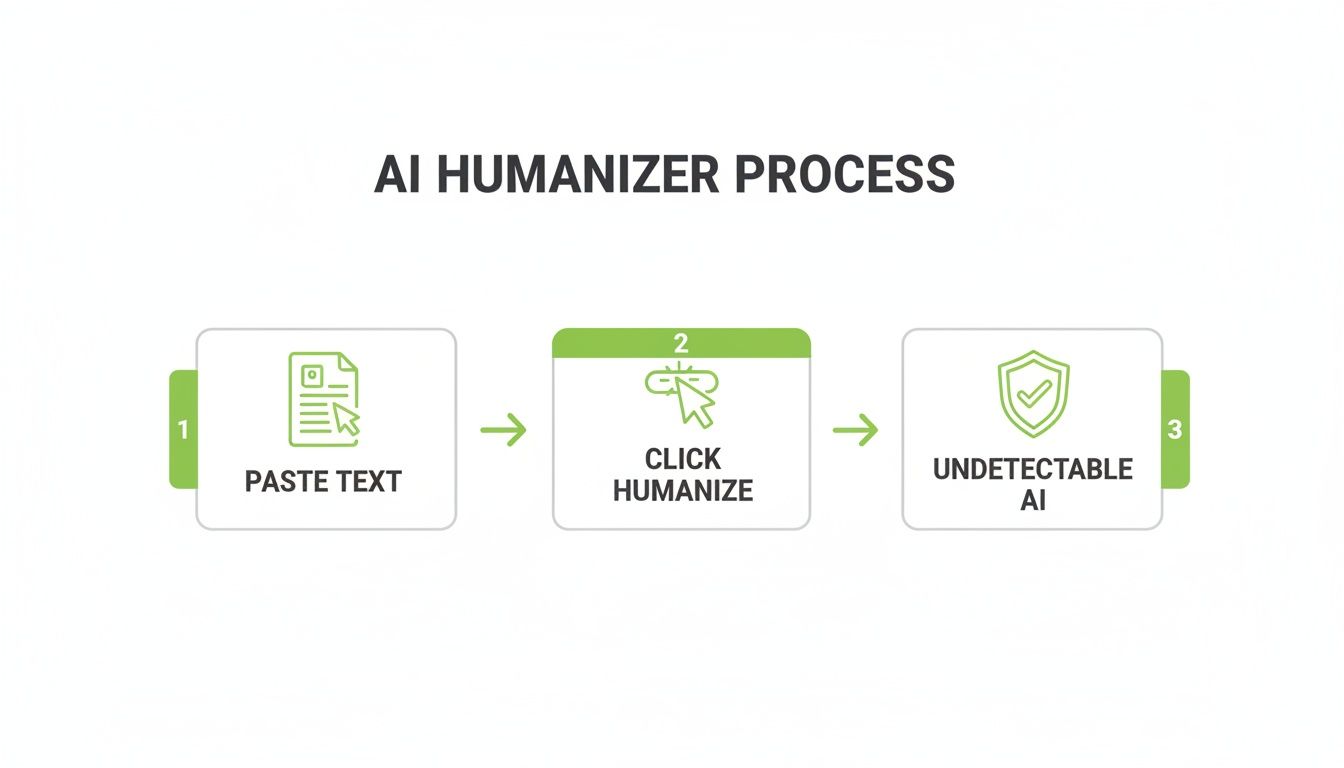
The whole process is built for speed. You start with your AI-generated draft—the kind of text that would almost certainly get a high AI probability score from a detector like GPTZero.
Next, you just paste that draft into the humanizer. The tool's algorithm gets to work, scanning for those classic AI giveaways: uniform sentence lengths, overly formal language, and predictable phrasing. Then, it rewrites the content, deliberately injecting the very human-like inconsistencies it was trained to recognize.
What you get back is a new version of your text that says the same thing but has a completely different linguistic DNA.
Here’s a snapshot of what that looks like inside HumanText.pro. The "before" text on the left shows a high AI detection score, while the "after" text on the right passes as human-written.
You can see the immediate effect—a piece of content that was flagged is now ready to go, and it only took a few seconds.
Key Benefits of This Approach
While going manual gives you total control, using a dedicated tool offers a different set of perks that are critical for many writers and marketers. It really comes down to consistency and scale.
- Unmatched Speed: This is the big one. What could take you an hour of careful wordsmithing can be done in less than a minute.
- Consistent Quality: A good humanizer applies the same quality standards to every piece of text. It doesn't get tired or lazy like we humans do after a long day of editing.
- Maintained Intent: Unlike those old-school article spinners that could butcher your meaning, top-tier humanizers are designed to preserve the original intent and crucial information of your draft.
It's also worth noting that other AI-powered tools exist to help with different parts of the content process. For instance, some AI note-taker apps can automatically transcribe and summarize video content, which is a huge help for research and learning.
The real magic of an AI humanizer is its role as a high-speed finishing tool. It takes a functional but robotic draft and polishes it into a final product that’s both high-quality and undetectable, bridging that gap between AI efficiency and human authenticity.
When to Choose a Humanizer Over Manual Edits
So, when should you reach for a tool instead of digging in yourself? It usually boils down to the project and your available time. A humanizer is the clear winner in a few common scenarios.
- High-Volume Content Production: If you're an SEO specialist, part of a marketing agency, or a blogger churning out multiple articles a day, a humanizer is pretty much essential to keep things moving.
- Repetitive or Template-Based Content: When you're working with things like product descriptions or standard email templates, a humanizer can add that natural touch quickly without you having to get creative with the same content over and over.
- Final Quality Check: Even if you've done some manual edits, running your text through a humanizer can be a great final polish. It often catches subtle AI patterns your own eyes might have missed.
Often, the smartest workflow is a hybrid one. You can use an AI humanizer to do the initial heavy lifting, then give it a quick manual once-over to add a final layer of your own personal style. To see how different tools stack up, check out our guide on finding the best AI text humanizer tool for your specific needs. This combo gives you the best of both worlds: speed and total creative control.
A Proactive Workflow for Undetectable Content
Editing AI text after the fact is one way to go, but it’s a reactive approach. You’re always on the back foot, cleaning up messes. A much smarter, more efficient workflow is to be proactive. This means changing how you think about AI in the first place. Don't treat it as a writer; treat it as an incredibly fast research assistant.
This hybrid strategy is about blending AI's speed with your irreplaceable human creativity. By doing this, you build content that’s inherently difficult for detectors to flag because, at its core, it is human. You’re simply using the machine for the grunt work—the outlining, the data gathering—while you handle the actual art of writing.
Prompting AI as a Research Partner
To truly bypass GPTZero, you have to shift your relationship with the AI. Stop asking it to write for you and start asking it to prepare you to write. It's a subtle but powerful change that puts you firmly in the driver's seat.
Think of your prompts as requests for raw materials, not finished prose.
- For outlines: "Generate a comprehensive, five-part blog post outline for the keyword 'bypass gptzero'. Include H3 subheadings for each section and suggest key topics to cover."
- For research: "Find three surprising statistics about the accuracy of AI detection tools. Provide the data and a brief context for each point."
- For persona adoption: "Act as a skeptical digital marketer. What are the top three concerns you would have about using an AI humanizer? List them as bullet points."
This method gets you structured ideas and hard data without the tell-tale robotic sentence patterns that detectors are trained to spot.
Weaving in Your Unique Insights
With your AI-assisted research and outline in hand, it's time to write the first draft yourself. This is where you inject the magic—your personal stories, your unique analogies, your hard-won opinions. This is, hands down, the best way to naturally boost your text's perplexity and burstiness.
Look for opportunities to get specific. Instead of a generic statement like, "Many users find AI detection frustrating," dig into your own experience. "I remember spending hours editing a blog post, only to see it flagged as 98% AI—it was infuriating." That one emotional, specific detail is something an AI simply can't invent.
A proactive workflow isn't about avoiding AI. It's about strategically using it for its strengths—data aggregation and structure—while reserving the creative, nuanced work of writing for the human expert: you.
Building your content on an AI-generated framework, but writing the draft manually, creates a foundation that is fundamentally human from the start.
Using a Humanizer as a Final Polish
Even with a human-first approach, some AI-isms can sneak in, especially if you copy-paste a factual snippet or a technical definition. This is the perfect time to bring in a tool like HumanText.pro. Think of it not as a complete rewriter, but as a final polishing cloth.
Its job is to harmonize the entire piece, smoothing out any remaining robotic artifacts you might have missed.
Running your mostly human draft through a humanizer ensures a consistent, natural voice from top to bottom. It’s a final quality-control check that catches the subtle giveaways, locking in that authentic feel before you hit publish. This proactive, hybrid approach is simply the smartest way to work with AI, not against it.
Your Questions About AI Detection, Answered
Even with the best tools, trying to stay ahead of AI detectors can feel a bit like a cat-and-mouse game. It’s natural to have questions. Let's clear up some of the most common ones so you can move forward with confidence.
Is It Wrong to Bypass GPTZero for My Work?
This is a great question, and the answer really boils down to your intent. Are you just trying to clean up an AI-assisted first draft? Making it flow better and sound more like you? That’s just smart editing. Think of it like using an advanced grammar checker to polish your writing—you’re refining, not deceiving.
The ethical line gets crossed when, for example, a student submits a 100% AI-generated paper for a class that requires original thought. That’s academic dishonesty, plain and simple. It always comes down to the rules of the game you’re playing. The goal should be to elevate your own work, not to pass off a machine’s work as yours when authorship is key.
Why Do Basic Paraphrasing Tools Still Get Flagged?
I see this all the time. People run their text through a standard paraphraser and are shocked when it still gets flagged. The problem is that most of these tools are pretty superficial. They just swap out words for synonyms and shuffle the sentence order a bit, leaving the robotic, predictable structure of the original text completely intact.
A detector like GPTZero isn't just looking at word choice. It's digging deeper, analyzing linguistic patterns like sentence length variation (burstiness) and how predictable your words are (perplexity). A simple word-swapper doesn't touch those core patterns, which is why it’s such an easy catch for the algorithm.
A true AI humanizer works differently. It reconstructs the text from the ground up to mimic the slightly messy, unpredictable, and varied patterns of real human writing. That’s why they’re so much more effective.
Can GPTZero Detect Content with Both Human and AI Parts?
Yes, absolutely. This is a huge trap for a lot of writers. GPTZero is built to analyze text sentence by sentence, and it will often highlight the specific parts it thinks are machine-generated. This creates what I call a "patchwork" detection score.
For example, imagine you write an introduction yourself, then paste in three paragraphs of AI-generated text for the body. GPTZero will likely flag those body paragraphs while marking your intro as human. The inconsistency between your writing and the AI's is a dead giveaway. This is why it’s so important to run the entire document through a quality humanizer as a final step. It harmonizes everything into a single, cohesive voice that sounds natural from start to finish.
How Reliable Are the Top AI Humanizer Tools?
The best humanizers on the market are incredibly reliable, and it's because they're built on seriously advanced language models. These aren't simple synonym-swappers; they’ve been trained on massive datasets of real human writing—everything from blogs and novels to academic journals.
A tool like HumanText.pro, for instance, doesn't just tweak words. It’s been specifically engineered to rebuild sentence structures, vary the cadence, and introduce the kind of linguistic quirks that detectors look for. That's how it can achieve up to a 99% bypass rate. Its reliability comes from this deep, structural approach. It essentially reverse-engineers the detection process to produce text that reads genuinely human.
Ready to ensure your content passes every time? HumanText.pro transforms AI drafts into natural, undetectable text with a single click. Try it for free and see the difference.
Ready to transform your AI-generated content into natural, human-like writing? Humantext.pro instantly refines your text, ensuring it reads naturally and authentically. Try our free AI humanizer today →
Related Articles
AI Generated Text Detection: How It Actually Works
Explore AI generated text detection methods, accuracy limits, and how to choose the right tool for publishers, educators, and compliance workflows.
AI Humanizer Free Trial: Your Step-by-Step Playbook
Try an AI humanizer free trial the smart way. Learn what to expect, how to test quality, and how to choose the right paid plan for your workflow.
Sightengine API Review for Media Moderation
Explore how the Sightengine API handles image and video moderation. Learn about its accuracy, pricing, and when a browser-based checker is a better fit.

