A Practical Guide to Humanize ChatGPT Text and Bypass AI Detectors
Discover how to humanize ChatGPT text with proven strategies. Learn to edit AI content for a natural voice that connects with readers and avoids detection.
If you’ve ever read a piece of content and thought, an AI definitely wrote this, you’re not alone. The raw output from models like ChatGPT often has a certain… flatness. It feels predictable, almost sanitized.
You can sense the algorithm humming in the background—perfectly balanced paragraphs, flawless grammar, but zero personality. This happens because these models are built to predict the most likely next word, a process that naturally favors safe, generic, and logically sound phrasing over anything remotely interesting or surprising.
This predictability is exactly what AI detectors are designed to catch. They’re trained to spot the uniform patterns that human writers instinctively avoid. So, our goal isn’t just to fool a piece of software. It's about taking an AI-assisted draft and breathing enough life into it that it genuinely connects with a human reader, whether you're a student trying to sound less robotic or a marketer writing copy that needs to sell.
The Tell-Tale Signs of an AI Author
AI models default to a style that’s missing human texture. They nail clarity and comprehensiveness but sacrifice the beautiful imperfections that make writing feel real. The conversation around why Reddit users are abandoning ChatGPT for novel translation often touches on this very issue—the lack of nuance and artistic voice.
Here are the dead giveaways that a machine is behind the words:
- Uniform Sentence Structure: You'll see a parade of sentences all marching to the same beat, similar in length and complexity. It creates a monotonous rhythm that can put a reader to sleep.
- Excessive Formality: The AI avoids contractions like the plague ("it is" instead of "it's") and leans on clunky transition words like "furthermore" or "consequently" that most people wouldn't actually use in conversation.
- A Ghostly Lack of Voice: The text is an empty vessel. It reports information but offers no distinct perspective, no personal stories, and no unique insights. It’s all tell, no show.
- Too Perfect to Be Real: The ideas flow in such a logical, linear sequence that it feels unnatural. Human thought isn't that tidy; we use asides, occasional tangents, and conversational detours.
The Expert Takeaway: The core reason AI text sounds robotic is its lack of "burstiness" and "perplexity." Human writing has a natural rhythm—a mix of short, punchy sentences and longer, more descriptive ones (burstiness). It also uses varied vocabulary and sentence structures that can be unexpected (perplexity). AI models, by default, have low burstiness and low perplexity, which makes their output predictable.
Spotting the Difference Instantly
Once you know what to look for, these robotic traits become glaringly obvious. Think of it as developing an ear for authentic writing. To make it even clearer, here’s a quick comparison of the common AI patterns versus the nuanced traits we’re aiming for.
Robotic vs Humanized Text Characteristics
| Characteristic | Typical AI-Generated Text | Effective Humanized Text |
|---|---|---|
| Sentence Structure | Consistently medium-to-long sentences with little variation. | A dynamic mix of short, direct statements and longer, descriptive sentences. |
| Tone of Voice | Formal, neutral, and overly helpful, often lacking any real personality. | Conversational, opinionated, and tailored to a specific audience or persona. |
| Word Choice | Relies on common, safe vocabulary and avoids colloquialisms or slang. | Uses specific, evocative language, including contractions and informal phrases. |
| Flow & Transitions | Uses clunky, formal transition words like "moreover" and "in conclusion." | Connects ideas with natural, conversational segues like "So, what does this mean?" or "Anyway..." |
This table is your cheat sheet. Use it to diagnose your AI drafts and pinpoint exactly where you need to inject more humanity. Recognizing the problem is the first, and most important, step to fixing it.
Crafting Prompts That Generate Human-Like First Drafts
Getting a less robotic output from ChatGPT isn’t about some magic command; it’s about being a better director. If you give generic instructions, you get a generic draft. Plain and simple. To really humanize ChatGPT text from the get-go, you need to layer your prompts with specific, nuanced instructions that force the AI out of its default, overly formal comfort zone.
Think of it like this: telling ChatGPT to "write a blog post about email marketing" is like telling an actor to "act." The request is so vague you're guaranteed a bland, predictable performance. A much better approach is to hand it a detailed character brief, a specific setting, and some emotional context.
This flowchart maps out that simple but crucial transformation from raw, robotic output to engaging, human-centric content.
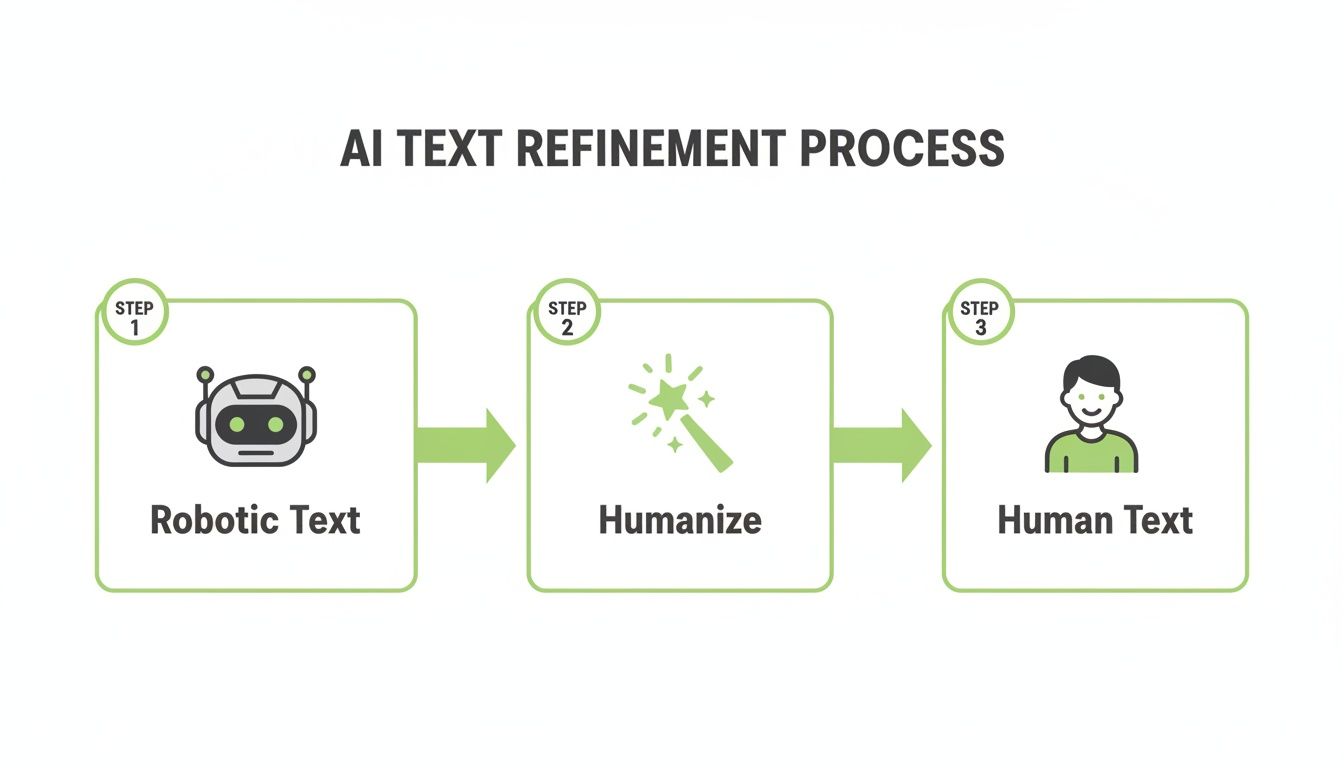
The takeaway here is that "humanizing" isn't a passive wish—it's an active step, a necessary bridge between raw AI generation and a polished final product.
Assign a Specific Persona and Voice
The single most powerful way to shift ChatGPT's tone is to give it a persona to embody. Don't just say "write in a friendly tone." Instead, build a character with a backstory and a distinct point of view. A well-defined persona acts as a filter for every single word the AI generates.
Generic Prompt:
"Write about the benefits of remote work in a friendly tone."
Humanized Prompt:
"Act as a seasoned tech blogger who has worked remotely for 10 years and is slightly skeptical of corporate hype. Write about the real, unfiltered benefits of remote work. Your voice is conversational, slightly sarcastic, and you use personal anecdotes to make your points. You believe remote work is great, but not for the reasons most CEOs claim."
This level of detail forces the AI to adopt a unique perspective, immediately making the output feel less like a generic listicle and more like a real person's take.
Use Negative Constraints to Weed Out Robotic Language
Just as important as telling ChatGPT what to do is telling it what not to do. AI models lean on formal words and clunky transitions because they're statistically common in its training data. Negative constraints are specific rules that forbid these robotic habits before they even happen.
Here’s a practical checklist of negative constraints you can drop right into your prompts:
- Forbid formal transitions: "Do not use words like 'moreover,' 'furthermore,' 'in conclusion,' or 'consequently'."
- Enforce contractions: "Use contractions whenever possible (e.g., 'it's' instead of 'it is', 'you're' instead of 'you are')."
- Ban corporate jargon: "Avoid overused business jargon like 'synergy,' 'leverage,' 'paradigm shift,' and 'streamline'."
- Set a reading level: "Write at an 8th-grade reading level to ensure the language is accessible and clear."
Adding these rules can instantly make the text feel more natural and conversational, saving you a ton of editing time later. For writers looking to scale their efforts, using an effective AI to rewrite text can automate many of these stylistic adjustments.
Pro Tip: Combine persona and negative constraints for maximum impact. For instance, "As the skeptical tech blogger, write this section. Absolutely no buzzwords or formal transition phrases are allowed. Keep it real."
Request Specific Rhetorical Devices
Human writers don't just state facts; they use rhetorical devices to make their content more engaging and memorable. You can prompt ChatGPT to do the same, pushing it beyond simple, declarative sentences.
Instead of just presenting information, ask it to explain concepts using specific literary tools.
- Ask for analogies: "Explain the concept of blockchain using an analogy related to a library's card catalog system."
- Request anecdotes: "Include a short, fictional anecdote about a small business owner who struggled with social media marketing before discovering a new strategy."
- Demand rhetorical questions: "Start the second paragraph with a rhetorical question that challenges the reader, like 'But what does this actually mean for your bottom line?'"
By explicitly requesting these elements, you guide the AI to structure its response in a more creative and human-like way. This multi-layered approach transforms ChatGPT from a simple text generator into a more sophisticated writing assistant, giving you a first draft that's already 80% of the way to sounding genuinely human.
The Human Touch: Your Manual Editing Checklist
Even the most sophisticated prompt gets you a lump of clay, not a finished sculpture. The raw AI draft has the right general shape, but it's missing the fine details, the texture, and the unique marks that prove a human was here. This is where the real work—and the real magic—begins.
Manual editing isn't about a full rewrite. Think of it as a strategic, surgical pass to smooth out the robotic edges and add the character that AI just can't fake. Your goal is to leave your fingerprints all over the final piece.

Find and Destroy Robotic Language
First things first: hunt down and eliminate the most obvious AI tells. ChatGPT often defaults to overly formal phrasing and hedging language that practically screams "I am a large language model." Your job is to swap these patterns for the way real people actually talk and write.
Start by scanning for words that feel stiff or overly academic. Be ruthless.
- Before (Robotic): "It is imperative to acknowledge that the utilization of this strategy can yield significant results."
- After (Human): "Look, this strategy gets big results. You need to know that."
Next, simplify the vocabulary. AI loves using a ten-dollar word when a ten-cent one works better. Swap "utilize" for "use," "leverage" for "use," and "consequently" for "so." This one change alone makes your writing far more direct and conversational.
Master Sentence Variability for a Natural Rhythm
One of the surest signs of AI writing is a monotonous sentence structure. Most sentences are a similar, medium length, creating a predictable, droning rhythm. To humanize ChatGPT text, you have to intentionally break this pattern by creating "burstiness"—a mix of short, punchy statements and longer, more complex thoughts.
Think of it like a conversation. You don't speak in perfectly uniform sentences, and your writing shouldn't, either.
The Rhythm Checklist: An Actionable Example
- Read this AI-generated text aloud: "The integration of artificial intelligence into business workflows has resulted in considerable efficiency gains for many companies. This technology allows for the automation of repetitive tasks, which frees up human employees to focus on more strategic initiatives."
- Does it sound flat? Yes. Both sentences are long and have the same formal rhythm.
- Now, apply the fix: "AI in the workplace has been a game-changer. It automates the boring stuff. This simple change frees up your team to focus on what really matters: strategy."
- The Result: A mix of short, direct sentences ("It automates the boring stuff.") and a slightly longer one. The rhythm is more natural and engaging.
This intentional variation is what makes human writing feel dynamic. In fact, simple tricks like varying sentence lengths and adding just a couple of contractions per 100 words are known to mimic the natural "burstiness" of human writing, making it harder for detectors to flag. Studies show these small manual tweaks can significantly reduce detection rates. You can find more insights on this topic over at LSAC.org.
Inject Your Authentic Voice and Opinions
This is the most critical step. AI can give you information, but it can't give you your perspective. Your voice is the secret sauce that builds trust and connection with your audience. It's what makes your content uniquely yours.
Go through the draft and find every opportunity to add a little personal flavor. These don't have to be major rewrites; small injections make a huge difference.
- Add Personal Asides: Use parentheses or em-dashes to slip in a quick thought. For example, "The new software update is feature-rich—though half those features feel pretty useless, to be honest."
- State Your Opinion Boldly: Don't let the AI's neutral tone water down your message. Turn a generic statement into a firm stance. Instead of, "Some users may find this feature helpful," try, "I think this feature is a game-changer, and here's why."
- Share a Mini-Story: Turn an abstract point into a relatable micro-anecdote. Instead of "Customer service is important," try "I once spent 45 minutes on hold just to ask a simple question. That’s why responsive customer service isn’t a nice-to-have; it's essential."
Embrace Imperfection and Conversational Flow
Perfect, flawless prose is often a dead giveaway for AI-generated content. Humans write with charming imperfections that make text feel more authentic and approachable. You can strategically introduce these "flaws" to make your writing more relatable.
One of the easiest ways to do this is by starting sentences with conjunctions like "And," "But," or "So." Your high school English teacher might have hated it, but it's a common staple of modern, conversational writing.
Before (AI-Perfect):
"The system offers many benefits. However, it also has several drawbacks that users should consider."
After (Human-Flawed):
"The system offers a ton of benefits. But you also have to weigh the drawbacks, and there are a few big ones."
You should also sprinkle in conversational transition words. Ditch the formal "furthermore" and "moreover" for natural segues like "Anyway," "So, here's the thing," or "Bottom line?" These small shifts bridge the gap between sterile, informational text and genuine, human-to-human communication.
Understanding the Limits of AI Detection Tools
Before you can humanize AI-generated text, you have to get inside the heads of the tools trying to detect it. AI detectors aren't magic. They're just complex algorithms trained to sniff out mathematical patterns common in machine-written text.
They look for things like perplexity (how predictable the word choices are) and burstiness (the variation in sentence length). Content that feels too perfect, too uniform, or too statistically probable gets a red flag.
But here’s the big secret: they’re notoriously unreliable. These tools don't know if an AI wrote something. They’re making an educated guess based on patterns, and that process is loaded with errors—especially false positives that incorrectly flag human writing as AI-generated. This happens a lot with non-native English speakers, whose natural sentence structures can deviate from the detector’s training data.
The Fragility of Detection Accuracy
You've probably seen the bold claims of 99% accuracy plastered across detector websites. It sounds impressive, but it's deeply misleading. Those numbers almost always come from testing raw, unedited AI output.
The second a human steps in to edit—or even uses a slightly clever prompt—that so-called accuracy collapses.
A July 2023 study from Stanford University researchers put this to the test. They ran text through seven popular detectors, including GPTZero and Originality.ai. Then, they asked ChatGPT to do something simple: "elevate the provided text by employing literary language."
With that one tiny tweak, the average detection rate plummeted to just 3%. The study, published in the journal Patterns, blew the lid off the gap between marketing hype and real-world performance. You can read a great summary of the findings on The Hechinger Report.
This screenshot from the report says it all. It shows the dramatic nosedive in detection rates after that one simple "elevate text" prompt.
The data makes it crystal clear: these tools are easily confused. They should be seen as imperfect guides, not definitive judges.
Shifting Your Goal from Deception to Quality
This brings us to a crucial mindset shift. Your goal should never be to "trick" a flawed system. Chasing a 100% human score on an unreliable tool is a waste of time and completely misses the point of good writing.
Your primary objective isn't to create undetectable AI content; it's to create genuinely valuable, engaging, and authentic content that resonates with a human audience. If you do that successfully, bypassing detectors becomes a natural byproduct, not the main goal.
Think of AI detectors as a spell-checker for robotic language. Use them for a quick first pass to catch obvious AI habits you might have missed, but never let a score dictate your final draft. If you want to go deeper on how these tools work under the hood, check out our guide on if undetectable AI really works.
Ethical Guidelines for Students and Professionals
Using AI responsibly requires a clear ethical framework, especially in academic and professional settings where originality is non-negotiable. The golden rule is to use AI as an assistant, never a replacement.
Here are a few practical guidelines to live by:
- For Students: It's fine to use AI for brainstorming, outlining, or getting a rough first draft on the page. But the work you submit must be substantially rewritten in your own words. It needs to reflect your own critical thinking and analysis. Always, always check your institution's specific academic integrity policy.
- For Professionals: Transparency is everything. Using AI to generate marketing copy or internal reports is usually acceptable, but passing off AI work as entirely your own can demolish your credibility. The focus should be on boosting your productivity while ensuring the final product meets your high standards for quality and accuracy.
Ultimately, AI detectors are just one small, flawed part of the modern writing process. When you understand their limits and focus on creating genuine quality, you can use AI's power to produce work that is not only effective but also authentically human.
Using an AI Humanizer to Speed Up Your Workflow
Let's be real. While fancy prompting and a meticulous manual edit can definitely humanize your ChatGPT text, it's not always a practical solution. When you're staring down a dozen articles and a tight deadline, spending hours surgically altering every single piece just isn't in the cards.
This is exactly where a dedicated AI humanizer comes in. It’s a game-changer for any serious content workflow.
Tools like HumanText.pro aren't just glorified paraphrasers. They're sophisticated platforms built on millions of examples of actual human writing. This lets them intelligently rewrite AI-generated text, keeping your core message intact while adding the natural flow, varied sentence structures, and nuanced word choices that scream "human."

The real magic here is efficiency. What used to be a tedious, multi-hour editing slog becomes a quick, automated step. This frees you up to think about the bigger picture—strategy, promotion, and what comes next.
What an AI Humanizer Actually Does for You
Plugging an AI humanizer into your process gives you some immediate, tangible wins. It’s less about "fooling" detectors and more about clawing back valuable time and hitting a consistent quality bar, especially at scale. And when you're optimizing your content pipeline, platforms like Shortgenius can also help with related tasks like creating video content from your articles.
Here’s what you stand to gain:
- Massive Time Savings: You can pretty much skip hours of mind-numbing manual edits. Instead of rewriting every sentence, you get a draft that's already 90% of the way there, just needing a quick final polish.
- A Consistent Voice: If you're part of a team pumping out a lot of content, a humanizer helps keep the brand voice consistent across different writers and articles. No more patchwork styles.
- Reliable Detector Bypass: For students or professionals who need to ensure their work registers as human-written, a quality humanizer offers peace of mind and a reliable way to pass AI detection checks.
How to Fit a Humanizer Into Your Workflow
Using a tool like HumanText.pro is incredibly simple. The whole process is built for speed and doesn't require you to be a tech wizard.
- Generate: Create your first draft in ChatGPT as you normally would.
- Copy and Paste: Take that raw AI output and paste it directly into the humanizer tool. Many platforms, HumanText.pro included, offer a free trial without needing to sign up, so you can test a few hundred words and see the results for yourself, instantly.
- Humanize: Click the button. The tool analyzes the text and provides a rewritten version in seconds.
- Polish: Give the new version a quick read-through. Check for accuracy and add any final personal touches. This final step should take minutes, not hours.
Key Takeaway: The best humanizers don't just swap out words. They fundamentally alter the text's structure to mimic how real people write by learning the subtle patterns of human language—like varying sentence length and using more nuanced vocabulary. It's a much deeper fix than simple paraphrasing.
The output is designed to keep your original message clear while making it sound completely natural. For a deeper dive into the mechanics, you can check out our guide on how to use a Chat GPT humanizer effectively.
This isn't just theory; the data backs it up. Originality.ai's Q1 2024 stats show that while AI detectors are still pretty good against raw AI output, they struggle against content that's been humanized. Tools like HumanText.pro, trained on over 1.2 million human writing samples, can achieve up to a 99% bypass rate against top detectors like Sapling and ZeroGPT. This makes them a go-to solution for everyone from SEO teams to university students.
Ultimately, an AI humanizer is the missing link in a truly efficient content system. It perfectly bridges the gap between the raw horsepower of AI and the authentic, polished writing that real people want to read.
Got Questions About Humanizing AI Text? We Have Answers.
If you're diving into the world of AI-assisted writing, you've probably got some questions buzzing around. It's totally normal. As you figure out the best way to humanize ChatGPT's output, it's smart to think about the ethics, the effectiveness, and the nitty-gritty details.
Let's clear the air on some of the most common concerns.
Is It Ethical to Humanize ChatGPT Text for School or Work?
This really comes down to intent and transparency. Are you using AI as a supercharged brainstorming partner? A tool to get a rough first draft on the page? In that case, you’re in the clear. It’s no different than using a calculator or a spell-checker to make your work better.
The ethical line gets blurry—and then crossed—when the goal is to deceive. Passing off a machine's work as 100% your own, especially in a school with strict plagiarism rules, is a major no-go. Always, always check the specific guidelines from your professor or your boss. The goal should be to elevate your own work, not to commit academic fraud.
Can AI Detectors Still Flag Humanized Text?
Today’s top-tier detectors are smart, but a thorough humanization process is smarter. While nothing is 100% foolproof against whatever detection tech comes next, the methods we're talking about are incredibly effective right now. The secret is to go way beyond just swapping out a few words.
When you manually edit for a unique voice, weave in personal stories, and really mix up your sentence structures, you’ll see detection scores plummet. It also helps to use tools built for this exact purpose. For instance, a platform like HumanText.pro is trained on mountains of human-written text, allowing it to rewrite content in a way that mimics our natural, slightly chaotic style. It’s not uncommon to see it bypass detectors like Turnitin and GPTZero up to 99% of the time.
The bottom line is this: the more you make the text your own—either by hand or with a specialized tool—the harder it is for any current detector to flag it.
What's the Single Most Effective Way to Make ChatGPT Sound Less Robotic?
If you only have time to do one thing, focus on "burstiness."
Think about how real people talk and write. We mix it up. We use short, punchy sentences. Then we follow them with longer, more descriptive ones. AI, on the other hand, tends to fall into a monotonous rhythm where every sentence is roughly the same length. It’s a dead giveaway.
To fix it, go through the text and deliberately break up long sentences into short, direct statements—maybe just 5-7 words. Then, find a few simple ideas and string them together into a longer, more complex sentence. This single change, varying the rhythm of your writing, is one of the most powerful signals of a human author. Throw in some contractions (like "it's" instead of "it is"), and the text will instantly feel more natural.
Will Humanizing My Content Kill My SEO?
Actually, it's the exact opposite. Humanizing your AI content almost always gives your SEO a boost.
Google's whole game right now, especially with its Helpful Content System, is to reward content that's genuinely created for people. Robotic, generic, and predictable AI-generated text often screams that it wasn't. It fails to show the E-E-A-T (Experience, Expertise, Authoritativeness, and Trustworthiness) signals that Google's algorithm is looking for.
When you inject your own insights, a distinct voice, and a better flow, you transform that generic filler into something valuable. That's the kind of content that satisfies readers, earns backlinks, and climbs the search rankings.
Ready to turn your AI drafts into undetectable, human-quality content in seconds? HumanText.pro uses advanced algorithms trained on millions of human writing examples to add the natural variation and authentic voice your content needs. Try it for free today and see the difference for yourself at https://humantext.pro.
Ready to transform your AI-generated content into natural, human-like writing? Humantext.pro instantly refines your text, ensuring it reads naturally and authentically. Try our free AI humanizer today →
Related Articles
AI Detector Score: What It Means and How to Use It
Understand AI detector scores, learn how they are calculated, and discover practical ways to interpret and use them for quality assurance and compliance.
Data Monetization Platform Guide: Build, Price, and Scale
Master the data monetization platform model. Learn architecture, pricing strategies, compliance rules, and real examples to turn data into revenue safely.
10 Different Words for Sad: Ranked by Intensity and Tone
Explore different words for sad, ranked by intensity, register, and context, with example sentences and usage notes for writers and students.

