Your Practical Guide to Using a ChatGPT Humanizer
Discover how a ChatGPT humanizer transforms AI text. This guide shares actionable techniques and tools to make your content sound more natural and engaging.
A ChatGPT humanizer isn't just a spell-checker for robots. Think of it as a specialized tool that rewrites AI-generated text, smoothing out the robotic edges to make it sound like it was written by a person. It tunes up the tone, varies the sentence structure, and swaps out predictable words, all to help your content connect with real people and sidestep AI detectors.
Why Raw AI Content Fails to Connect
Let's be real—raw output from ChatGPT often feels... off. While it's a phenomenal starting point for a first draft, the text can be sterile, missing the subtle quirks and nuances that make writing feel authentic. Readers, and the algorithms getting smarter by the day, can usually spot unedited AI a mile away.
So, why the disconnect? AI models learn from enormous piles of data, which makes them lean toward predictable patterns, overly formal language, and repetitive sentence structures. They can't inject genuine personality, tell a personal story, or capture the unique brand voice that builds a real relationship with an audience. The result is content that informs but rarely inspires, persuades, or entertains.
The Rise of the Humanizer
This gap created a need for a new kind of tool. By the mid‑2020s, AI “humanizer” tools popped up in direct response to the explosion of systems like ChatGPT, which hit an estimated 100 million monthly active users just two months after its launch. Businesses started using AI to scale up content for blogs, SEO, and emails, but they quickly ran into a wall. The raw output sounded generic, relying on stock phrases and clunky sentences that readers and detection tools easily flagged.
This problem fueled the development of specialized humanizers that go beyond simple rewording, focusing instead on tone, rhythm, and flow.
For example, a raw AI product description might say: "This innovative device utilizes advanced mechanics to provide a superior user experience." It's technically correct, but it has zero personality.
A humanized version gets to the point: "Tired of clunky gadgets? This device was designed to feel intuitive from the moment you pick it up." See the difference?
Actionable Insight: The goal of a ChatGPT humanizer isn't just about fooling an algorithm. It's about restoring the essential human elements—personality, rhythm, and originality—that make content compelling and trustworthy. Use it to translate features into benefits and formal language into conversation.
Common Signs of Unedited AI Text
Spotting the weak points in raw AI output is the first step to making it better. Here are a few dead giveaways that a piece of content hasn't been properly refined:
- Repetitive sentence starters: Too many paragraphs kicking off with "In addition," "Furthermore," or "Moreover."
- Lack of a distinct voice: The tone is bland and formal, failing to reflect a specific brand personality—whether you’re going for playful, authoritative, or empathetic.
- Overly complex vocabulary: AI loves using fancy words like "utilize" when "use" works just fine, making the text harder to read.
- Absence of personal stories: AI can't share real experiences, anecdotes, or opinions, which are the bedrock of building rapport with an audience.
To help you spot these issues in your own workflow, here’s a quick rundown of the differences.
AI vs Humanized Content Telltale Signs
| Characteristic | Raw ChatGPT Output | Humanized Content |
|---|---|---|
| Sentence Structure | Often uniform; repetitive sentence lengths and patterns. | Varied and dynamic; mixes short, punchy sentences with longer ones. |
| Word Choice | Predictable and often overly formal ("utilize," "thus"). | Natural and specific; uses common language and vivid verbs. |
| Tone of Voice | Typically neutral, generic, and lacks personality. | Reflects a clear, consistent brand voice (e.g., witty, expert, friendly). |
| Flow & Rhythm | Can feel disjointed or choppy between paragraphs. | Smooth transitions create a natural, engaging reading experience. |
| Originality | Tends to state obvious facts and follow common templates. | Offers unique insights, personal anecdotes, or fresh perspectives. |
| Emotional Connection | Informs the reader logically but rarely evokes emotion. | Aims to connect emotionally through storytelling and empathy. |
Recognizing these telltale signs is crucial. Understanding why raw AI struggles is the first step you need to take before you can effectively outrank AI content with thoughtfully humanized text. Transforming these robotic drafts is what turns generic content into something your audience will actually want to read.
A Simple Workflow for Humanizing AI Text
Turning a robotic AI draft into something that sounds genuinely human doesn't have to be a guessing game. If you follow a structured workflow, you can consistently produce high-quality text that actually connects with readers and, just as importantly, avoids AI detection. A reliable process takes the guesswork out of it, ensuring every piece gets the polish it needs.
This simple, repeatable system is built on four key stages: Generate, Test, Humanize, and Re-test. Think of it as a quality control loop for your AI-assisted writing. It turns a one-off task into a predictable method for getting great results every time.
Start with a Stronger Foundation
The quality of your final article hangs on the quality of your initial draft. The better the first version you get from ChatGPT, the less time you'll spend fixing it later. This is where smart prompting comes in.
Instead of a lazy, generic request, give the AI specific constraints and a clear stylistic direction. For example, rather than just asking for "a blog post about digital marketing," try a prompt with more detail:
Practical Example Prompt: "Write a 500-word blog post about the benefits of email marketing for small businesses. Use a conversational and encouraging tone. Keep sentences short (under 20 words) and use simple, everyday language. Avoid business jargon like 'synergy' or 'leverage'."
This kind of prompt immediately steers the AI toward a more human-like writing style, giving you a much stronger starting point for the real work ahead.
Establish Your Baseline with an AI Detector
Once you have your initial draft from ChatGPT, you need to see what you're up against. Before you touch a single word, run the text through an AI detection tool. This gives you a baseline score—a starting point to measure your progress against.
Think of it as a diagnostic check. Knowing the initial "AI score" helps you understand how much work is needed and, later on, proves that your edits actually worked. A high AI score, like 80-100%, confirms the text is full of predictable patterns that need to be broken up. This step is non-negotiable for anyone serious about creating content that feels authentic.
This flow chart shows the basic journey from a robotic draft to engaging, humanized content.
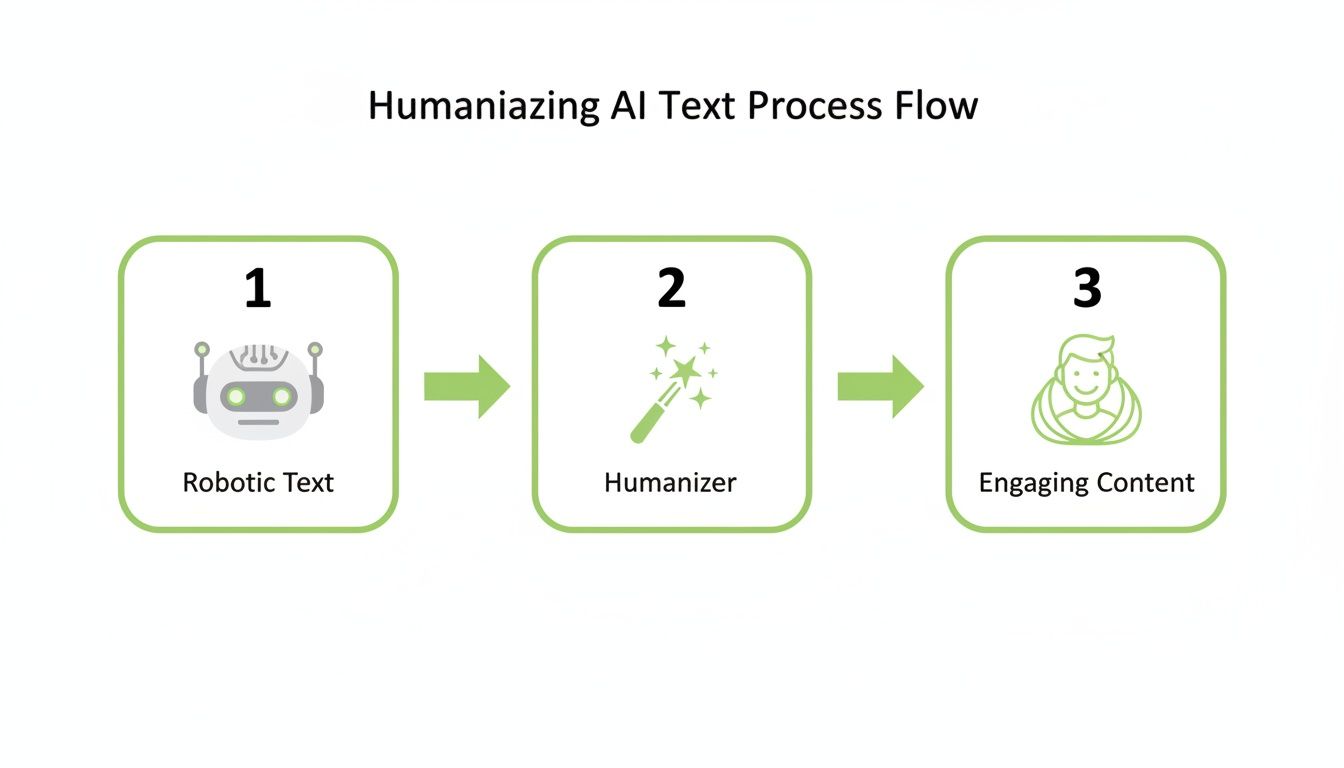
As you can see, a dedicated ChatGPT humanizer acts as the bridge, turning that raw AI output into something polished and reader-friendly.
The Humanization Phase: Edit and Enhance
This is where the real magic happens. The humanization phase is a mix of hands-on manual editing and the smart use of a dedicated tool. Your goal is simple: break up the robotic patterns that the AI detector flagged.
Here are a few practical moves you can make right away:
- Inject Your Personal Voice: Add a short, relevant anecdote or a personal opinion. AI can't fake lived experience, making this one of the most powerful ways to humanize your text. For example, add a sentence like, "I learned this the hard way on a project last year..."
- Vary Sentence Structure: If you notice a string of long, complex sentences, chop them up. Mix short, punchy statements with longer, more descriptive ones to create a natural reading rhythm.
- Use a Humanizer Tool: For speed and efficiency, a ChatGPT humanizer like HumanText.pro is a game-changer. Just paste your text in, and the tool automatically rewrites it, smoothing out awkward phrasing and adjusting the vocabulary to sound more natural. These tools are trained on massive datasets of human writing, so they're great at mimicking authentic styles.
Actionable Insight: I've found that a hybrid approach works best. Use a tool for the heavy lifting to quickly revise the text, then do a final manual pass to add your unique insights and personality. This gives you the best of both worlds: efficiency and authenticity.
Final Check: Re-test and Refine
After you've manually edited the text and run it through a humanizer, it's time for the final step: re-testing. Use the exact same AI detector from the "Test" phase to see how much the score has improved. You're looking for a significant drop in the AI detection percentage, hopefully pushing it deep into the "human-written" range.
This final check confirms your efforts paid off. If the score is still higher than you'd like, you can dive back in for one more round of light edits, focusing on any lingering repetitive phrases or clunky transitions. This last step closes the loop and gives you the confidence to publish your content.
Editing Techniques to Make AI Text Your Own
Before you even think about reaching for an automated ChatGPT humanizer, let's talk about the real magic: manual editing. Mastering a few hands-on strategies gives you incredible control, transforming a generic AI draft into something that actually sounds like you.
It's about taking the solid foundation ChatGPT provides and layering your own voice, expertise, and personality on top. Think of it less as "fixing" the text and more as "owning" it. You're not just correcting errors; you're infusing the content with human qualities that no algorithm can truly replicate.

Vary Your Sentence Rhythm
One of the biggest tells of AI content is its monotonous sentence structure. Language models love to spit out a series of sentences that are all roughly the same length. It creates a flat, robotic cadence that puts readers to sleep.
The fix is simple: mix it up.
Follow a long, descriptive sentence with a short, punchy one. Short sentences grab attention. They create emphasis. Longer sentences, on the other hand, are perfect for adding detail and context. This combination creates a dynamic flow that keeps people engaged.
Practical Example:
- Before (AI): The implementation of this new marketing strategy requires the coordination of multiple departments. Additionally, it is essential to monitor key performance indicators to ensure its overall success and effectiveness.
- After (Humanized): This new marketing strategy needs everyone on board. We have to coordinate across departments. Then, we’ll track the key metrics closely to make sure it’s actually working.
Inject Personality and Anecdotes
AI can't draw from personal experience. This is your ace in the hole.
Weaving in a short, relevant story or a personal opinion is the fastest way to add a layer of authenticity AI simply can't fake. It builds trust and makes your content far more memorable. You don't need a long-winded saga—a single sentence sharing a quick lesson you learned can instantly make the text feel human.
Actionable Insight: Keep a running list of short, relevant anecdotes from your work or life. When editing an AI draft, look for opportunities to insert one. For example, instead of saying, "Customer feedback is important," you could say, "I once ignored a single piece of customer feedback and it cost us a major client. Now, I read every comment."
Key Takeaway: Personalization is non-negotiable for humanizing AI text. Your unique experiences, opinions, and stories are the elements that create a genuine connection with your audience and make your content stand out.
Show, Don’t Tell
ChatGPT loves to tell the reader things. It makes abstract statements and declarations that lack impact, like saying a product is "easy to use."
The classic writing advice "show, don't tell" is your best friend here. Use vivid descriptions and concrete examples to bring your ideas to life. Instead of just stating a concept is "important," give a real-world example of its impact. This technique makes your writing more immersive and persuasive.
Practical Example:
- Before (Telling): The software has a user-friendly interface that improves productivity.
- After (Showing): With just three clicks, you can generate a complete report, cutting a task that used to take an hour down to just a few minutes.
Simplify Complex Vocabulary
AI models, trained on mountains of academic and technical papers, often reach for unnecessarily complex words. They'll say "utilize" instead of "use," or "commence" instead of "start."
Your goal is clear communication, not sounding like a walking thesaurus. Go through the text and swap these stuffy words for simpler, more common alternatives. This is a quick win for readability and makes your content feel more conversational.
Actionable Tip: Create a "banned words" list for your AI content. During your editing pass, use your word processor's "Find and Replace" function to quickly swap out these common AI-isms.
- Utilize → Use
- Consequently → So
- Furthermore → Also / And
- In order to → To
- Notwithstanding → Despite / Even though
By applying these manual editing techniques first, you can dramatically elevate your AI-assisted content. This hands-on approach ensures the final piece is engaging, authentic, and truly yours before you even consider using a ChatGPT humanizer for that final polish.
Using a ChatGPT Humanizer Tool Effectively
Look, manual editing is fantastic for adding a personal touch, but when you're dealing with a high volume of content, it's just not practical. This is where an automated tool becomes a lifesaver. While your hands-on tweaks inject personality, a good ChatGPT humanizer can apply the same structural and stylistic fixes in seconds, saving you a ridiculous amount of time.
These tools are built to do the heavy lifting. They’re designed to systematically rewrite your text, breaking up those predictable AI sentence patterns, introducing varied structures, and swapping out robotic vocabulary—all without losing the core message. For anyone churning out content regularly, they’re invaluable.
A Quick Walkthrough with a Tool Like HumanText.pro
Let's run through the process with a platform like HumanText.pro, which is built specifically for this. The workflow is refreshingly simple and basically mirrors the manual process, just way faster.
First, you just copy your raw ChatGPT draft and paste it directly into the tool. Right away, you’ll usually see an initial AI detection score. This gives you an instant baseline—a clear number showing you how robotic the text looks to the major detectors.
Here’s a peek at the clean interface where you drop your text.
The simple layout cuts out the guesswork. You paste your content and immediately see where you stand before doing anything else.
From there, you just click a button to start the humanization process. The tool’s algorithm gets to work, completely restructuring sentences and tweaking the phrasing. What you get back is a refined version of your text that’s designed to sound much more natural. The final step is to check the new detection score to see how much it improved.
How It Works Under the Hood
The magic of a good ChatGPT humanizer comes from its training data. HumanText.pro, for example, runs on a model trained on over 1.2 million samples of actual human writing. This massive dataset allows it to pick up on the subtle rhythms, nuances, and stylistic quirks that make writing feel authentic.
It’s not just swapping out a few words here and there. The tool is actively hunting for and eliminating common "AI fingerprints," such as:
- Predictable Transitions: Getting rid of the constant "moreover," "furthermore," and "in conclusion."
- Uniform Sentence Length: It breaks up monotonous, same-y sentence structures by mixing in short, punchy lines with longer, more descriptive ones.
- Stuffy Vocabulary: It replaces overly formal or academic words with more natural, common alternatives that people actually use.
This automated process applies the exact same techniques we covered for manual editing, but it does it across thousands of words in a flash. For a deeper look, check out our complete guide on using an AI humanizer tool effectively.
Getting Past Detectors and Staying Compliant
Beyond just making your writing sound better, these tools play a critical role in compliance. With AI detectors becoming standard in universities and publishing houses, there’s a real need for tools that can make AI-assisted writing statistically invisible. Content teams often use 'AI to human text converters' as a final step before publishing to manage this risk.
HumanText.pro is built for this reality, explicitly designed to beat leading detectors like GPTZero, Turnitin, and Grammarly's detector, claiming it can achieve up to a 99% detection bypass while keeping the text clear and readable. For anyone using AI but needing to pass these checks, this has become a non-negotiable safeguard.
Practical Insight: Use a humanizer as your first major revision. It handles the heavy structural work, which frees you up to focus on what really matters: adding your unique insights, personal stories, and expert opinion in a quick final pass. This hybrid approach gives you the best of both worlds—speed and authenticity.
How Humanized Content Boosts SEO and Engagement
Let's be honest, getting past AI detectors is just the first step. The real win from using a ChatGPT humanizer is creating content that actually performs—content that connects with real people and impresses the search engine algorithms that decide your fate. When your writing sounds natural, the results are measurable.
Authentic, human-like content has a direct line to your key metrics. Think about it: varied phrasing and a natural tone make an article more enjoyable to read. This keeps people on your page longer, boosting dwell times and slashing bounce rates. To Google, those are huge signals that your page is delivering a great experience, which can give your search rankings a serious lift.

Satisfying Google’s People-First Approach
Google’s core mission hasn't changed: reward content made for people. Robotic, predictable text just doesn't cut it. The techniques a humanizer uses—like statistical disruption and pattern elimination—are designed to break up the monotonous rhythm that screams "unedited AI."
This isn't just about sounding pretty; it's about performance. SEO studies consistently show that humanized AI content can dramatically outperform its raw counterpart. We've seen experiments showing 2× higher click-through rates (CTR) and around 30% more social shares compared to untouched AI text. This happens because modern humanizers scrub hundreds of known "AI fingerprints" that both detectors and discerning readers pick up on.
When you align your content with Google's people-first mandate, you're not just dodging penalties. You're building a stronger SEO foundation from the ground up.
Driving Real Engagement and Building Trust
True engagement is more than just a click. It's about creating content so good that people want to share it, link to it, and talk about it. Humanized text, with its relatable tone and authentic voice, is far more likely to get that kind of reaction.
When an article feels genuine, readers trust its message. That trust is the currency of the internet. It’s what builds a loyal audience and, crucially, earns valuable backlinks from other reputable sites—one of the most powerful ranking factors in all of SEO.
Actionable Insight: Humanization is a direct investment in your content quality. It shifts your focus from just churning out words to creating valuable assets that build authority, drive organic traffic, and deliver a real return. For your next article, try humanizing just the introduction and conclusion, then check your analytics to see if page dwell time improves.
A machine can assemble facts, sure. But it takes a human touch to turn those facts into a story that actually resonates with someone.
A Practical Look at Content Impact
The performance gap between raw AI output and carefully humanized content is stark. Just look at how each version influences user behavior and those all-important SEO signals.
| Metric | Raw AI Content Impact | Humanized Content Impact |
|---|---|---|
| Dwell Time | Low; monotonous text makes readers leave quickly. | High; an engaging rhythm and tone keep readers on the page. |
| Social Shares | Minimal; generic content isn't inspiring enough to share. | Increased; a unique voice and relatable points drive more shares. |
| Backlink Potential | Very low; nobody wants to link to robotic-sounding content. | High; authentic, valuable content is seen as a credible source worth linking to. |
| Bounce Rate | High; users often leave after seeing just one bland page. | Low; compelling content makes people want to see what else you have. |
Ultimately, using a ChatGPT humanizer isn't a shortcut; it's a strategic move to make every piece of content perform better. It ensures your articles are optimized for the human experience, which is exactly what search engines are built to reward. If you're serious about your content strategy, this is a core part of learning how to write SEO articles that actually get results.
Responsible and Ethical AI Content Creation
Let's talk about the right way to use a ChatGPT humanizer. These tools are powerful writing assistants, designed to help you transform a clunky AI draft into polished, readable content. Their real job is to improve your workflow and the quality of your writing—not to help you cut corners on academic honesty or mislead your audience.
The heart of using these tools ethically boils down to one word: accountability.
Always, always treat the AI-generated text as a first draft. It’s a starting point, nothing more. You’re still the expert in the driver’s seat. It's on you to fact-check every claim, verify every piece of data, and make sure the final text truly reflects your knowledge and intent. The tool refines the language; you own the message.
Actionable Tip: Think of a humanizer as a stylistic polisher. It’s there to bridge the gap between a robotic first draft and a final piece that actually sounds like you. Before publishing, do a final read-through and ask yourself: "Does this sound like something I would actually say?" If the answer is no, keep editing until it does.
Transparency and Building Trust
In any professional setting, being upfront is the best policy. While you don’t need to add a footnote to every sentence, think about when it makes sense to disclose that you've used AI to help you. On some projects, a simple disclosure can actually build trust by showing you’re using modern tools responsibly.
A lot of people wonder about Google's stance on AI-generated content. The truth is, Google has been pretty consistent: they care about helpful, high-quality content, no matter how it’s made. The focus should always be on creating something valuable for the reader, not just trying to game the system.
When you use them correctly, humanizers are ethical tools for quality control. They help you produce better work, faster. But the final stamp of approval—and all the responsibility that comes with it—is still yours.
For a deeper dive, our guide on creating undetectable AI discusses how you can maintain your authentic voice while still using these powerful tools. It’s about seeing a ChatGPT humanizer not as a way to cheat, but as a way to produce your best work.
https://humantext.pro/blog/undetectable-ai
A Few Common Questions About Humanizing AI Content
Once you start using a ChatGPT humanizer in your workflow, you're bound to have a few practical questions. Let's tackle the big ones I hear all the time so you can move forward with confidence.
Will a Humanizer Guarantee I Pass Every Single AI Detector?
This is the million-dollar question, isn't it? While the best humanizers out there have incredibly high success rates, no tool on earth can promise a 100% pass rate against every detector, forever.
Think of it as a cat-and-mouse game. AI detectors are constantly tweaking their algorithms, and in response, humanizers have to update theirs to keep pace. A quality tool will consistently land your content deep in the "human-written" zone, but you have to remember the landscape is always shifting.
Does Humanizing AI Text Mess Up the Meaning?
A well-built ChatGPT humanizer is specifically designed to preserve the core meaning and facts of your text. Its real job is to overhaul the style—the sentence structures, word choices, and overall rhythm—not the substance of what you’re trying to say.
That said, after any automated process, a quick human once-over is non-negotiable. This final check is your chance to make sure the intended message is still perfectly intact and lines up with what you wanted to communicate in the first place.
Actionable Insight: I’ve found the most effective strategy is almost always a hybrid approach. Use an AI humanizer for the heavy lifting—restructuring that robotic, predictable text. Then, you jump in for a quick manual edit to inject your unique expertise and give the meaning one last check. This method gives you the best of both worlds: serious speed and genuine authenticity.
Ready to turn those clunky AI drafts into content that actually connects with people? HumanText.pro makes it simple to get natural-sounding text that sails past AI detection. Give it a try for free today.
Ready to transform your AI-generated content into natural, human-like writing? Humantext.pro instantly refines your text, ensuring it reads naturally and authentically. Try our free AI humanizer today →
Related Articles
10 Websites That Humanize AI Writing in 2026
Compare 10 websites that humanize ai writing by features, pricing, privacy, language support, and best use cases for writers, agencies, and educators.
AI Generated Text Detection: How It Actually Works
Explore AI generated text detection methods, accuracy limits, and how to choose the right tool for publishers, educators, and compliance workflows.
AI Humanizer Free Trial: Your Step-by-Step Playbook
Try an AI humanizer free trial the smart way. Learn what to expect, how to test quality, and how to choose the right paid plan for your workflow.

