How to Remove AI Detection and Humanize Your Content
Learn how to remove AI detection from your writing. Our guide offers practical techniques to bypass AI detectors and make your content authentic and engaging.
To get your text past an AI detector, you can't just shuffle a few words around. You need to fundamentally change its structure and rhythm, injecting a human voice where a machine's predictable patterns used to be. The goal is to make the text sound genuinely written by a person, not just tweaked to look different.
Understanding How AI Detectors Actually Work

Before you can beat the system, you need to know what you’re up against. AI detectors aren't magic boxes; they’re sophisticated algorithms trained on enormous amounts of text. Their job is to spot the subtle, almost mathematical signatures that language models like ChatGPT leave behind.
Think of an AI detector as a linguistic profiler. It doesn't just read your words—it analyzes the statistical probability of those words appearing in that exact sequence. At its core, this whole process boils down to catching a few key giveaways.
The Telltale Signs of AI Writing
AI detectors are relentlessly hunting for two main characteristics that scream "machine-generated": low perplexity and a lack of burstiness.
Perplexity is just a fancy way of measuring how predictable a text is. AI models are trained to pick the most statistically likely next word. This makes their output logical and grammatically perfect, but also incredibly safe and unsurprising. Human writing is messier, filled with unexpected word choices and creative detours, which gives it much higher perplexity.
- Practical Example: An AI might write, "The dog ran quickly across the field." A human might write, "The dog tore across the field like a cannonball." The second sentence is far less predictable and has higher perplexity.
Burstiness is all about the rhythm and flow of your sentences. Humans write with a natural cadence, mixing short, punchy statements with longer, more complex ones. AI, on the other hand, tends to churn out sentences of uniform length and structure. This creates a monotonous, robotic drone that detectors are built to flag.
- Practical Example: An AI might write three sentences in a row, each about 15 words long. A human might write: "It was a disaster. The whole system crashed, leaving us with nothing but a blinking cursor and a sinking feeling in our stomachs. What now?" The varied length creates a natural rhythm.
AI Text vs Human Text Key Differences
This table highlights the primary characteristics that AI detectors use to distinguish between machine-generated and human-written content.
| Characteristic | Typical AI-Generated Text | Typical Human-Written Text |
|---|---|---|
| Sentence Structure | Uniform length, simple and repetitive. | Varied lengths, mixing short and long. |
| Word Choice | Predictable, common vocabulary. | Creative, sometimes unusual word choices. |
| Flow (Burstiness) | Low burstiness; consistent, even pace. | High burstiness; rhythmic and varied. |
| Predictability (Perplexity) | High predictability; low perplexity. | Low predictability; high perplexity. |
| Tone | Often overly formal or neutral. | Varies; shows personality, opinion, emotion. |
| Figurative Language | Rare and often clichéd. | Uses metaphors, idioms, and analogies naturally. |
| Errors | Grammatically perfect, no typos. | May contain minor errors or quirks. |
Understanding these distinctions is the first step. You can see these patterns for yourself by experimenting with different offline AI chat tools and analyzing their output—the lack of perplexity and burstiness becomes obvious pretty quickly.
The Missing Human Element
Beyond the pure statistics, detectors are also getting better at flagging content that just lacks a human voice. This is something even a casual reader can often feel. AI text frequently defaults to a stiff, academic tone. It avoids personal stories, steers clear of strong opinions, and rarely connects with the reader on an emotional level. It reports information but doesn't tell a story.
AI-generated content is often perfectly average. It’s grammatically sound, logically structured, and completely devoid of the quirks, personality, and memorable phrasing that make human writing compelling. This predictable perfection is exactly what detectors are designed to catch.
And these tools are getting scarily good. In the 2025 AI Detection Benchmark, the best tools hit staggering accuracy rates, with some correctly identifying AI content over 98% of the time. This massive jump in performance means that simply swapping out a few synonyms or making minor edits won't cut it anymore.
A Practical Framework for Humanizing AI Content
Alright, let's move from theory to action. If you want to get past modern AI detectors, you can't just swap out a few words and call it a day. It doesn't work. The process is more like an artist adding layers to a painting—each one builds on the last to create something rich and authentic.
I've found the most effective way to do this is with a three-layer editing framework: structural, stylistic, and authentic. By tackling them in this order, you can systematically break down a robotic AI draft and rebuild it into something that’s not only undetectable but genuinely good.
Layer One: Structural Edits
First things first, we have to mess with the rhythm. This is the most critical step. AI-generated text has a monotonous, predictable beat because the sentences are often the same length. Your job is to disrupt that flow completely.
Think "burstiness." You need to intentionally mix short, punchy sentences with longer, more detailed ones. This one change does more to mimic natural human writing than anything else. We don’t talk or write in perfectly balanced sentences, and our content shouldn't either.
Original AI Text: "The implementation of renewable energy sources demonstrates significant potential for mitigating the adverse effects of climate change, thereby fostering a more sustainable global future." (That’s a mouthful at 26 words.)
Humanized Text: "Renewable energy could really help fight climate change. But there’s a catch. We need massive infrastructure investment first. It's a huge challenge." (Sentence lengths: 7, 4, 8, 5 words.)
See the difference? The rhythm is completely different. Injecting this kind of variety and a more casual flair has been shown to slash detection scores. Breaking up uniform sentence patterns is the most powerful first move you can make to remove AI detection flags.
Layer Two: Stylistic Changes
Once the structure feels less robotic, it's time to work on the style. This is all about injecting personality and ditching the sterile, corporate language that AI models love. They’re trained on a massive dataset of formal text, so they naturally avoid having a unique voice.
Your goal here is simple: make it sound like something a real person would actually say. Think about how you’d explain the topic to a friend over coffee. You’d probably use idioms, analogies, or rhetorical questions to get your point across.
Actionable Insight: Do a "find and replace" for common AI crutch words. Search for terms like "delve into," "in conclusion," "it is important to note," and "the digital landscape." Replace them with simpler, more direct language. This one trick instantly makes your writing feel less robotic.
Here are a few quick stylistic edits you can make right away:
- Kill common AI phrases: Swap "In conclusion" with "So, what's the bottom line?" or "delve into" with "let's unpack."
- Use figurative language: A simple metaphor can make a complex idea click. "AI detectors are like linguistic profilers" is way more interesting than "AI detectors analyze text for patterns."
- Vary your vocabulary: Don't just right-click for a synonym. Pick words that actually fit the tone you’re going for. For example, instead of the AI-favored "utilize," try "use," "leverage," or "employ" depending on the context.
This isn't just for written articles. For anyone using AI for other media, like in AI script to video content creation, these same principles apply. A natural voice and rhythm are just as crucial for a spoken script to connect with an audience.
Layer Three: Authentic Overlays
This final layer is what truly sets your content apart. Authenticity is about adding unique value that an AI simply cannot fake. This is where you weave in elements grounded in real human experience, original thought, and hard evidence.
It’s not just about sounding human; it’s about proving you are one by adding things a machine could never come up with on its own.
Types of Authentic Overlays:
| Overlay Type | Description | Example |
|---|---|---|
| Personal Anecdote | A short, relevant story from your own experience. | "I once spent a week trying to rank an article, only to realize my robotic intro was killing my engagement..." |
| Unique Insight | An original thought or a contrarian viewpoint. | "Everyone says to use more data, but sometimes, a powerful story is more persuasive than any chart." |
| Credible Evidence | Citing specific data or quoting an expert to back up your claims. | "According to a recent HubSpot study, 64% of marketers actively invest in SEO..." |
This last pass infuses your text with genuine authority. By layering these structural, stylistic, and authentic edits, you systematically dismantle the telltale signs of AI. What you're left with is content that not only flies under the radar but is also far more valuable to your readers.
Using AI Humanizers for Speed and Efficiency
Manually editing every sentence to dodge AI detectors is incredibly effective, but let's be honest—it’s a huge time sink. When you’re facing a tight deadline or churning out content at scale, that kind of hands-on rewrite just isn't realistic. It quickly becomes a massive bottleneck.
This is where AI humanizers come in. Think of them as a powerful first pass, a way to accelerate the tedious parts of the editing process so you can focus on what really matters.
How These Tools Get the Job Done
Instead of you spending hours swapping words and restructuring paragraphs, these tools do the heavy lifting in seconds. They’re specifically designed to strip out the tell-tale patterns that AI detectors flag by rewriting text in a more natural, human-like style.
A good humanizer is much more than a simple word spinner. It runs on sophisticated models trained on millions of examples of authentic human writing. This allows it to grasp the subtle nuances—the rhythm, tone, and quirky word choices—that separate our writing from a machine's.
When you feed it AI-generated content, it gets to work by:
- Varying Sentence Structure: It automatically breaks up the monotonous, uniform sentence lengths common in AI text, introducing the "burstiness" that detectors look for.
- Improving Word Choice: It swaps out predictable, generic AI vocabulary for more interesting or contextually sharper words.
- Adjusting Syntax: It rephrases sentences to create more complex and less predictable grammatical structures, which directly boosts the text's perplexity score.
For anyone new to this, learning more about how an AI humanizer tool works can give you a great foundation for using them well. The results can be pretty dramatic.
We ran a few tests on raw AI text that was getting flagged with a 73% AI detection score. After a single pass through a humanizer, that same text scored just 0.56% AI—that's a 99.44% human-like score. It sailed through major detectors like GPTZero and Turnitin.
A Real-World Scenario
Picture this: you just generated a 1,000-word blog post. You run it through a detector, and it comes back with an 85% AI score. Ouch. Instead of starting a manual overhaul from scratch, you can use a tool like HumanText.pro to get a massive head start.
The process is straightforward. Just look at the simple interface.
You paste your original text on the left and get the humanized version on the right almost instantly. A rewrite that could have taken an hour is now done in seconds.
Actionable Insight: Use the humanizer's output as a new starting point, not the final product. Go through the rewritten text and find 3-4 key sentences to tweak. Change a specific verb, add a personal aside in parentheses, or rephrase a heading to better match your brand's unique voice. This final human touch makes a huge difference.
After running your 85% AI text through the tool, the new draft might come back with a score of just 5%. Now your job is much easier. You can focus your energy on the final 10% of the work: adding a personal anecdote to the intro, tweaking a key phrase to match your brand's voice, and making sure the conclusion really hits home.
This approach gives you the best of both worlds—the speed of automation combined with the irreplaceable touch of human creativity.
Advanced Strategies to Beat AI Detection
When the stakes are high, standard editing tricks and automated tools just won't cut it. We're talking about the big stuff: your final thesis, a make-or-break client proposal, or a cornerstone article for your brand. For these projects, just slipping past an AI detector isn't the goal. The real aim is to create something indistinguishable from top-tier human writing.
This means going deeper than surface-level tweaks. It's about strategically embedding the very things that make writing feel alive and human: a distinct voice, a compelling story, and genuine conviction.
Develop a Unique Authorial Voice
The single most effective way to remove AI detection is to sound unapologetically like a real person. AI models are built on the statistical average of all the text they've consumed, which is why their output often feels so generic and bland. Your job is to fight that average.
Your authorial voice is your writer's fingerprint. It's that unique mix of your perspective, word choices, and overall tone. Are you naturally a bit witty? Deeply analytical? Straightforward and blunt? Lean into it. Whatever your natural style is, amplify it.
- Actionable Tip: Before you start editing, try this. Write one paragraph explaining your topic as if you were talking to a good friend over coffee. This little exercise is brilliant for shattering the formal, robotic tone AI defaults to. Once you've found that natural voice, use it to guide the rest of your edits.
Weave Data into a Compelling Narrative
An AI can spit out facts and figures with ease. What it can't do is tell a story that makes those numbers matter. People don't connect with raw data; they connect with narratives. Instead of just listing your data points, frame them inside a story with a clear beginning, middle, and end.
- Practical Example:
- AI Version: "The new marketing campaign resulted in a 40% increase in qualified leads and a 15% rise in conversion rates."
- Narrative Version: "For months, we were stuck. Our lead quality was flat, and the team was burning out. Then, we tried a completely new approach, focusing on storytelling instead of stats. It was a gamble, but it paid off—leads jumped 40%, and our conversion rate climbed 15%. It proved that a good story is the best sales tool we have."
An AI can tell you what happened, but a human writer can make you feel why it matters. This emotional layer is something detectors are currently terrible at identifying because it's so complex and variable.
Use the Citation Shield for Academic Work
If you're writing an academic paper, one of the most powerful advanced techniques is something I call the "citation shield." AI detectors often get tripped up by heavily cited text because proper academic writing is inherently complex and structurally varied.
When you integrate and discuss your sources properly, you naturally increase the text's perplexity. You aren't just dropping in quotes; you're analyzing, critiquing, and weaving together ideas from multiple scholars. This process forces you to build complex sentences that connect disparate ideas—a true hallmark of human academic work.
How to Apply the Citation Shield
- Integrate Sources Seamlessly: Never just "drop" a quote. Introduce the author and provide context for their work first.
- Analyze and Critique: After every citation, add at least two sentences of your own analysis. Explain its significance, agree or disagree with the point, or connect it to another source you've mentioned.
- Synthesize Multiple Viewpoints: Create paragraphs that put different scholars in conversation with one another. For example, "While Smith (2022) argues for X, Jones (2023) offers a compelling counterpoint by suggesting..."
Using this method makes your text a nightmare for an AI detector to parse because the sentence patterns become highly irregular and unpredictable. Better yet, it’s an authentic technique that dramatically improves the quality and depth of your academic writing.
Putting It All Together: A Real-World Walkthrough
Theory is one thing, but seeing a real-world transformation is what makes these techniques stick. Let's walk through a practical example, applying everything we've covered to a standard AI-generated draft. Our mission is to take a piece of text flagged as AI and systematically edit it until it passes detection with flying colors.
Our starting point is a 500-word draft on "the benefits of remote work." A quick check with a popular detector gives us a baseline: a predictable 92% AI-generated score. The text is clean, logical, and completely soulless—the perfect candidate for humanization.
Initial Draft Analysis And Structural Edits
The first problem is obvious: the rhythm is painfully monotonous. Almost every sentence is between 15 and 20 words long, creating a robotic drone that practically screams AI. Our first job is to introduce some "burstiness" by shattering this uniformity.
We'll break up long, meandering sentences into shorter, punchier ones. We'll also combine some short sentences to create more complex, layered thoughts. It's all about creating an unpredictable, natural cadence.
Before: "The proliferation of remote work models has provided employees with unprecedented flexibility, which in turn fosters a healthier work-life balance and increases overall job satisfaction." (27 words)
After: "Remote work offers incredible flexibility. This helps people build a better work-life balance. Ultimately, it just makes them happier at their jobs." (5, 8, and 8 words)
This one change immediately disrupts the AI's signature cadence. The text already feels more dynamic. By applying this logic throughout the draft, we’re tackling the biggest red flag for most detectors right out of the gate.
Layering In Style And Personal Voice
With the structure fixed, it's time to inject some personality. The original draft is littered with sterile, AI-favored phrases like "Furthermore," "It is imperative to note," and the classic "In conclusion." We'll swap these out for more natural, conversational transitions that sound like an actual person wrote them.
This is also where we add a unique authorial voice. Instead of just stating facts, we can frame them with a personal perspective or a relatable analogy. Think about how you'd explain this to a friend.
Before: "Companies that adopt remote work often observe a significant enhancement in productivity metrics."
After: "You'd think working from home would be a recipe for distraction. But surprisingly, the data shows the opposite. Most teams actually get more done when they ditch the office."
By reframing the statement with a bit of conversational skepticism followed by a surprising reveal, the content becomes far more engaging and human-like. This is the core of the advanced writing process: moving past generic statements and focusing on voice, narrative, and solid evidence.
This infographic breaks down the three key components of this process.
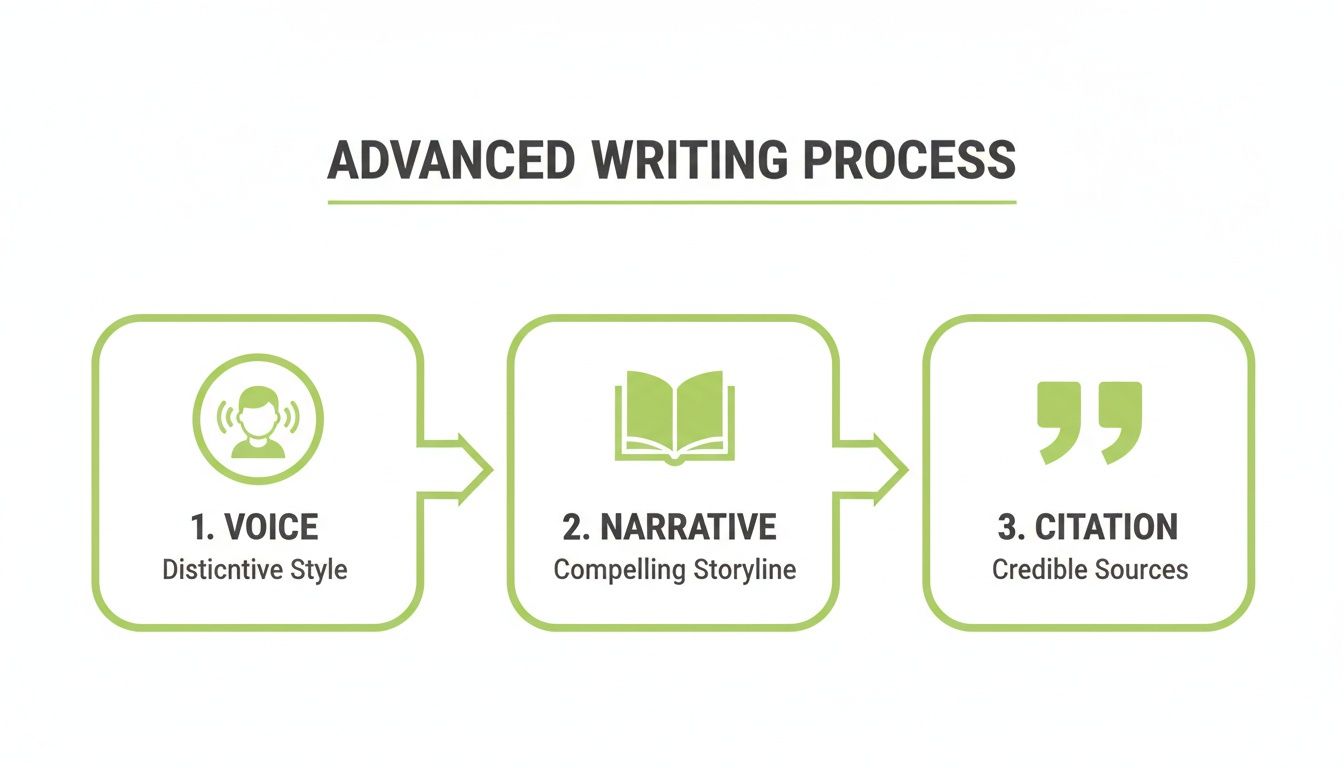
As you can see, shifting from a generic voice to a distinct narrative supported by credible sources is a powerful way to remove AI detection signatures from your text.
The Final Polish With An AI Humanizer
After our manual edits, the draft feels much, much better. A quick rescan shows the AI score has plummeted from 92% down to around 25%. That's a massive improvement, but we can do even better. For the final touch, we'll run it through an AI humanizer for a quick polish.
This tool will refine our work, catching any lingering awkward phrases or predictable sentence patterns we might have missed. It just smooths out the edges, running a final pass on vocabulary and syntax to push it over the finish line. You can learn more about the specifics of transforming AI to human text with these tools in our detailed guide.
After a single pass through the humanizer, we run one last check. The final score? A mere 3% AI probability. We successfully turned a robotic, easily flagged article into a piece of content that reads authentically and sails right past detectors.
This layered workflow—structure, then style, then a final automated polish—is a repeatable and efficient system. It combines the strategic, creative input of a human editor with the speed of an AI tool, delivering high-quality, undetectable content every time.
To give you a better idea of how these different approaches stack up, we ran a series of tests on AI-generated articles.
Effectiveness of Different Humanization Methods
The table below summarizes our findings on the average time investment and resulting AI detection scores for various editing methods.
| Humanization Method | Average Time Investment (per 1,000 words) | Average AI Detection Score (Post-Edit) |
|---|---|---|
| Basic Proofreading (Grammar/Spelling) | 15-20 minutes | 75-85% |
| Manual Structural & Style Edits | 45-60 minutes | 20-30% |
| Using an AI Humanizer Only | 2-5 minutes | 10-20% |
| Combined Manual & AI Humanizer | 50-65 minutes | 0-5% |
As the data clearly shows, while manual editing makes the biggest dent in the AI score, combining it with a final AI humanizer pass offers the most reliable path to a near-zero detection score.
Common Questions About Bypassing AI Detection
Even with a solid game plan, you're bound to run into questions when you’re deep in the weeds of editing AI content. Here are the most common ones I hear, with practical answers to help you humanize your work with confidence.
Can AI Detectors Be 100 Percent Accurate?
Nope. AI detectors are not perfect, and they never will be.
In fact, they’re known for producing false positives—sometimes flagging text written by a human as AI-generated. This happens because they're just playing a numbers game, looking for statistical patterns. Sometimes, human writing is just plain predictable.
A detector's accuracy hinges entirely on how sophisticated its algorithm is and how complex your text is. The goal isn't to "trick" the software. The real goal is to create high-quality, authentic content that has the natural variety of human writing. When you focus on quality, your text just naturally becomes much harder to flag.
Is It Unethical to Remove AI Detection From My Writing?
This all comes down to your intent. Using AI as a brainstorming partner, a writer's block sledgehammer, or a first-draft machine is now standard practice for tons of professionals. It’s a tool, just like a calculator or spell-checker.
The ethical line gets crossed when you submit AI text as your own original work where it's strictly forbidden—like an academic paper with a zero-tolerance AI policy. For marketers and content creators, though, humanizing AI text is just a non-negotiable editing step. It's about ensuring quality, originality, and a voice that actually sounds like your brand.
Actionable Insight: Always check the specific rules for your school, client, or platform. Before using any AI assistance on an academic paper, review your university's academic integrity policy. For client work, clarify the AI usage policy in your contract. Transparency is your best friend and can prevent major issues down the road.
Does an AI Humanizer Guarantee a Pass on All Detectors?
While a great tool like HumanText.pro is built specifically to give you the best possible shot at bypassing detection, no tool can offer a 100% guarantee against every detector out there. The tech is a constant game of cat-and-mouse; detectors get updated, and humanizers evolve to keep up.
Think of a humanizer as your powerful first editing pass. It does the heavy lifting—restructuring sentences, swapping out robotic words, and fixing awkward phrasing. After that, you need to do a final manual review to add your unique voice, fact-check everything, and make sure the content truly hits the mark. This one-two punch is the most reliable strategy.
Are There Other Benefits to Humanizing AI Text?
Absolutely. Forget the detectors for a second. The single biggest benefit of humanizing AI content is a massive leap in quality.
Humanized text is more engaging, persuasive, and relatable. It has the quirks of human communication—things like storytelling, personality, and genuine emotion. This process helps you build a real connection with your audience and maintain a brand voice that doesn't sound like a generic robot.
In a world drowning in generic, robotic content, a real human touch is what makes your writing stand out. Ultimately, the process of removing AI detection is really just the process of making your writing better.
Ready to turn your AI drafts into undetectable, high-quality content? HumanText.pro can help you rewrite your text in seconds, keeping your core message while adding the natural style that sails past detectors. Try it for free today at humantext.pro.
Ready to transform your AI-generated content into natural, human-like writing? Humantext.pro instantly refines your text, ensuring it reads naturally and authentically. Try our free AI humanizer today →
Related Articles
10 Different Words for Sad: Ranked by Intensity and Tone
Explore different words for sad, ranked by intensity, register, and context, with example sentences and usage notes for writers and students.
AI Detector Essay Checker: A Step-by-Step Guide
Learn to use an AI detector essay checker with practical steps for students and teachers. Verify text authenticity, interpret scores, and humanize AI content
10 Websites That Humanize AI Writing in 2026
Compare 10 websites that humanize ai writing by features, pricing, privacy, language support, and best use cases for writers, agencies, and educators.

