Przewodnik po pisaniu z AI: jak uczłowieczyć tekst GPT za pomocą promptów i edycji
Odkryj praktyczne kroki, jak uczłowieczyć tekst GPT za pomocą promptów, edycji i narzędzi, które sprawią, że pisanie AI zabrzmi naturalnie i angażująco.
Uczłowieczenie tekstu GPT oznacza wzięcie jego robotycznego, często przewidywalnego wyniku i tchnięcie w niego życia. Chodzi o ręczne poprawianie zdań, nadawanie im swojego unikalnego głosu i wybieranie słów, które naprawdę łączą się z ludźmi na ludzkim poziomie.
Dlaczego uczłowieczanie treści AI jest koniecznością

Bądźmy szczerzy — surowy tekst z GPT często nie trafia w cel. Może wydawać się sterylny i dziwnie powtarzalny, brakuje mu rytmu i osobowości, które czynią tekst naprawdę przekonującym. Ta robotyczna jakość to oczywisty sygnał zarówno dla wnikliwych czytelników, jak i dla detektorów AI, które z dnia na dzień stają się coraz ostrzejsze.
Stawka jest wyższa, niż mogłoby się wydawać. Publikowanie nieedytowanych treści AI może poważnie zaszkodzić Twoim wysiłkom. Pomyśl o słabym zaangażowaniu na blogu, niższych pozycjach w SEO z powodu cienkiej treści, a nawet karach akademickich. To nie są tylko hipotezy — to realne zagrożenia.
Sygnały ostrzegawcze tekstu wygenerowanego przez AI
Modele AI uczą się na ogromnych zbiorach danych, co wymusza na nich pewne nawyki. Gdy wiesz, czego szukać, te wzorce stają się rażąco oczywiste. Ich rozpoznanie to pierwszy krok do zostania świetnym redaktorem.
Oto kilka typowych oznak z praktycznymi przykładami:
- Przewidywalne wzorce zdań: AI uwielbia jednolitość. Często produkuje tekst, w którym każde zdanie ma mniej więcej tę samą długość i strukturę, tworząc monotonny szum.
- Przykład AI: "System jest wydajny. Redukuje koszty operacyjne. Poprawia satysfakcję użytkowników."
- Praktyczna wskazówka: Połącz je w jedno, bardziej dynamiczne zdanie: "Wydajność systemu nie tylko znacząco obniża koszty operacyjne, ale też znacząco poprawia satysfakcję użytkowników."
- Nadmiernie formalny język: GPT domyślnie używa złożonych słów i unika skrótów. To sprawia, że tekst wydaje się sztywny i bezosobowy, jak dokument prawny, którego nikt nie chce czytać.
- Przykład AI: "Konieczne jest, aby wykorzystywać odpowiednie kanały komunikacji."
- Praktyczna wskazówka: Uprość to: "Musisz korzystać z właściwych kanałów komunikacji."
- Brak osobistego wglądu: Bez konkretnego promptu mówiącego inaczej, AI nie jest w stanie podzielić się osobistą historią, zaoferować unikalnej opinii ani dostarczyć perspektywy budującej zaufanie czytelnika.
- Powtarzalne sformułowania: Zaczniesz zauważać te same słowa przejściowe pojawiające się raz za razem ("Ponadto", "Dodatkowo", "Co więcej"). To klasyczny znak pisania algorytmicznego.
- Praktyczna wskazówka: Aktywnie szukaj tych powtarzających się słów i albo je usuwaj, albo zastępuj bardziej naturalnymi przejściami.
Prawdziwy cel to nie tylko przemknięcie się obok detektorów AI; chodzi o dodawanie prawdziwej wartości. Uczłowieczenie tekstu GPT to tworzenie komunikacji, która przekonuje, informuje i bawi — komunikacji, która naprawdę działa.
Ostatecznie musisz traktować AI jako blok startowy, nie linię mety. Magia dzieje się, gdy łączysz niesamowitą wydajność AI z niezastąpionymi niuansami ludzkiej kreatywności. Aby bliżej przyjrzeć się tym technikom, nasz przewodnik o tym, jak zamienić pisanie AI na tekst ludzki, to świetny kolejny krok. Chodzi o to, by Twój końcowy tekst był nie tylko niewykrywalny, ale naprawdę warty przeczytania.
Bierzemy się do roboty: jak ręcznie edytować szkice AI
Przekształcenie sterylnego, wygenerowanego przez AI szkicu w coś, co brzmi autentycznie, to sztuka, a nie tylko zadanie korekty. Tu zaczyna się prawdziwa praca. Musisz ręcznie dodać niuanse, osobowość i rytm, których algorytmy po prostu nie potrafią odtworzyć. Ta praktyczna edycja to sposób, w jaki naprawdę uczłowieczasz tekst GPT i sprawiasz, że łączy się z Twoimi odbiorcami.
Po pierwsze: rozbij robotyczną kadencję. GPT ma złą tendencję do produkowania akapitów, gdzie każde zdanie ma mniej więcej tę samą długość i strukturę. To monotonne i oczywisty sygnał. Twoim zadaniem jest wprowadzić trochę różnorodności.
Mieszaj krótkie, uderzające zdania z dłuższymi, bardziej opisowymi. To tworzy naturalny przepływ, który utrzymuje zaangażowanie czytelnika i sprawia, że treść mniej przypomina wykład, a bardziej prawdziwą rozmowę.
Wstrzyknij swój głos i osobowość
To jest ta część, której AI nie potrafi podrobić. Algorytm nie jest w stanie podzielić się osobistą historią o projekcie, który poszedł nie tak, ani zaoferować mocnej opinii ukształtowanej latami doświadczenia. Wplatanie własnych anegdot, spostrzeżeń i nawet odrobiny humoru w tekst to najszybszy sposób, by treść stała się naprawdę Twoja.
Możesz też zrobić ogromną różnicę, zamieniając generyczne słownictwo AI na bardziej barwny język. AI kocha bezpieczne, mdłe słowa. Twoim zadaniem jest dodać trochę smaku.
- Zamiast: "Nowe oprogramowanie jest bardzo dobre."
- Spróbuj: "Nowe oprogramowanie to absolutna rewolucja w naszym przepływie pracy."
- Zamiast: "Dane wskazują na pozytywny trend."
- Spróbuj: "Wszystko wskazuje w górę — dane opowiadają naprawdę ekscytującą historię."
Widzisz różnicę? Te proste poprawki dodają warstwę prawdziwego entuzjazmu, której maszyna po prostu nie jest w stanie wygenerować sama. To mała edycja z ogromnym wpływem na ogólny ton.
Twoim celem nie jest samo przekazanie informacji. Chodzi o stworzenie doświadczenia dla czytelnika. Dodawanie osobistego smaczku i używanie języka, który budzi zainteresowanie — to właśnie droga do celu.
Opanuj konwersacyjny przepływ
Chcesz szybkiej wygranej? Używaj strony czynnej. Jest bezpośrednia, jasna i energiczna — dokładne przeciwieństwo pasywnego, akademickiego tonu, do którego AI często domyślnie się ucieka.
- Strona bierna (jak AI): "Raport został napisany przez zespół marketingu."
- Strona czynna (po ludzku): "Zespół marketingu napisał raport."
Nie bój się też skrótów i potocznych wyrażeń. Tak właśnie ludzie naprawdę mówią. GPT często ich unika, żeby brzmieć bardziej formalnie, ale to sprawia, że tekst wydaje się sztywny i nienaturalny.
Posypanie nimi tekstu natychmiast zmiękcza ton i czyni pisanie bardziej przystępnym. To fundamentalna technika, w którą możesz zagłębić się bardziej, eksplorując jak przekształcić tekst AI w ludzkie pisanie.
Ten rodzaj ręcznej edycji jest ważniejszy niż kiedykolwiek. Gra w kotka i myszkę między generatorami treści AI a detektorami stała się niewiarygodnie wyrafinowana. Detektory wychodzą poza prostą analizę wzorców w stronę głębokiej analizy semantycznej, by wykryć "ślad myślenia," który zostawiają ludzie. Podczas gdy wczesne narzędzia flagowały prawie cały surowy tekst z ChatGPT, nowoczesne humanizatory mogą teraz osiągać wskaźniki omijania powyżej 95%, naśladując specyficzne style pisania użytkowników. Twoje ręczne edycje zapewniają tę ostatnią, niezbędną warstwę autentyczności, której żadne narzędzie nie potrafi idealnie odtworzyć.
Tworzenie promptów generujących tekst brzmiący po ludzku
Choć edycja końcowa to miejsce, gdzie dzieje się magia, prawdziwa bitwa o uczłowieczenie tekstu GPT często rozgrywa się, zanim wygenerujesz choćby jedno słowo. Wszystko zaczyna się od promptu.
Generyczny prompt daje generyczną, robotyczną odpowiedź. Ale konkretny, przemyślany prompt? Może dać Ci pierwszy szkic, który już jest w połowie drogi do ludzkiego brzmienia, oszczędzając ogromną ilość czasu na edycję.
Pomyśl o sobie jak o reżyserze prowadzącym aktora. Nie powiedziałbyś po prostu "Graj." Dałbyś mu postać, motywację, historię i scenę. Dokładnie ta sama zasada obowiązuje, gdy tworzysz prompt dla AI. Nie proś tylko o informacje; podaj bogaty kontekst, wyraźną personę i konkretne ograniczenia.
Nadaj swojemu AI personę
Jednym z najszybszych sposobów na uzyskanie bardziej naturalnie brzmiącego tekstu jest przypisanie AI konkretnej roli. Ten prosty ruch zmusza ją do przyjęcia określonego głosu i perspektywy, wyciągając ją z domyślnego, sterylnego i nadmiernie neutralnego tonu.
Oto kilka rzeczywistych przykładów promptów opartych na personie, które robią cuda:
- Do bloga marketingowego: "Pisz jak doświadczony CMO z 15-letnim stażem, dzielący się szczerymi, konkretnym radami z początkującymi marketerami. Twój ton powinien być pewny siebie, ale przystępny, jakbyś mentorował ich przy kawie."
- Do przewodnika edukacyjnego: "Przyjmij personę przyjaznego, cierpliwego korepetytora wyjaśniającego fizykę kwantową licealiście po raz pierwszy. Używaj prostych analogii i rozbijaj złożone pomysły na małe, łatwe do przyswojenia kawałki."
- Do tekstu produktu: "Wyobraź sobie, że jesteś pasjonatem-deweloperem produktu, który naprawdę wierzy, że ta funkcja rozwiąże ogromny problem użytkowników. Pisz z wyczuwalnym entuzjazmem i przekonaniem."
Ta prosta zmiana z co pisać na kto pisze może dramatycznie zmienić teksturę i autentyczność Twojego pierwszego szkicu. Jeśli chcesz naprawdę to opanować, Goldilocks Prompt Formula zapewnia świetne ramy do konsekwentnego generowania tekstu brzmiącego po ludzku.
Zdefiniuj ograniczenia dla bardziej ludzkiego odczucia
Oprócz samego przypisania persony, możesz prowadzić AI, wyznaczając jasne granice stylistyczne. Bądźmy szczerzy — ludzie nie piszą w idealnie jednolitych akapitach z konsekwentnie formalnym słownictwem. Mówiąc AI, by naśladowało te naturalne niedoskonałości, uzyskasz znacznie bardziej wiarygodny rezultat.
Twój prompt powinien być szczegółowym planem końcowego tekstu, nie tylko prośbą o temat. Im bardziej szczegółowe instrukcje, tym mniej ręcznej pracy później.
Spróbuj dodać tego rodzaju ograniczenia do następnego promptu i zobacz, jaką to robi różnicę.
- Różnicuj strukturę zdań: "Napisz akapit na ten temat, ale upewnij się, że mieszasz krótkie, uderzające zdania z dłuższymi, bardziej złożonymi."
- Włącz elementy konwersacyjne: "Zawrzyj przynajmniej jedno pytanie retoryczne i użyj potocznych skrótów, by stworzyć bardziej konwersacyjny klimat."
- Ustal zasady formatowania: "Ogranicz wszystkie akapity do maksymalnie trzech zdań. To kluczowe dla czytelności na urządzeniach mobilnych."
Gdy wbudujesz te ograniczenia bezpośrednio w prompt, w zasadzie pre-edytujesz treść, zanim zostanie utworzona. To proaktywne podejście, które pomaga pracować mądrzej, a nie po prostu ciężej edytować.
Korzystanie z humanizatorów AI dla szybkości i skali
Bądźmy realistami: ręczna edycja jest fantastyczna, ale to luksus, na który nie zawsze nas stać. Gdy patrzysz na napięty termin lub masz górę treści do przerobienia, spędzanie godzin na szlifowaniu każdego zdania po prostu nie jest praktyczne. Tu wkraczają humanizatory AI. Pomyśl o nich jak o swoim tajnym narzędziu do uczłowieczania tekstu GPT na masową skalę, bez obniżania jakości.
Te narzędzia to nie tylko rozbudowane słowniki synonimów. Zaawansowana platforma jak HumanText.pro działa jako wyspecjalizowana warstwa edycyjna nad Twoim początkowym szkicem AI. Zagłębia się w tekst, używając zaawansowanych modeli lingwistycznych do kompletnego przerobienia treści — dostosowując struktury zdań, wymieniając robotyczne słownictwo i poprawiając ogólny rytm, by brzmiał bardziej naturalnie.
Jak humanizator AI naprawdę działa
Dobry humanizator robi znacznie więcej niż parafrazowanie. Te platformy są trenowane na ogromnych zbiorach danych wypełnionych milionami przykładów autentycznego, ludzkiego tekstu. To pozwala im wyłapywać subtelne niuanse, które odróżniają nasze pisanie od maszynowego.
- Inteligentnie mieszają struktury zdań dla lepszej różnorodności i płynności.
- Porzucają typowe dla AI wybory słów na rzecz bardziej naturalnie brzmiących alternatyw.
- Dostosowują kadencję pisania, by naśladować naturalny rytm ludzkiej mowy.
Cały proces jest zbudowany z myślą o szybkości. Wklejasz szkic, sprawdzasz początkowy wynik detekcji AI i klikasz przycisk. Kilka sekund później masz zhuman izowaną wersję gotową do użycia.
Ten zrzut ekranu z HumanText.pro pokazuje, jak prosty jest przepływ pracy, z czystym wejściem po lewej i dopracowanym wyjściem po prawej.
Najważniejszy wniosek to wydajność. Narzędzie daje natychmiastowy wynik AI i naprawę jednym kliknięciem, zamieniając żmudne zadanie w coś prostego.
Przejście przez detektory z zachowaniem znaczenia
Jednym z głównych powodów, dla których ludzie sięgają po humanizatory, jest uczynienie treści niewidoczną dla detektorów AI takich jak GPTZero czy Turnitin. Najlepsze narzędzia potrafią to zrobić, zachowując jednocześnie podstawowe znaczenie oryginalnego szkicu w nienaruszonym stanie. Nie chodzi o zamienianie słów w bełkot; chodzi o udoskonalenie przekazu tak, by brzmiał jak napisany przez człowieka.
Jesteśmy w środku wyścigu zbrojeń w detekcji AI, gdzie detektory twierdzą, że mają kosmicznie wysoką dokładność. GPTZero mówi na przykład, że ma 99% skuteczność na surowym tekście AI. Ale nasze własne testy pokazują, że te systemy często się potykają, gdy treść została zhumanizowana. Wskaźnik wykrywalności tekstu wygenerowanego przez AI na GPTZero spada do zaledwie 56% po przepuszczeniu przez jakościowy humanizator.
Najlepsze humanizatory AI nie tylko oszukują detektory; tworzą naprawdę lepszą treść. Nadają tekstowi subtelne "prawdopodobieństwo ludzkości," którego zaawansowane algorytmy są specjalnie zaprojektowane, by szukać.
Używając narzędzia wytrenowanego na milionach próbek ludzkiego pisania, możesz osiągnąć poziom autentyczności, który jest niesamowicie trudny i czasochłonny do osiągnięcia ręcznie. Pełny przegląd najlepszych opcji znajdziesz w naszym przewodniku po najlepszych narzędziach humanizatora AI. A jeśli chcesz poszerzyć swój zestaw narzędzi, eksploracja najlepszych narzędzi dla twórców treści może pomóc ulepszyć cały Twój przepływ pracy.
Praktyczna prezentacja humanizacji krok po kroku
Teoria jest świetna, ale zobaczenie procesu w działaniu to jest to, co naprawdę wszystko rozjaśnia. Przejdźmy przez prawdziwy przykład, pokazując powtarzalny przepływ pracy do humanizacji tekstu GPT, który możesz zastosować do wszystkiego — od szybkiego maila po duży raport.
Zaczniemy od mdłego, generycznego szkicu z GPT-4 na temat "Korzyści z pracy zdalnej." Następnie pokażę, jak zastosować sztuczki ręcznej edycji, które omówiliśmy, zbadamy, jak lepszy prompt mógłby zaoszczędzić nam czas, i na koniec przepuścimy tekst przez humanizator AI, by zobaczyć końcowe rezultaty.
Surowe wyjście AI
Oto pierwszy szkic, który dostaliśmy z GPT-4 używając dość leniwego, mało wymagającego promptu:
Praca zdalna, znana również jako telepraca, oferuje liczne korzyści zarówno pracownikom, jak i pracodawcom. Pracownikom zapewnia zwiększoną elastyczność i równowagę między życiem zawodowym a prywatnym, ponieważ czas dojazdów jest eliminowany. Ta zmiana paradygmatu często skutkuje zwiększoną satysfakcją z pracy i morale. Dla pracodawców korzyści obejmują dostęp do szerszej puli talentów, zmniejszone koszty ogólne związane z przestrzenią biurową oraz potencjalne wzrosty produktywności. Wdrożenie polityki pracy zdalnej to strategiczna decyzja, która może wspierać bardziej odporną i zwinną siłę roboczą.
To nie jest technicznie błędne, ale boleśnie robotyczne. Język jest sztywny i formalny ("liczne korzyści", "zmiana paradygmatu"), struktura zdań przewidywalna, a osobowości zero. To typ tekstu, który detektory AI flagują natychmiast.
Zastosowanie ręcznych edycji i lepszego promptu
Najpierw tchnijmy trochę życia w ten tekst kilkoma szybkimi ręcznymi poprawkami. Celem jest rozbicie monotonnego rytmu, dodanie konwersacyjnego luzu i sprawienie, by brzmiał jak napisany przez prawdziwą osobę.
- Edytowany fragment: "Praca zdalna to nie tylko trend; to prawdziwa rewolucja dla wszystkich zaangażowanych. Dla pracowników porzucenie dojazdów oznacza więcej elastyczności i realną szansę na work-life balance, co napędza satysfakcję z pracy. Tymczasem firmy mogą sięgnąć po globalną pulę talentów, obciąć koszty biurowe i często zobaczyć skok produktywności."
To już ogromna poprawa. Ale co, gdybyśmy mogli dostać lepszy pierwszy szkic od samego początku? Zamiast naszego początkowego leniwego zapytania, wyobraź sobie, że daliśmy GPT taki prompt:
"Pisz jak doświadczony menedżer HR wyjaśniający realne korzyści pracy zdalnej sceptycznemu dyrektorowi. Używaj pewnego siebie, ale konwersacyjnego tonu, trzymaj akapity krótko i zawrzyj przynajmniej jedno pytanie retoryczne."
Tego rodzaju szczegółowa inżynieria promptów zmusza AI do przyjęcia konkretnej persony i stylu od samego początku. Dostajesz znacznie mocniejszy, bardziej naturalnie brzmiący szkic od razu, co dramatycznie skraca czas edycji.
Cała podróż, od tego pierwszego niezgrabnego szkicu AI do dopracowanego końcowego tekstu, tak naprawdę podąża za prostym, powtarzalnym przepływem.
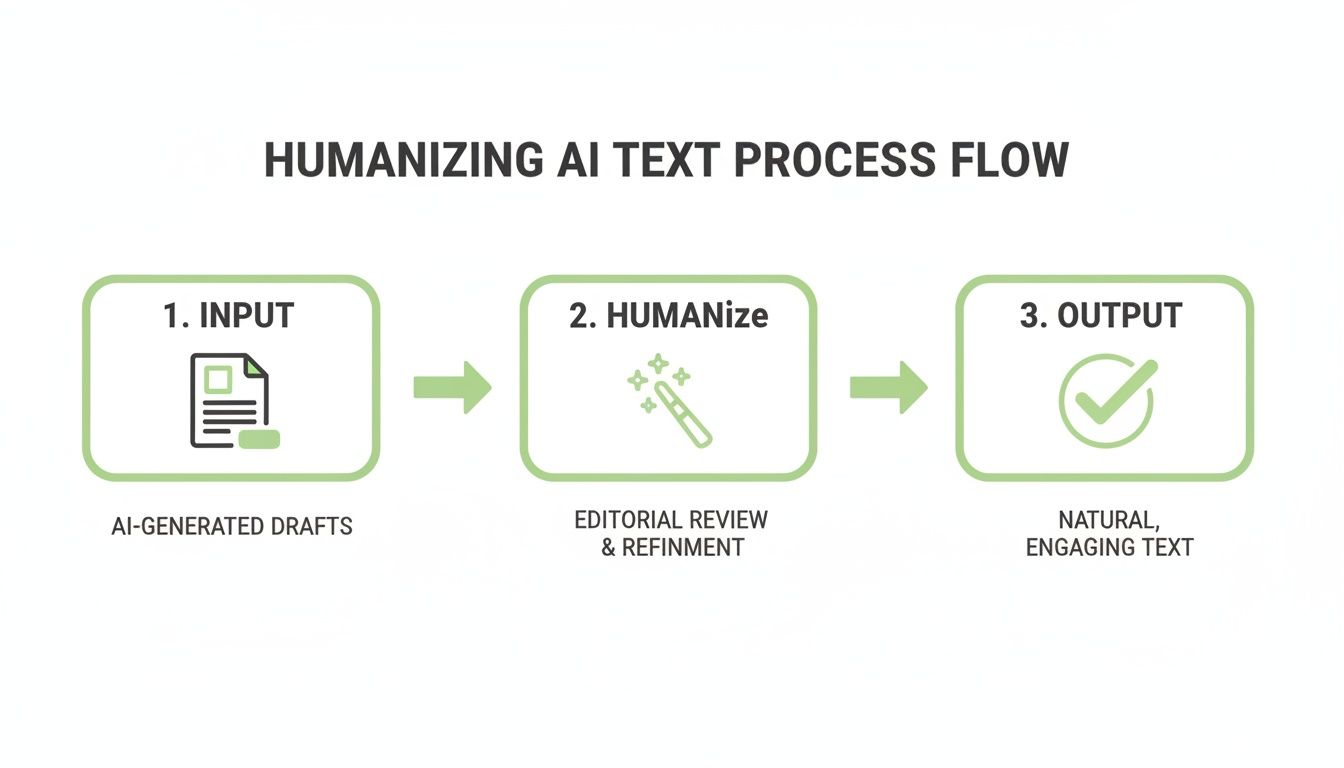
Ta grafika tylko podkreśla, że humanizacja to nie kwestia jednego magicznego przycisku. To ustrukturyzowany proces łączący inteligentne promptowanie na początku z przemyślaną edycją na końcu, by uzyskać naprawdę autentyczne rezultaty.
Żeby te różnice były krystalicznie jasne, rozłóżmy je obok siebie.
Tekst AI kontra tekst zhumanizowany: porównanie obok siebie
Ta tabela podkreśla konkretne zmiany zachodzące przy transformacji surowego szkicu AI w dopracowany, po ludzku brzmiący tekst. Zauważ, jak małe zmiany w tonie, strukturze i doborze słów sumują się do ogromnej różnicy w jakości i wykrywalności.
| Cecha | Przykład surowego tekstu GPT | Przykład tekstu zhumanizowanego | Wpływ |
|---|---|---|---|
| Ton | Formalny, akademicki ("liczne korzyści", "zmiana paradygmatu") | Konwersacyjny, pewny siebie ("rewolucja", "realna szansa") | Angażuje czytelnika i czyni treść bardziej przystępną i wiarygodną. |
| Struktura zdań | Długie, złożone zdania o przewidywalnym rytmie. | Mieszanka krótkich, uderzających zdań i dłuższych, płynnych. | Tworzy bardziej naturalną kadencję czytania, utrzymuje uwagę i unika robotycznego brzmienia. |
| Dobór słów | Sztywny żargon korporacyjny ("wdrożenie polityki") | Bezpośredni, aktywny język i potoczne wyrażenia ("porzucenie dojazdów", "to nie tylko") | Poprawia jasność i sprawia, że tekst brzmi bardziej autentycznie i mniej maszynowo. |
| Osobowość | Brak wyraźnego głosu czy punktu widzenia. | Wyraźna persona (np. doświadczony profesjonalista dzielący się spostrzeżeniami). | Buduje więź z czytelnikiem i czyni przekaz bardziej zapadającym w pamięć. |
| Wykrywalność | Wysokie prawdopodobieństwo oflagowania przez narzędzia detekcji AI. | Niskie do zerowego prawdopodobieństwa oflagowania. | Zapewnia, że treść przechodzi jako napisana przez człowieka, co jest kluczowe dla SEO i wiarygodności. |
Jak widać, zhumanizowana wersja to nie tylko przepisanie — to kompletna transformacja sposobu prezentacji informacji.
Ostatni krok: użycie humanizatora AI
Dla ostatniej warstwy szlifu, i by mieć absolutną pewność, że tekst przejdzie przez wszystkie detektory, możemy przepuścić ręcznie edytowaną wersję przez humanizator AI taki jak HumanText.pro. Te narzędzia sięgają głębiej niż prosta zamiana synonimów; przeprowadzają zaawansowaną analizę lingwistyczną, dostosowując kadencję, złożoność i wzorce słowne tekstu, aż idealnie naśladują naturalne ludzkie pisanie.
Po tym ostatnim kroku treść jest nie tylko bardziej angażująca i autentyczna, ale rejestruje się jako 100% ludzka w czołowych narzędziach detekcyjnych. To wielowarstwowe podejście — mocne promptowanie, inteligentna ręczna edycja i końcowe przejście przez humanizator — to najpotężniejszy i najwydajniejszy przepływ pracy do tworzenia wysokiej jakości treści na dużą skalę.
Nawigacja po mętnych wodach etyki pisania z AI
Eksplozja potężnych narzędzi do pisania z AI rzuciła ogromne wyzwanie etyczne w szkoły i biura. Wszyscy gorączkowo próbują ustalić, gdzie przebiega granica między inteligentnym asystentem — pomyśl o tym jak o sprawdzaniu pisowni na sterydach — a jawnym oszustwem akademickim.
Kluczem jest poczucie własności. Co innego pozwolić AI stworzyć pierwszy szkic, by przełamać pusty ekran. Zupełnie co innego skopiować, wkleić i uznać sprawę za zamkniętą. Etyczne podejście polega na wykorzystaniu tekstu AI jako rampy startowej, nie spadochronu. Musisz z nim pracować, wstrzyknąć własną perspektywę i upewnić się, że końcowy tekst naprawdę odzwierciedla Twoje myślenie i głos. Nie chodzi o oszukiwanie kogokolwiek; chodzi o inteligentniejszą pracę.
Ukryte zagrożenie: gdy detektory AI się mylą
Ale oto zwrot akcji, który nie otrzymuje wystarczającej uwagi: poważny problem fałszywych alarmów detektorów AI. Te narzędzia są notorycznie zawodne, często flagując tekst w 100% napisany przez człowieka jako wygenerowany przez AI. To tworzy koszmarny scenariusz dla uczciwych studentów i profesjonalistów, którzy mogą zostać oskarżeni o oszustwo z powodu wadliwego algorytmu.
Nagle uczłowieczenie tekstu GPT staje się czymś więcej niż wyborem stylistycznym — to manewr obronny. Nie tylko próbujesz sprawić, by Twoja treść brzmiała lepiej; aktywnie chronisz swoją oryginalną pracę przed błędną identyfikacją.
Skala tego problemu jest oszałamiająca. Gdy Turnitin uruchomił swoją detekcję AI w kwietniu 2023, natychmiast zaczął skanować 65 milionów prac studenckich, które przetwarza rocznie. Niedługo później badanie ze Stanfordu wykazało, że szokujące 67% studentów uczelni miało swoje własne prace błędnie oflagowane jako AI. Niektórzy profesorowie widzieli nawet, jak ich własne opublikowane badania zostały oflagowane. Możesz przeczytać więcej o wysokiej stawce fałszywych alarmów detekcji AI i chaosie, który to powoduje wśród studentów.
Gdy wadliwy algorytm może zniszczyć Twoją średnią ocen lub postawić Twoją profesjonalną reputację na szali, upewnienie się, że Twoje pisanie ma niezaprzeczalny ludzki dotyk, to po prostu zdrowy rozsądek. To forma samoobrony.
Ostatecznie najlepszym podejściem jest traktowanie AI jako współpracownika, nie ghostwritera. Pozwól jej pomagać w burzy mózgów, strukturyzowaniu myśli czy przełamaniu trudnego przypadku bloku pisarskiego. Ale produkt końcowy — unikalne spostrzeżenia, osobowość i odpowiedzialność — to musi pochodzić od Ciebie.
Gotowy, by upewnić się, że Twoje treści wspomagane przez AI są niewykrywalne i naprawdę brzmią po ludzku? HumanText.pro przekształca robotyczny tekst w naturalną, angażującą pisownię w sekundy. Wypróbuj teraz i chroń swoją pracę przed wadliwymi detektorami AI.
Gotowy, aby przekształcić treści generowane przez AI w naturalny, ludzki tekst? Humantext.pro natychmiast udoskonala Twój tekst, zapewniając naturalne i autentyczne brzmienie. Wypróbuj nasz darmowy humanizator AI już dziś →
Powiązane artykuły
AI Face Search Explained: Verify Identity and Stay Safe
Understand how AI face search works, including embeddings, accuracy, and legal issues. Learn to use these tools for personal safety and verify identity online.

Reverse Face Search: A Verification Safety Guide
Learn how reverse face search works, when to use it for safety, and how to pair it with AI image checks to verify online contacts and reused photos.

Face ID Search Explained: How It Works and How to Verify
Learn how face ID search works, why it differs from reverse image search, and how to verify identities and photos safely with practical checks and tools.

