Face Reverse Image Search: Safety and Verification Guide
Learn how to use face reverse image search for safety, catfish detection, and privacy verification. Compare tools, follow step-by-step workflows, and protect
You've been chatting with someone online for days. Their profile looks polished, the conversation feels personal, but the photo seems strangely familiar. Before you share more information, send money, or arrange a meeting, run a face reverse image search as one part of a wider safety check.
The tool can reveal that a profile photo appears under another name, on unrelated accounts, or in places that contradict the person's story. It can also return nothing, and that blank result doesn't prove the profile is genuine. Face search is a verification aid, not a universal identity lookup.
Why Face Reverse Image Search Matters for Online Safety
Online trust often develops faster than evidence. A person can build an apparently authentic profile with a few attractive photos, a convincing biography, and regular messages. If the images belong to someone else, the profile may be part of a catfishing scheme, romance scam, or impersonation attempt.
A face reverse image search helps answer a narrow but important question: where else does this face or photo appear publicly online? It doesn't establish that every result shows the same person, and it can't confirm a private identity. It gives you leads to inspect before you make a risky decision.
Consumer-safety guidance from AARP recommends reverse image search as a first-line check for suspected catfishing and romance scams. The practical approach is to run the image through both generic and face-specific search, compare mismatched names, ages, or locations, and use a live video call when possible.
Use the result to test a story
Suppose an online date says they live in one city, works in a particular profession, and has used the same profile photo for years. A search may show that the image appears on several unrelated profiles with different names or locations. That conflict is a serious warning, even if you can't identify the original person.
A stronger check combines several signals:
- Compare names: Look for different names attached to the same image or face.
- Check locations: Treat major differences between the profile story and public image context as a warning.
- Review dates: An old public appearance doesn't prove fraud, but it can challenge a claim that a profile photo is recent.
- Request a live call: A real-time conversation can help confirm that the person using the account matches the photos.
- Protect your information: Don't send money, identity documents, intimate images, or account credentials while basic verification remains unresolved.
Safety rule: A face-search result should change how carefully you verify someone. It shouldn't give you permission to expose, harass, or investigate them beyond a legitimate safety purpose.
Use the technology for personal safety, checking whether someone you met online appears to be using stolen photos, or finding where your own images were reused without permission. Don't use it to stalk, surveil, or identify strangers against their wishes. Some jurisdictions also restrict biometric face search, so legality and consent matter even when an image is publicly visible.
Generic Reverse Image Search vs Face-Specific Search
Generic reverse image search and face-specific search answer different questions. Generic search focuses mainly on the image itself. Face-specific search focuses on facial features and may find different photos containing a similar face.
That distinction matters in scam screening. If a scammer copies one profile image exactly, generic search may locate duplicate uploads, stock-photo pages, or the original source. If the same face appears in several different photographs, face-specific search may produce leads that exact-image matching would miss.
| User Goal | Recommended Tool | Strengths | Limitations |
|---|---|---|---|
| Find where the exact photo appears | Generic reverse image search | Good for duplicate images, reposts, and source tracing | May miss different photos of the same face |
| Check whether a dating profile photo was reused | Face-specific search, followed by generic search | Helps locate possible appearances across different images | Results can include lookalikes and require manual review |
| Find the original or earliest public version of an image | Generic reverse image search | Useful for tracing image history and public context | An indexed result isn't automatically the original |
| Check whether your own photo appears on impersonation accounts | Use both | Combines exact-image coverage with face-based discovery | Private pages and unindexed sources remain invisible |
| Assess a suspicious screenshot or image with text | Generic visual search | Can connect visible text and visual elements to public pages | It doesn't establish the identity of a person shown |
| Verify a person's identity | Face-specific search plus independent checks | Produces candidate matches for further review | It isn't definitive proof of identity |
Pick the tool according to the question
Start with generic search when your concern is image provenance. For example, if someone sends you a photograph that looks like a professional portrait, search the whole image to see whether it appears on stock-photo pages, unrelated accounts, or older posts.
Choose face-specific search when the question is whether the same face appears in other public images. Crop the image carefully, search the face, and then inspect every promising result in context. You can find more practical detail in this guide to AI face search.
Neither method deserves automatic trust. A 2026 audit reported substantial irrelevant information in Google reverse image search results, with debunking content making up less than 30% of results. The same discussion cited a dataset summary with 18% accurate results, 35% wrong results, and 44% incomplete results in its assessed material, as reported by the audit coverage. Those figures reinforce a simple rule: a plausible result is a lead to verify, not a conclusion to publish or act on immediately.
How to Perform a Face Reverse Image Search Step by Step
Begin with the best source image you can lawfully use. A clear, front-facing photograph with good lighting usually gives a search system more useful facial information than a blurry screenshot, extreme side profile, heavy mask, or image with the face partly covered.
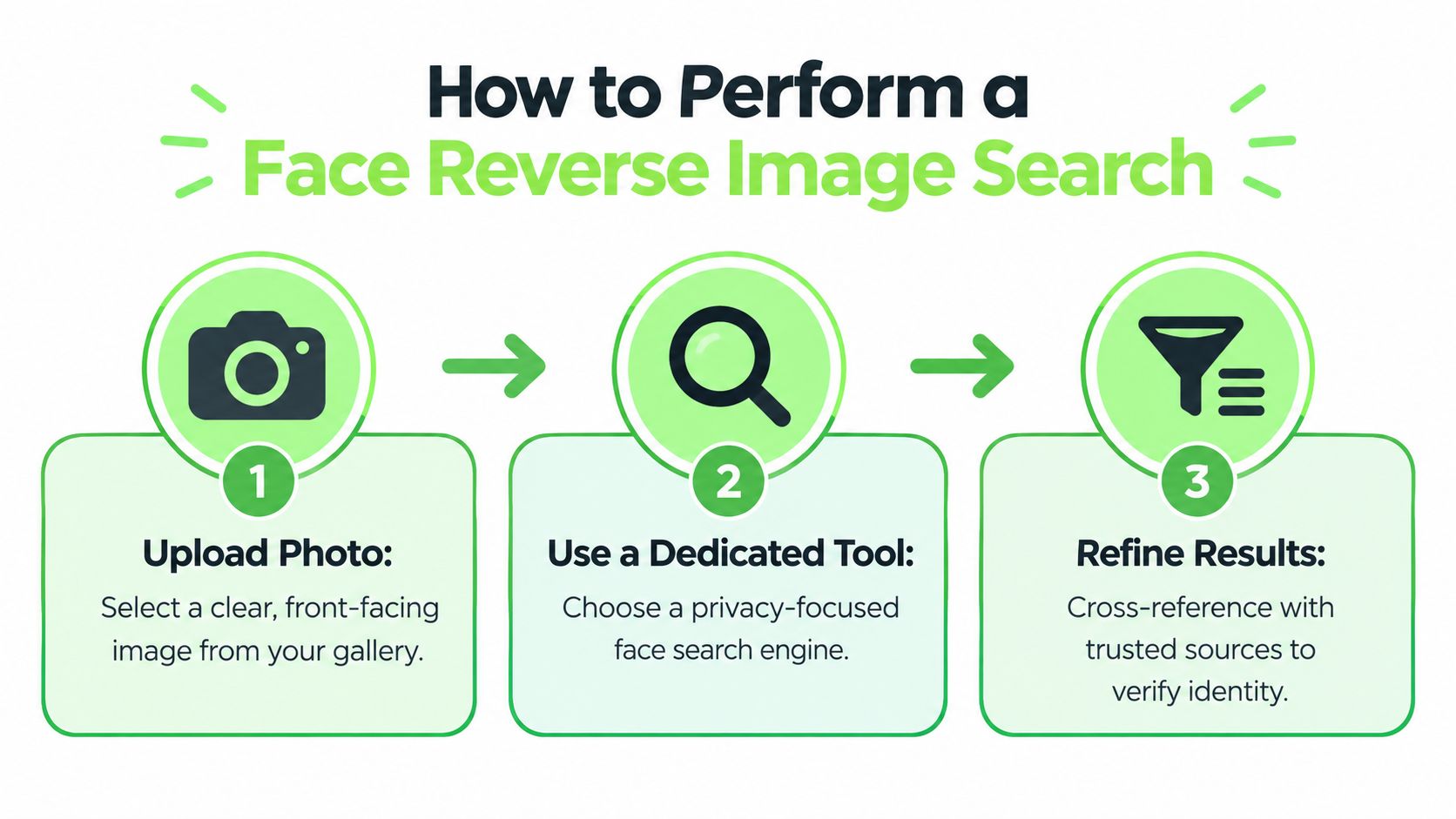
If possible, save the original public image instead of photographing your screen. Keep a copy for your records, but don't upload sensitive images to an unfamiliar service without checking its privacy terms. For a broader process involving ordinary image matching, consult this guide to free reverse image search.
Prepare the image carefully
Crop around the face without removing useful context entirely. If the photograph contains several people, use a version that isolates the subject you're checking, then retain the original so you can compare results with the surrounding image.
Avoid making a conclusion from one upload. Try a small set of lawful source images when you have them, especially if one image has sunglasses, strong shadows, unusual makeup, or an obstructed face. Different images can reveal whether a result is tied to one copied file or appears across separate public photographs.
Understand what the system is doing
Face reverse image search commonly follows a two-stage pipeline. It first detects and normalizes the face crop, then compares a learned facial embedding with a large indexed gallery. NIST-based reporting summarized by the Federation of American Scientists describes leading recognition systems exceeding 99.5% accuracy on high-quality images in controlled benchmarks.
That benchmark figure doesn't translate into certainty for an ordinary internet search. Your image may be low quality, the person may be photographed from an unusual angle, or the relevant pages may not be indexed. The system may return a confidence or similarity score, but that score still needs contextual review.
Treat ranked results as candidates
Inspect the highest-ranked matches first, then open the underlying pages rather than relying only on thumbnails. Compare the face, image date, surrounding text, usernames, location claims, and whether the page appears to be an original account or a scraped copy.
A no-result search has limited meaning. The person may be known, but the relevant public photograph might not be included in the tool's gallery. A blank result means no usable match was found in that search environment, not that the person is authentic, unknown, or absent from the web.
How to Verify and Interpret Face Search Results
The safest interpretation is simple: face search generates candidates. It doesn't hand you a verified identity.
A candidate becomes more credible when several independent details align. The face should be consistent across images, the source page should have a coherent history, the name and location should fit the person's claim, and other public information should support the same conclusion. One attractive thumbnail or high similarity score isn't enough.
Coverage often matters more than confidence
A search engine can only return material it has indexed and is allowed to show. People with limited public footprints, strict privacy settings, or mostly private accounts may produce no results or only partial results. That gap causes false reassurance because users often mistake silence for confirmation.
Review results in layers:
- Image layer: Is it the same photograph, a crop, an edited version, or merely a similar-looking face?
- Identity layer: Do names, usernames, ages, and locations agree?
- Context layer: Does the page belong to a real account, a stock-photo library, a repost network, or an unrelated article?
- Timeline layer: Do the dates support the person's story?
- Independent layer: Can a live call or another trustworthy source confirm the claim?
A practical workflow is to rank candidates by the system's similarity measure, then re-rank them mentally by context. A visually close result from an unrelated page may be less useful than a slightly lower-ranked result that matches the account history, location, and stated identity.
Manual review is not optional
Demographic performance differences make blind trust especially dangerous. A NIST-cited analysis reported that, as of March 2025, the top system produced 358 times as many false positives for West African females over 65 as for Eastern European males aged 35 to 50, according to independent guidance summarizing the analysis.
That finding doesn't tell you the reliability of every tool or every search. It does show why thresholds, image quality, and human review matter. If a result could affect someone's reputation, safety, access, or employment, require corroboration before treating it as meaningful.
Synthetic faces change the meaning of no result
AI-generated faces may never have appeared elsewhere online. A blank reverse-search result therefore doesn't prove that a profile photo is genuine. Real-time face swapping and synthetic media can also undermine simple photo or video checks, so suspicious accounts need broader scrutiny.
Look for inconsistencies in lighting, facial details, image history, biography, communication patterns, and willingness to verify through a live call. Use media-authenticity tools as additional checks, not as a substitute for judgment.
Privacy, Ethics, and Legal Boundaries for Face Search
Face-specific search is more sensitive than looking for duplicate artwork or a product photograph. It can turn an image into a biometric comparison, which raises questions about consent, purpose, storage, and the consequences of a mistaken match.
The ethical boundary is clear. Use face search to protect yourself, verify a person you met online, or find unauthorized reuse of your own images. Don't use it to stalk, surveil, compile dossiers on strangers, or identify people in street and event photos against their wishes.
Public visibility isn't unlimited permission
A photo can be publicly viewable while its repurposing for biometric identification remains legally sensitive. The Council of Europe guidance discussed by the Government Accountability Office states that facial recognition applied to images collected for other purposes requires a specific legal basis before those images are processed into biometric templates. It also says private entities generally need explicit, specific, free, and informed consent unless an applicable authorization exists.
That distinction matters in ordinary situations. Checking whether a dating profile photo appears elsewhere for a safety decision is different from identifying every bystander in an event photograph. Searching your own images for impersonation is different from monitoring a neighbor's public activity.
Check the rules where you live
The U.S. Government Accountability Office found that no federal law expressly regulates commercial uses of facial recognition technology, and that existing laws don't fully address identifying people or tracking their whereabouts, as explained in its facial recognition technology report. The absence of a single federal rule doesn't make every use acceptable.
State and regional requirements can still apply. Policy summaries identify biometric privacy rules in places including Illinois, Colorado, and Oregon, with consent and processing obligations that may affect face-search use. Before using a service for work, research, or a recurring workflow, read the provider's terms and check the applicable privacy rules. Data privacy compliance guidance can help frame that review, but it isn't a substitute for qualified legal advice.
Ethical boundary: If you wouldn't feel comfortable explaining the search to the person involved, reconsider the purpose, scope, and legal basis before uploading the image.
Minimize what you collect, don't retain results longer than necessary, and don't share a suspected identity publicly based on an algorithmic match. If the concern is immediate danger or fraud, preserve relevant evidence and use appropriate platform reporting or law-enforcement channels instead of conducting personal surveillance.
Best Practices for Publishers, Educators, and SEO Creators
Professional teams face a different risk. They may process many images, publish claims quickly, and influence how audiences understand a person or event. A mistaken face match can turn a routine editorial error into reputational harm.
Publishers should use face search to check image reuse, attribution, and identity claims, not to create unsupported profiles of private people. When a contributor photograph appears elsewhere under a conflicting name, pause publication and ask the contributor for clarification. Keep the search result as an internal lead, not as publishable proof.
Build verification into editorial review
A useful editorial record should include:
- Source context: Where did the image come from, and did the person provide it directly?
- Search scope: Which generic and face-specific tools were used?
- Result quality: Did the system find exact copies, similar faces, or unrelated material?
- Human review: Who inspected the underlying pages and compared the context?
- Consent status: Is there a legitimate basis to process and retain the image?
- Publication decision: What evidence supports the final caption or identity statement?
Educators can use the same process to teach digital literacy without turning students into amateur investigators. Ask learners to compare image provenance, spot mismatched captions, and explain why a no-result search doesn't establish authenticity. Don't assign students to identify classmates, strangers, or people in public photographs.
Improve content quality without overstating certainty
SEO creators should check whether profile photos, author images, and illustrative portraits have been reused in misleading contexts. They should also flag synthetic or manipulated imagery when the image affects trust, expertise, safety, or a product claim.
Automated systems have improved substantially. A 50-year review of automated face recognition describes the field's movement from geometric landmark matching to deep neural networks that often exceed human performance on benchmark tasks. Technical progress still doesn't guarantee a correct identity in a messy web environment.
For media verification, pair face search with source review, image-history checks, direct confirmation, and clear editorial labels. Humantext.pro offers face search by photo for finding pages where the same photo appears, alongside reverse image search for locating visually matching images. Its AI image, video, and voice detectors can serve as additional content-quality checks, but none should replace consent review or human validation.
Final Checklist for Safe and Verified Face Search Use
A reader receives a suspicious dating-profile image and finds no match. That result may mean the image is private, newly created, synthetic, or absent from the search index. Another reader finds three profiles using the same face under different names. That result deserves investigation, but it still needs context before anyone is accused.
Use this checklist:
- Choose a clear image: Prefer a lawful, front-facing source with the face visible.
- Run both search types: Use generic search for exact copies and face-specific search for possible appearances in different photos.
- Inspect original pages: Don't rely on thumbnails or similarity scores alone.
- Compare context: Check names, locations, dates, usernames, and profile history.
- Use independent verification: Request a live video call when personal safety allows.
- Consider synthetic media: A blank result doesn't prove that a face or profile is real.
- Respect consent and law: Never stalk, surveil, or identify strangers against their wishes.
- Protect your data: Don't upload sensitive images without understanding retention and processing practices.
Treat face reverse image search as a safety shield with limited visibility, not a certainty engine.
Humantext.pro can help you check where a face photo or visually matching image appears online, then assess related media with AI-content verification tools. Visit Humantext.pro to run a focused search and strengthen your image-verification workflow before trusting or publishing a result.
Ready to transform your AI-generated content into natural, human-like writing? Humantext.pro instantly refines your text, ensuring it reads naturally and authentically. Try our free AI humanizer today →
Related Articles
Face Search Person by Photo: A Verification Guide
Learn how to face search person by photo safely. Step-by-step guide for reverse image search, scam detection, and identity verification.
AI Face Search Explained: Verify Identity and Stay Safe
Understand how AI face search works, including embeddings, accuracy, and legal issues. Learn to use these tools for personal safety and verify identity online.
Reverse Face Search: A Verification Safety Guide
Learn how reverse face search works, when to use it for safety, and how to pair it with AI image checks to verify online contacts and reused photos.

