AI humanizer no word limit: A Practical Guide to Humanizing Long-Form Content
AI humanizer no word limit: Learn practical workflows to transform long-form content into engaging, human-sounding prose without constraints.
Let's be honest: a true AI humanizer with no word limit is a bit of a myth. You won't find a magic button that flawlessly humanizes a 100,000-word manuscript in one go. Most tools have character or word caps, forcing you to feed them your dissertation or e-book in tiny, frustrating bites.
Handling Large-Scale Content Humanization

Whether you’re a grad student wrestling with a 10,000-word dissertation, an SEO pro juggling a dozen articles, or a researcher drafting a dense academic paper, the problem is always the same. You're sitting on a mountain of AI-generated text that needs to sound genuinely human—not just to sidestep today’s smarter AI detectors, but to actually connect with your readers.
The usual copy-paste routine, chunking out 300 or 500 words at a time, is more than just tedious. It's a workflow killer. This manual grind invites errors, muddles your tone, and burns through hours you should be spending on strategy and polishing. For anyone creating content at scale, it’s a major bottleneck.
When you're dealing with long-form content, the challenges go beyond simple word counts. The real struggle is maintaining the integrity of the work from beginning to end.
Challenges of Humanizing Long-Form AI Content
| Challenge | Impact on Your Work | Strategic Solution |
|---|---|---|
| Loss of Context | The tool misses the overarching narrative, leading to generic or irrelevant rewrites. | Process content in logical, self-contained sections (e.g., chapters, major arguments) to provide sufficient context. |
| Narrative Fragmentation | The flow between paragraphs breaks down, creating a disjointed and jarring reading experience. | Overlap your chunks slightly and review transitions manually to ensure a smooth, coherent flow. |
| Tonal Inconsistency | Your document ends up sounding like it was written by a committee, with shifting tones and styles. | Establish a clear style guide or reference tone for the humanizer and manually edit for consistency after processing. |
| Extreme Time Inefficiency | The manual labor of splitting and reassembling text defeats the purpose of using AI for speed. | Adopt a systematic "chunking method" that streamlines the breakdown and reassembly process, turning it into a predictable workflow. |
These obstacles highlight why a simple tool isn't enough; you need a smarter process.
Why Standard Tools Fall Short
Most AI humanizers are designed for quick hits: emails, social media captions, or short paragraphs. Their processing limits are a practical reality, tied to server costs and the sheer complexity of rewriting text while keeping its core meaning intact.
When you try to force a large document through these tools, the limitations become painfully obvious:
- Context Blindness: A tool that only sees a tiny slice of your work can't grasp the narrative threads, arguments, or specialized terms you’ve established. It's like asking someone to describe a movie after only seeing a 30-second clip.
- Broken Flow: Processing chapter by chapter often shatters the logical bridges between ideas. You're left with a collection of paragraphs that don't quite talk to each other, making the reader work way too hard.
- The Manual Labor Trap: The effort it takes to chop up, process, and stitch a big document back together is immense. It completely undermines the efficiency that AI is supposed to provide in the first place.
The real challenge isn’t just passing a detector; it’s preserving the soul and coherence of a long piece. A document that scores 100% human but reads like a jumbled mess is a total failure.
This is where having a strategic workflow makes all the difference. Instead of hunting for a mythical AI humanizer with no word limit, the real solution is to get methodical. The most effective strategy I've found is the 'chunking method'—a system for intelligently breaking down, humanizing, and reassembling large documents to maintain quality. It transforms a daunting task into a manageable, repeatable process.
For a deeper dive into different tools and their strengths, check out our guide on the best AI humanizer options available for various types of content.
The Chunking Method for Flawless Humanization
So, you're staring down a massive document—a dissertation, an e-book, maybe a pillar page that’s thousands of words long. Trying to humanize the whole thing at once is like trying to boil the ocean. It’s inefficient and often breaks the tool you're using.
Instead, you need a smarter approach. We call it the chunking method. It’s all about breaking that mountain of text into manageable, logical pieces.
Think of it like an architect planning a building, not a demolition crew randomly knocking down walls. You want to divide your document along its natural structural lines to keep the context and flow intact.
Here’s a practical breakdown of how to choose your chunks:
- For a research paper: I split it by its core sections—Introduction, Literature Review, Methodology, Results, and Conclusion. Each part is a self-contained argument, perfect for processing one at a time.
- For a long blog post: The H2 subheadings are your best friends. They already signal a shift in topic, making them the most natural breaking points.
- For an e-book or novel: This one's easy. Use the chapters. Each chapter has its own mini-narrative arc, so it’s the ideal unit to feed into a humanizer.
This strategy ensures that when you process a piece, the AI has enough surrounding text to understand the specific point you’re making in that section, which leads to much better, more relevant outputs.
Finding the Sweet Spot for Chunk Size
The perfect chunk size is a balancing act. You need enough text to preserve the narrative integrity, but not so much that you overwhelm the tool.
Most humanizers, including HumanText.pro, offer a generous free trial limit, usually around 500 words. In my experience, this is the sweet spot. It’s large enough to cover a complete idea or a few detailed paragraphs without losing the thread of the argument.
This is what a standard humanization tool interface looks like—you'd paste one of your chunks right into the input box.
The clean, simple layout is crucial. When you’re processing dozens of chunks, the last thing you want is a complicated workflow.
Stitching Your Humanized Content Back Together
Once all your chunks have been processed, it’s time for reassembly. And no, this isn't just a copy-and-paste job. This is where you put on your editor hat and smooth over the seams where the different pieces meet.
Focus on creating seamless transitions. Sometimes, a humanizer might end one chunk with a nice, conclusive sentence, but the next chunk is supposed to continue that same thought. You'll need to jump in and manually tweak those sentences to bridge the gap.
Actionable Example:
- Original Transition (Awkward): "...and that is why solar panels are efficient." [End of Chunk 1] * "Geothermal energy offers another sustainable option."* [Start of Chunk 2]
- Improved Transition (Smooth): "...and that is why solar panels are efficient." [End of Chunk 1] * "While solar power is a popular choice, geothermal energy offers another sustainable option."* [Start of Chunk 2]
Pro Tip: Read the entire, reassembled document aloud from start to finish. This is the single best way to catch any awkward shifts in tone or style that might have crept in between chunks. Your goal is a unified voice that feels completely intentional.
Getting a feel for word counts is a huge part of optimizing this process. To learn more, check out our guide on how long 500 words really is. It’s a game-changer for mastering your chunking strategy.
Let's get practical. How does this actually work?
Imagine you’ve got a dense, 3,000-word article spit out by an AI on sustainable urban planning. The facts are there, but it’s a snooze-fest—stiff, robotic, and screaming "AI" to every detector on the market. Our mission is to transform it into something engaging and, most importantly, human.
The first move is simple: chunk it down. I’d break that 3,000-word beast into six manageable 500-word pieces. The trick is to make logical cuts. I usually split articles right at the H2 subheadings. This keeps the core argument of each section intact, preventing the humanizer from losing context and scrambling your ideas.
Processing and Quality Checks
With my six chunks ready to go, I start the real work. I'll take the first 500-word section, pop it into the HumanText.pro interface, and hit "Humanize." It only takes a few seconds.
But before I jump to the next chunk, I do a quick quality check on the output. This is a non-negotiable step for me.
Here’s my mini-checklist for each piece:
- Message Integrity: Did the rewrite keep the original facts and arguments? For example, if the original text stated "a 25% reduction in emissions," the humanized text can't just say "a significant reduction."
- Tone Consistency: Does the new text still sound professional and informative? The goal is to make it sound better, not like it was written by a completely different person.
I just repeat this process for all six chunks, saving each humanized output in a fresh document. It’s a methodical approach, but it guarantees every part gets the attention it needs before the final assembly.
This entire workflow—divide, humanize, reassemble—is the key to handling long-form content effectively.
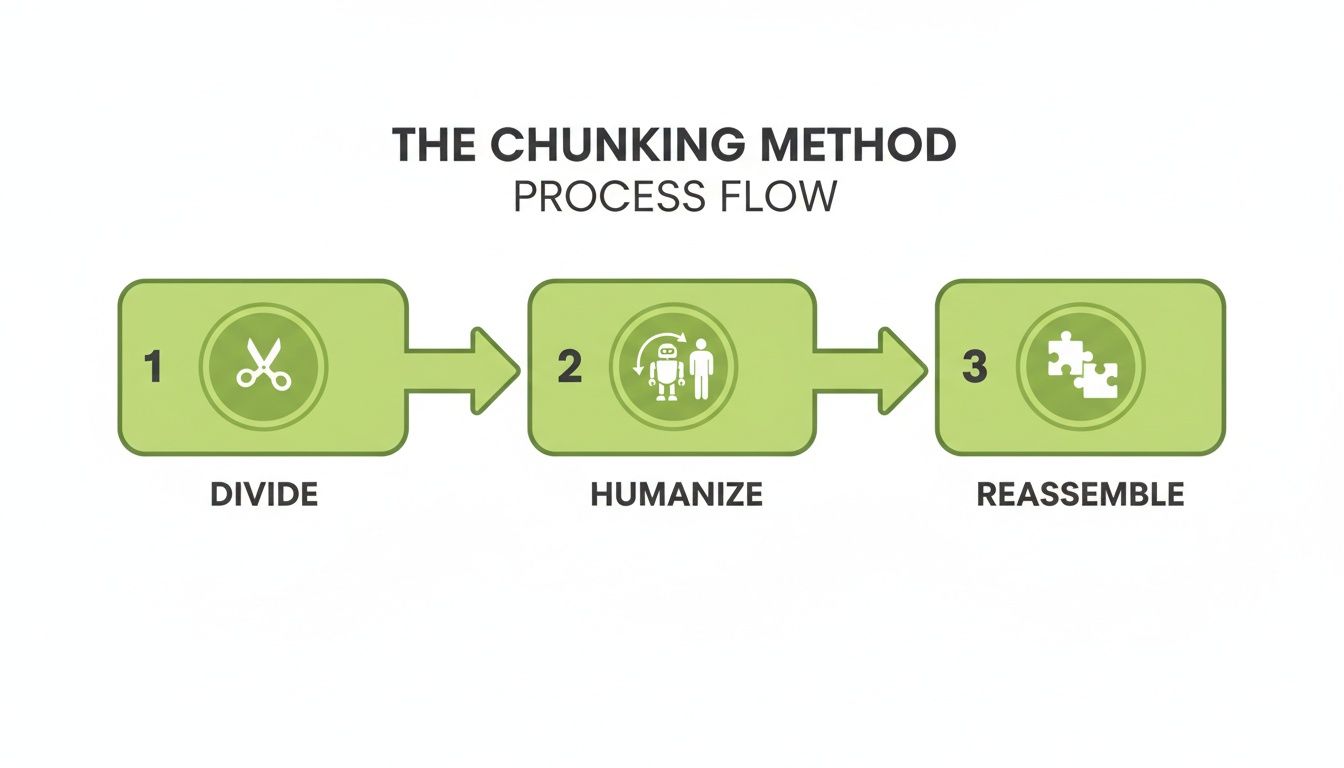
Breaking a huge task into smaller, controlled steps like this is how you maintain quality control and end up with a polished, seamless final draft.
Reassembly and Final Polish
Once all the chunks are humanized, it's time to stitch them back together. I reassemble the sections in their original order. This part is more than a simple copy-paste job; I'm looking for the seams between the chunks, smoothing out any awkward transitions to make sure the narrative flows naturally.
Next, I run the full 3,000-word article through an AI detector. I need to see a high human score across the entire document, not just in isolated parts.
But the most critical final step is a simple human read-through. I always read the whole article out loud. It’s the best way to catch weird phrases or jarring sentences that software might miss. This is the polish that separates good content from truly great content.
This final check is essential. After all, the best tools have a detector accuracy ranging from 65-90%, so that human verification is your ultimate safety net. It makes sure the content doesn't just pass a scan but actually connects with a real person.
If you're handling a lot of content, upgrading to a paid HumanText.pro plan is a no-brainer. It gets rid of word limits and makes this whole workflow faster and more efficient. For more tips, check out our guide on how a https://humantext.pro/blog/chat-gpt-humanizer can level up your process. You can also integrate this workflow with top AI content calendar tools to manage your entire content pipeline from creation to publication.
Advanced Strategies for Automation and Scale
If you're running a content agency, managing a fleet of SEO sites, or just have a mountain of text to get through, the manual chunking process is a real drag. Manually copying, pasting, and reassembling text is a serious bottleneck that chips away at the speed advantage you gained from using AI in the first place.
When you're dealing with dozens of articles a week, that "quick" manual process adds up. To really make this work at volume, you have to move beyond the browser and embrace automation.
This is where an API (application programming interface) becomes your new best friend. Think of it as a direct line from your systems to an AI humanizer like HumanText.pro, no human clicking required. Instead of feeding the machine one small piece at a time, you can build a slick pipeline that automates the whole sequence.
Building an Automated Humanization Pipeline
Setting up an automated workflow sounds more intimidating than it is. The core idea is simple: create a system that can grab a long document, slice it into perfect-sized chunks, fire each one off to the humanizer's API, and then neatly stitch the processed text back together.
You don't need to be a developer to pull this off. This can be done with simple scripts or even no-code platforms like Zapier or Make. Imagine a workflow where dropping a new AI-drafted article into a Google Drive folder automatically kicks off the entire humanization process behind the scenes.
Here’s what that looks like in practice:
- Trigger: A new file is added to a specific Google Drive folder.
- Action 1 (Automated Chunking): A Zapier or Make.com workflow automatically splits the document into 500-word text chunks.
- Action 2 (API Calls): The workflow sends each chunk, one by one, to the HumanText.pro API endpoint.
- Action 3 (Reassembly): The script gathers all the humanized outputs and creates a new document in another Google Drive folder, ready for final review.
Building a pipeline like this is the key to scaling your content operations. A workflow that once took an hour of manual effort can be completed in minutes, freeing up your team to focus on strategy, editing, and creative tasks.
When you consider the source of this content, like a powerful AI press release generator, you can see why having a streamlined humanization process on the back end is so critical.
Managing Costs and Quality at Scale
While automation is a game-changer for efficiency, it does bring a couple of new things to keep an eye on. When you're operating at volume, you have to be smart about managing costs and maintaining quality.
Cost Management: Most API access is pay-as-you-go, typically billed per character or word. Before you flip the switch on full automation, do some back-of-the-napkin math. Estimate your monthly volume and model the potential costs so there are no surprises. It's also a good idea to set up alerts to monitor your usage.
Quality Assurance: Automation is fast, but it isn't perfect. A final human touch is non-negotiable. Build a quick quality check into the end of your pipeline. After the document is reassembled, have someone give it a final read-through to smooth out any awkward transitions between chunks or fix any weird phrasing the machine might have missed. This final polish ensures your scaled-up content still meets your high standards.
Avoiding Common Pitfalls in AI Humanization

When you're processing a long document piece by piece, you’re inviting a few subtle problems that can sabotage the final product if you aren't paying attention. Even the slickest AI humanizer no word limit workflow needs a sharp eye to catch these common mistakes. The two biggest culprits are tonal inconsistency and context loss—both of which can completely undermine your content's credibility.
Tonal inconsistency is jarring for a reader. Imagine one chapter of your e-book sounds like a stuffy academic paper, but the next reads like a casual, chatty blog post. This happens when the humanizer, working on isolated chunks, makes different stylistic choices for each piece. You're left with a disjointed mess.
Then there's context loss. This is when the tool just can’t see the big picture. It might miss crucial nuances, recurring themes, or specialized terminology you’ve carefully established in earlier sections. This leads to generic, or even contradictory, rewrites. A humanizer might simplify a term in one chunk but leave it highly technical in another, leaving your reader completely confused.
The Essential Cohesion Edit
To fix all this, you absolutely have to perform a dedicated "cohesion edit" after stitching your humanized chunks back together. This is your chance to unify the document's voice and smooth over any of those rough transitions. It’s a non-negotiable step.
Here is an actionable checklist for your cohesion edit:
- Unify Voice and Tone: Read the first paragraph of each major section. Do they sound like they were written by the same person? If not, adjust word choices. Example: Replace "utilize" in one section with "use" if the rest of the document is more casual.
- Smooth Transitions: Scan the first sentence of every paragraph that follows a section break. Does it connect to the previous idea? If not, add a simple phrase. Example: Change "The data shows a trend" to "Building on the previous point, the data also shows a trend."
- Check Key Terminology: Use your word processor's search function (Ctrl+F or Cmd+F) to find key terms. Did you introduce an acronym like "SEO" in the beginning? Ensure you aren't spelling out "Search Engine Optimization" again in a later chapter.
This cohesion edit is so much more than just proofreading. It’s about weaving individual threads back into a single, seamless tapestry. It’s the one step that elevates a collection of well-written paragraphs into a truly cohesive, impactful document.
The Final Human Review
No matter how sophisticated your tools are, nothing can replace a final human review. This last read-through is where you catch the subtle errors and add the final layer of polish that automation simply can't replicate. It’s your opportunity to inject personality, double-check facts, and make sure the content genuinely connects with your audience.
For agencies scaling web copy, this whole process is a lifesaver. You can paste in raw content, get an instant AI score, and humanize it in seconds, preserving the core meaning while adding that crucial layer of authenticity. This is where HumanText.pro really shines, using linguistic models trained on over 1.2 million samples to mimic natural writing—you don't even need to sign up for a trial. Freelancers have told us it transforms polished AI into engaging posts that sail through every check, helping them land gigs without raising red flags. You can find more info on bypassing AI detection with these methods on papergen.ai.
Common Questions About Humanizing Long-Form Content
When you're staring down a mountain of AI text, a few questions always pop up. It's natural to wonder about the logistics, the impact, and the security of the process. Let's tackle some of the most common ones we hear from users tackling big projects.
Can This Method Really Work for a Book or Dissertation?
Absolutely. This is exactly what the chunking strategy was designed for. You're not going to paste an entire 80,000-word manuscript into a tool at once—that would be chaos. Instead, you break it down.
Actionable Insight: For a dissertation, treat each chapter (Introduction, Lit Review, Methodology, etc.) as a separate project. Humanize all the sections within Chapter 1 first, perform a cohesion edit on that chapter, and only then move on to Chapter 2. This compartmentalizes the work and prevents overwhelm. For a book, use the same chapter-by-chapter approach.
Will Humanizing in Batches Hurt My SEO?
Quite the opposite—it should give it a serious boost. Search engines are getting smarter every day, and they've gotten very good at spotting robotic, unhelpful content. When you humanize your text, even in pieces, the final product is more natural and engaging. That's a huge win for SEO.
As long as you piece the article back together logically and preserve your keyword focus, the process makes your content better for real people. And what's good for people is now what's good for Google.
The golden rule of modern SEO is to provide real value to your readers. Humanized content is inherently more valuable because it’s clearer, more engaging, and feels authentic.
Ultimately, this approach puts you squarely in line with what search algorithms are built to reward.
How Does HumanText.pro Protect My Sensitive Documents?
We get it. Handing over sensitive academic research or confidential business plans is a big deal. That's why we built HumanText.pro with a strict privacy-first policy: we do not store, share, or use your content for anything, especially not for training our models.
The moment you process your text and close the session, it's gone from our end. This applies to everyone, whether you're on a free trial or a paid plan. Your proprietary information stays completely confidential, secure, and—most importantly—yours. Always.
Ready to stop worrying about word counts and start creating content that connects? HumanText.pro gives you a clear, efficient workflow for humanizing text of any length. Turn those AI drafts into undetectable, high-quality writing that your audience will actually want to read.
Visit https://humantext.pro to get started for free.
Ready to transform your AI-generated content into natural, human-like writing? Humantext.pro instantly refines your text, ensuring it reads naturally and authentically. Try our free AI humanizer today →
Related Articles

What Is AI Law and How It Shapes Content in 2026
What is AI law? Learn EU AI Act, US rules, liability and IP risks, plus practical steps for creators to stay compliant in 2026.

How to Write a Newsletter That Readers Trust
Learn how to write a newsletter that drives engagement. Master subject lines, mobile-first structure, AI humanization, and deliverability

How to Improve Writing Clarity That Actually Reads Well
Learn how to improve writing clarity with proven sentence-level edits, structure fixes, and before-and-after examples that make any draft sharper and more

